Create views
Tip
See the Text and images tab for more details!
Views simplify how you access and present data in SQL Server. As a SQL developer, you create views to encapsulate complex queries, provide security boundaries, and present data in a format that matches your application's needs.
Understand views in SQL Server
A view is a virtual table based on a SELECT statement. Unlike physical tables, views don't store data themselves. Instead, they retrieve data from underlying tables each time you query them.
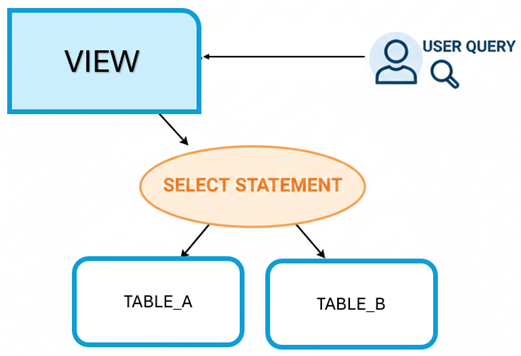
With views, you can hide the complexity of JOIN clauses, calculations, and filters from application code. For example, if your application frequently needs customer orders with product details, you can create a view that uses JOIN across the Customers, Orders, and Products tables. Your application then queries a single view instead of writing the same complex JOIN repeatedly.
Views also provide a security layer. You can grant users access to specific columns through a view while restricting access to the underlying tables. This approach lets you expose only the data users need without giving them full table access.
Create a basic view
You create a view using the CREATE VIEW statement followed by a SELECT query. The view definition determines what data appears when you query the view.
Here's a simple view that combines customer and order information:
CREATE VIEW Sales.CustomerOrders
AS
SELECT
    c.CustomerID,
    c.CustomerName,
    c.Email,
    o.OrderID,
    o.OrderDate,
    o.TotalAmount
FROM Sales.Customers c
INNER JOIN Sales.Orders o ON c.CustomerID = o.CustomerID;
After creating this view, you can query it like any table:
SELECT * FROM Sales.CustomerOrders
WHERE CustomerName = 'Contoso Ltd';
The view executes the underlying SELECT statement and returns results as if they came from a single table. This simplification makes your application code cleaner and easier to maintain.
You can also create views with calculated columns. The following view adds a column that categorizes orders by size:
CREATE VIEW Sales.OrderSummary
AS
SELECT
    OrderID,
    CustomerID,
    OrderDate,
    TotalAmount,
    CASE
        WHEN TotalAmount < 100 THEN 'Small'
        WHEN TotalAmount < 1000 THEN 'Medium'
        ELSE 'Large'
    END AS OrderSize
FROM Sales.Orders;
This view handles the categorization logic in one place. Every query against OrderSummary gets the same calculation without duplicating the CASE expression.
Apply design considerations
When designing views, consider how they'll be used and maintained. Well-designed views balance simplicity, performance, and security.
Specify column names explicitly instead of using SELECT *. Explicit columns make views more maintainable and prevent unexpected results when underlying tables change. If someone adds a column to a base table, your view definition stays consistent:
CREATE VIEW Sales.ActiveCustomers
AS
SELECT
    CustomerID,
    CustomerName,
    Email,
    Phone
FROM Sales.Customers
WHERE IsActive = 1;
Use the WITH CHECK OPTION clause when views will handle data modifications. This option ensures that INSERT and UPDATE statements through the view only affect rows visible in the view:
CREATE VIEW Sales.HighValueOrders
AS
SELECT
    OrderID,
    CustomerID,
    OrderDate,
    TotalAmount
FROM Sales.Orders
WHERE TotalAmount > 1000
WITH CHECK OPTION;
With this option, you can't insert an order with TotalAmount of 500 through the HighValueOrders view. The database rejects the operation because the new row wouldn't meet the view's WHERE condition.
Keep view definitions focused on a specific purpose. A view that tries to serve multiple purposes often becomes difficult to optimize and understand. Create separate views for different use cases rather than building one complex view.
Determine when to use views
Views excel at specific scenarios where their characteristics provide clear benefits. Understanding these scenarios helps you choose the right tool for each situation.
Use views to simplify complex queries that multiple applications or users need to execute. Instead of requiring everyone to understand the complexity of joining five tables with specific conditions, create a view once. This centralization also means you can optimize or modify the logic in one place.
Consider views when you need to restrict data access at the column or row level. A view can expose only the columns appropriate for a role while hiding sensitive information. Combined with appropriate permissions, views let you grant access to specific data without exposing entire tables.
Views work well for presenting data in different formats for different purposes. You might have a Products table with technical details, but your reporting team needs a simplified version with calculated fields. Create a view that transforms and aggregates the data appropriately.
At the same time, recognize when other objects serve better. For performance-critical queries that always return the same results, indexed views (materialized views) store the result set physically. For complex calculations that accept parameters, user-defined functions provide more flexibility. For data modification logic, stored procedures offer better control.
When you need to encapsulate reusable query logic without parameters, and you want to present data in a simplified way, views are your solution. They bridge the gap between the physical database structure and the logical view of data your applications need.