Configure resilient infrastructure
This unit includes two exercises that guide learners through configuring a resilient Microsoft Foundry hub infrastructure to support disaster recovery (DR) strategies. Each exercise focuses on different aspects of resilience planning and implementation for Microsoft Foundry deployments.
Learners can find the full list of labs and launch each exercise directly by visiting the Manage AI-Ready Infrastructure GitHub repository, which serves as the single entry point for the course’s hands‑on activities.
Exercise 1: Configure Microsoft Foundry hub
Microsoft Foundry offers a unified platform for managing AI development and deployment lifecycles, integrating capabilities for data preparation, experimentation, model training, and deployment. While Microsoft provides high availability for Azure services, unplanned regional outages can still occur, making it essential for organizations to plan and implement a disaster recovery (DR) strategy. Microsoft Foundry doesn't provide built-in automatic failover, so resilience should be achieved through a customer-managed approach that replicates critical components and configurations across multiple regions. Microsoft documentation illustrates such approach for hub-based deployments.
A sound recovery strategy for Microsoft Foundry hubs depends on several associated Azure services. The Microsoft Foundry infrastructure is managed by Microsoft, but many supporting services (such as Azure Storage, Azure Key Vault, Azure Container Registry, and Application Insights) are customer-managed and must be configured for disaster recovery. For example, Azure Key Vault provides built-in regional redundancy in most regions, while Azure Container Registry Premium supports geo-replication, allowing registry content to be synchronized across paired regions. Other services, such as Storage and Application Insights, require manual configuration and coordination between regions to ensure data consistency and recovery readiness. In particular, Azure Storage accounts used by Microsoft Foundry don't support geo-replication, requiring separate regional instances and custom synchronization of their content to maintain availability during failover.
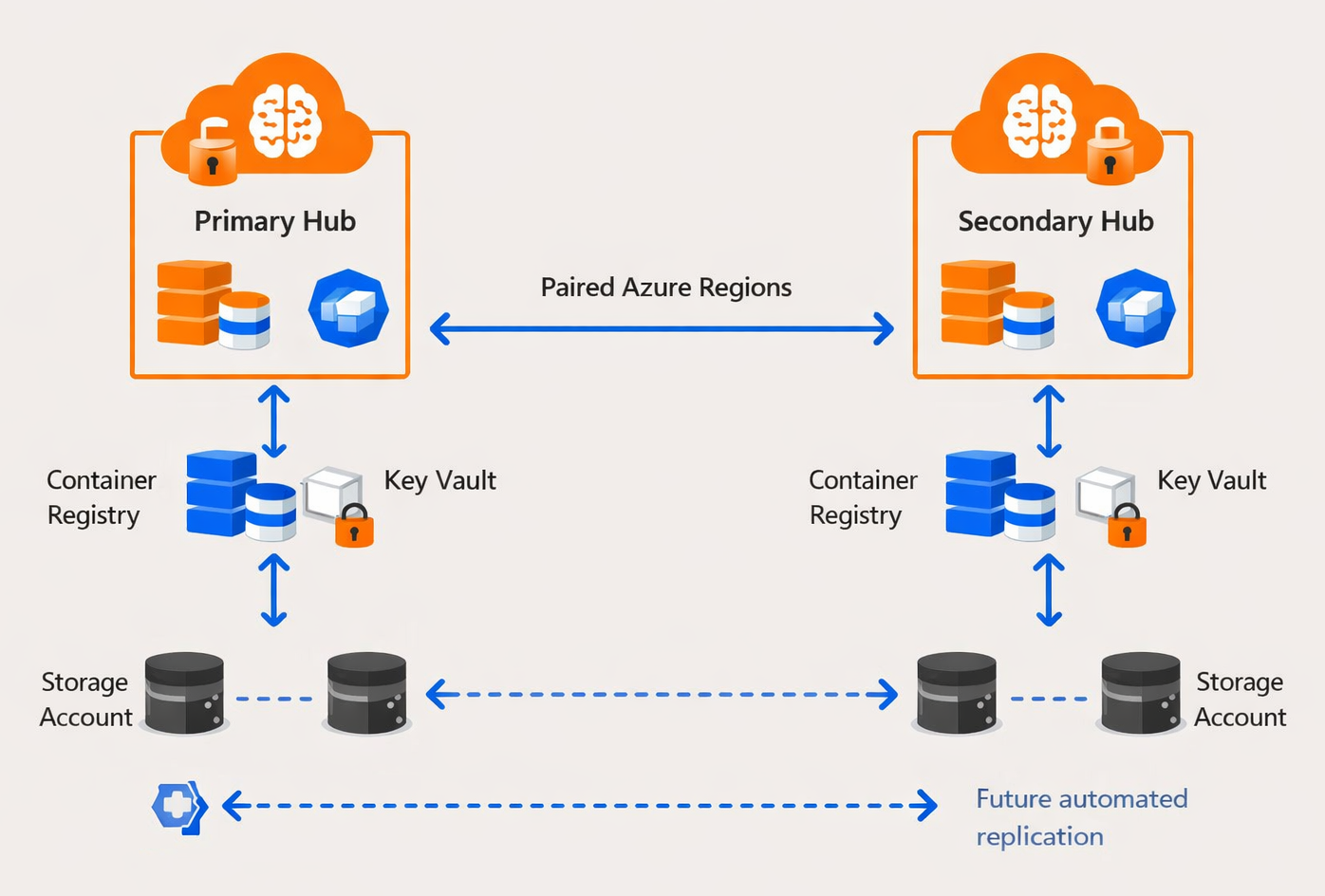
A multi-region deployment is the foundation of a robust DR plan. It involves creating duplicate Microsoft Foundry hubs and associated resources in two paired Azure regions—one serving as the primary and the other as the secondary (failover) environment. During a regional outage, workloads can be redirected to the secondary region with minimal downtime. Proper planning ensures that compute capacity, credentials, model artifacts, and registry data remain available and synchronized between regions, maximizing the ability to resume operations quickly and maintain continuity of AI-driven services.
Scenario
Your company plans to build a centralized AI platform on Microsoft Foundry to support enterprise-scale model development, experimentation, and deployment. To safeguard against potential regional service interruptions and ensure business continuity, your company implements a disaster recovery configuration for its Microsoft Foundry hub. The solution includes deploying a primary hub and a secondary hub in paired Azure regions, ensuring that critical resources, including the Key Vault and Container Registry, are available and synchronized across both locations. The Azure Container Registry is configured with geo-replication, while the Key Vault uses its built-in regional redundancy features to maintain availability of its artifacts. Replication of Storage accounts will be implemented later through a custom, automated process to ensure consistent data availability across regions.
Prerequisites
- Azure subscription: If you don't have an Azure subscription, create a free account before you begin.
- Permissions: To create Azure AI Services resources, you should have the Owner role assigned at the Azure subscription.
- Familiarity with Microsoft Foundry resource types: To learn more, refer to Choose an Azure resource type for AI foundry.
Estimated time
20 minutes

Exercise 2: Configure Microsoft Foundry hub disaster recovery
Microsoft strives to ensure that Azure services are resilient, but unplanned service outages might occur. Foundry doesn't provide automatic failover or disaster recovery, so creating a disaster recovery plan is essential. Such a plan should incorporate multi-region deployment of Foundry and associated resources, maximize recovery capabilities, include high availability provisions, and support failover to another Azure region.
Resiliency of Foundry Agent Service relies on the shared responsibility model. The specifics depend on the environment configuration mode. In Standard mode, Microsoft operates the control plane and capability host platform components, while you as a customer handle the durability of any stateful dependencies within your management scope. In Basic mode, these data components are Microsoft-managed, limiting your ability to customize recovery options.
When operating in Standard mode, Microsoft Foundry projects can attach optional resources based on workload patterns, such as retrieval, orchestration, monitoring, and integration. The corresponding service categories include Azure Storage, Cosmos DB, AI Search, Key Vault, ACR, Logic Apps, Functions, Event Grid, Application Insights, SharePoint, and Microsoft Purview. You have the flexibility to configure redundancy, backup, and replication settings of these services in accordance with your resiliency requirements.
In addition, to prevent accidental deletions, you should consider applying delete resource locks to critical resources such as Foundry accounts, Azure Cosmos DB accounts, AI Search services, and Storage accounts. However, you should keep in mind that these locks prevent deletion of the resource itself, but they don't protect the data within containers, indexes, or blobs. For more protection, you can combine locks with Azure Policy denyAction effects to block resource provider delete requests. You might want to also use features such as soft delete for Azure Blob Storage and continuous backups for Cosmos DB.
In general, your resources should be configured to support recovery before incidents occur. Recommended practices include using user-assigned managed identities (instead of system assigned, which lifecycle is inherently tied to their respective resources), enabling multi-region replication and system-managed failover for Cosmos DB, and geo-zone-redundant storage (GZRS) for Storage accounts.
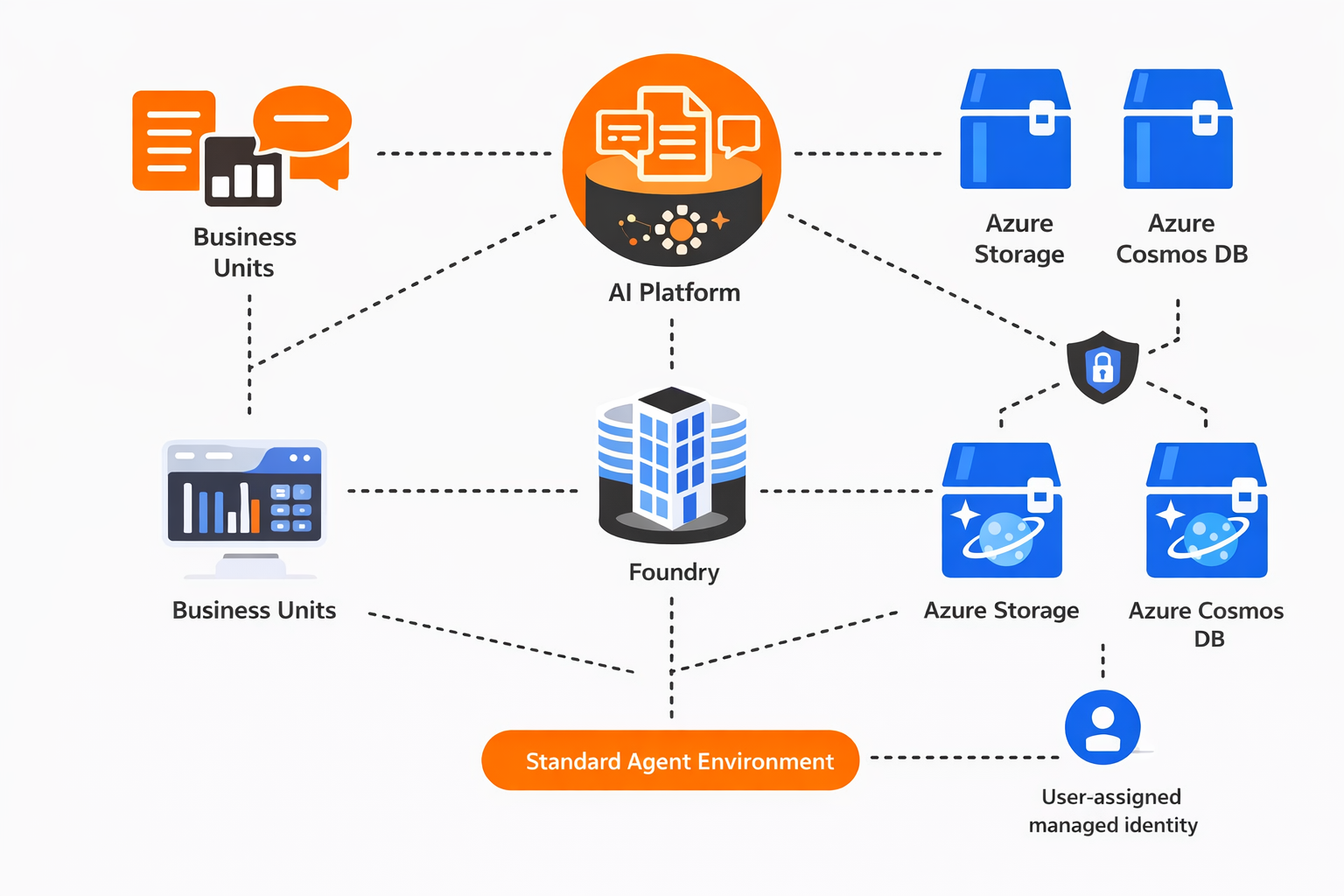
Provisioning standard environments isn't available directly from the Azure portal, but you can implement them either programmatically or via deployment templates. These templates support provisioning a Foundry account and project, deploying a model, and configuring authentication using user-assigned managed identity. With the Standard configuration option, you can choose between automatic provisioning of the required Azure resources or referencing pre-provisioned resources via template parameters, giving you full control over how Azure Storage, Azure Cosmos DB, and Azure AI Search are connected to your project.
Scenario
Your company is building a centralized AI platform on Microsoft Foundry to support enterprise knowledge management and decision support across multiple business units, with a focus on enabling intelligent document retrieval, automated analysis of internal reports, and conversational insights while ensuring strict compliance and data ownership controls. To achieve operational resilience, the team deploys a Standard agent environment using pre-provisioned, customer-owned Azure resources, including geo-redundant Azure Storage accounts and Azure Cosmos DB with continuous backup and failover configured, integrated via a user-assigned managed identity. The deployment is automated using template-based methods that reference these resources, creating a Foundry account and project, binding the resources to the project, and configuring an agent model to use them, establishing a secure, highly available, and centrally managed foundation for scalable AI-driven services across the organization.
Prerequisites
- Azure subscription: If you don't have an Azure subscription, create a free account before you begin.
- Permissions: To create Azure AI Services resources, you should have the Owner role assigned at the Azure subscription.
- Familiarity with Microsoft Foundry resource types: To learn more, refer to Choose an Azure resource type for AI foundry.
Estimated time
25 minutes