Implement complex expressions and error-handling flow control
The Contoso equipment-provisioning flow breaks on malformed data. It also fails outright when the external availability service has a bad moment, because it relies on literal values and a single unbroken chain of actions. This unit shifts that flow from rigid, single-path logic to one that uses expressions to transform and validate data dynamically. It also uses flow control actions to handle errors predictably, instead of failing outright.
Transform and validate data with expressions
An expression in Power Automate is a small piece of logic, prefixed with @, that you insert into an action's input instead of a literal value. Expressions reference dynamic content from earlier steps, and they run server-side when the flow executes, not when you design it. That distinction matters: an expression evaluates against whatever data actually arrives at runtime, which is exactly what you need when a request can be well-formed or messy.
Power Automate groups expression functions by what they operate on:
- String functions like
concat()andtoUpper()manipulate text. - Collection functions like
empty(),contains(), andfirst()work with arrays and objects. - Logical comparison functions like
and(),or(),equals(), andif()evaluate conditions and return a value based on the result.
Conversion, date and time, math, workflow, URI parsing, and manipulation functions for JSON and XML round out the list. The coalesce() function covered next falls under that last category, manipulation functions for JSON and XML, but for data validation you reach most often for the logical and collection categories.
Consider the device category field on an incoming request. If an employee's request omits it or sends a null value, the flow needs a sensible default instead of passing a blank value to the availability check. The coalesce() function returns the first non-null value from a list of candidates, so coalesce(triggerBody()?['DeviceCategory'], 'Standard') returns the submitted category when present, or falls back to 'Standard' when the field is null.
If the source can also send an empty string, you can combine this with if() and empty() for more explicit branching: if(empty(triggerBody()?['DeviceCategory']), 'Standard', triggerBody()?['DeviceCategory']) produces the same result with intent that's easier for another maker to read later.
Validating that a request has everything it needs often means checking more than one field at once. The and() function returns true only when every argument is true. That suits a check like confirming the request carries both a recognized employee and a valid device type before the flow calls the availability service: and(not(empty(triggerBody()?['EmployeeId'])), not(empty(triggerBody()?['DeviceType']))).
The or() function fits cases where any one condition should be enough to proceed, such as accepting a request identified by either an employee ID or an email address.
Grounding each expression in a concrete field, as shown here, keeps it readable: an expression is only as maintainable as the field names and fallback values someone can recognize months later.
Organize decisions with condition, Switch, and scope
Expressions decide what value a flow uses; flow control actions decide which actions run at all. A Condition action evaluates a single true/false expression and branches into If yes and If no paths. That's useful for a binary decision like whether the requested allowance covers the device cost.
A Switch action extends that idea to several possible values from one source. Instead of nesting multiple conditions to route a request by device category, a switch compares one expression against a list of cases and matches a case directly.
As a flow grows past a handful of actions, grouping related steps becomes as important as the logic within them. A Scope is a container that runs its contained actions as a single block. You explore grouping the Contoso flow's allowance check, availability call, and routing steps into one scope for organization and clarity.
That way, the designer can collapse that whole section into one card. A scope also reports a single status, such as Succeeded, Failed, or Skipped, for everything inside it, which becomes the foundation for the error-handling pattern in the next section.
| Control action | Best for | Reports |
|---|---|---|
| Condition | A single true/false decision | If yes / If no branch taken |
| Switch | One value routed to several possible cases | The matched case |
| Scope | Grouping related actions for clarity and status checks | One combined status for the group |
Branch on outcomes with run after settings
Every action in a cloud flow carries Run after settings that determine when its next step executes, based on the previous action's outcome: is successful, has failed, is skipped, or has timed out. By default, a new action only runs after success, which is why an unhandled failure stops the whole flow instead of recovering from it.
Changing an action's run-after configuration to include has failed opens a branch that only executes when something goes wrong. That's how a flow stops failing outright and starts handling the problem instead.
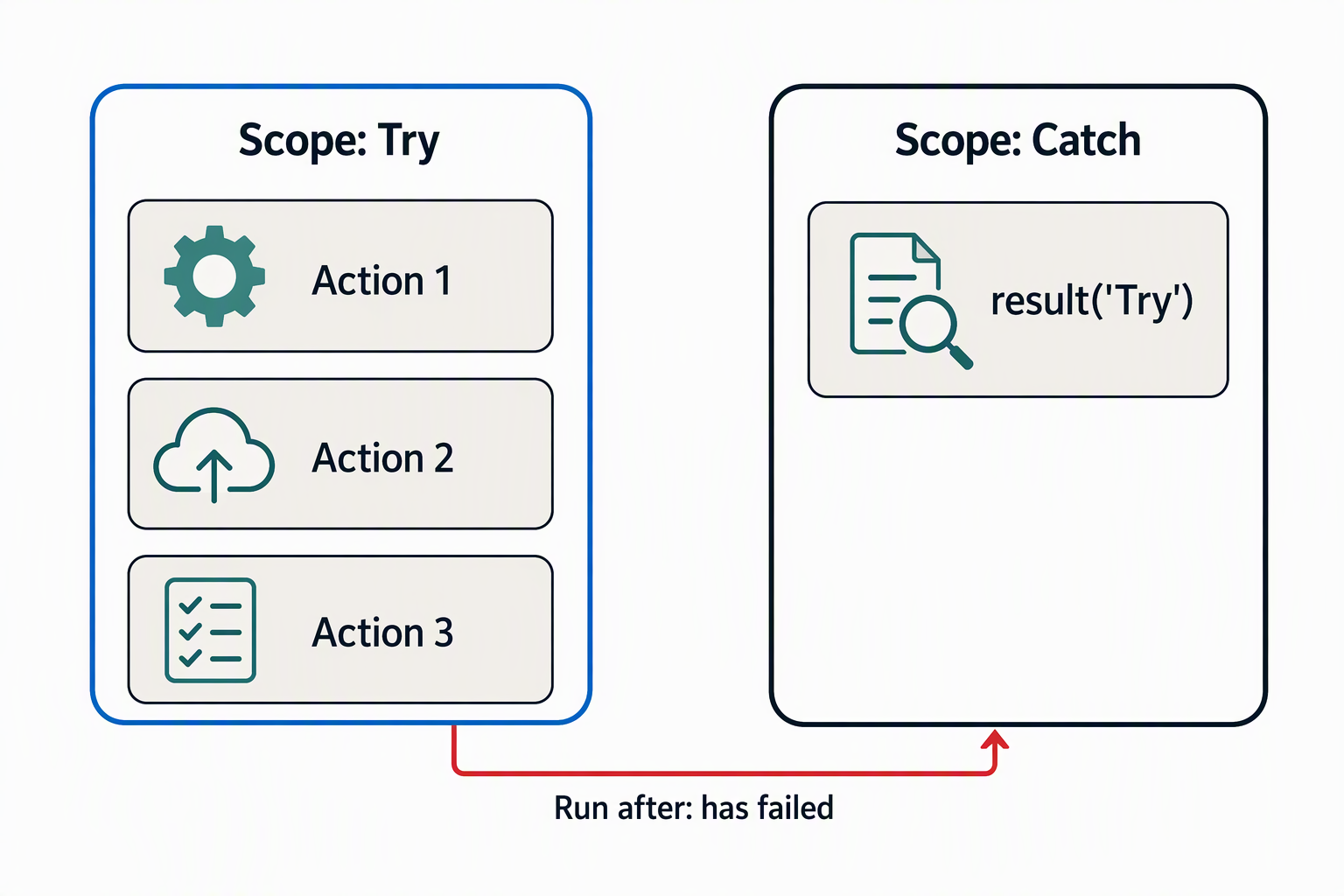
The clearest way to apply this is the scope-based try/catch pattern. You group the flow's main logic, such as the allowance check and the availability call, into a scope named something like "Try." You then add a second scope, "Catch," configured to run only when the "Try" scope has failed.
Inside "Catch," the result() function retrieves the outcome of each action within "Try," including its status and error details. You can then inspect conceptually what failed, without needing to know in advance which specific step caused the problem. This gives the Contoso flow a place to log the failed availability call or malformed request instead of letting the whole run die.
Guiding question: Think about a step in one of your own flows that currently has no run-after branch for failure. What would a "Catch" scope need to do there—log the error, notify someone, or retry—to keep the flow from failing outright?
Decide when a flow should stop on purpose
Not every error deserves a graceful recovery. Suppose a failure is severe enough that continuing would process bad data or leave a request in an inconsistent state. In that case, the Terminate action stops the flow immediately. It sets an explicit status, such as Failed or Cancelled, along with a message explaining why.
This differs from an unhandled failure in an important way: a flow that fails outright leaves Contoso's fulfillment coordinator without context, while a flow that terminates deliberately records a clear reason the moment it happens.
Choosing between a Catch scope that logs and recovers and a Terminate action that stops the run comes down to whether the flow can meaningfully continue. If the availability service returns an error for one device but the request has other valid items, the flow can log the issue and keep going.
If the request itself is missing an employee ID entirely, continuing serves no purpose. A deliberate stop with a clear message is more useful than a run that either fails silently or pushes bad data further downstream.
Validated inputs and a clean recovery path still don't answer a different question: when a flow should run in the first place, and what to do when an external call is down only temporarily rather than broken outright. That's where the next part of hardening the Contoso flow picks up.