Select an authorization model for Azure Storage
Once the foundational security settings are configured, you need to select an authorization model that controls who and what can access storage data. Azure Storage provides three authorization approaches, each with different security characteristics and appropriate use cases.
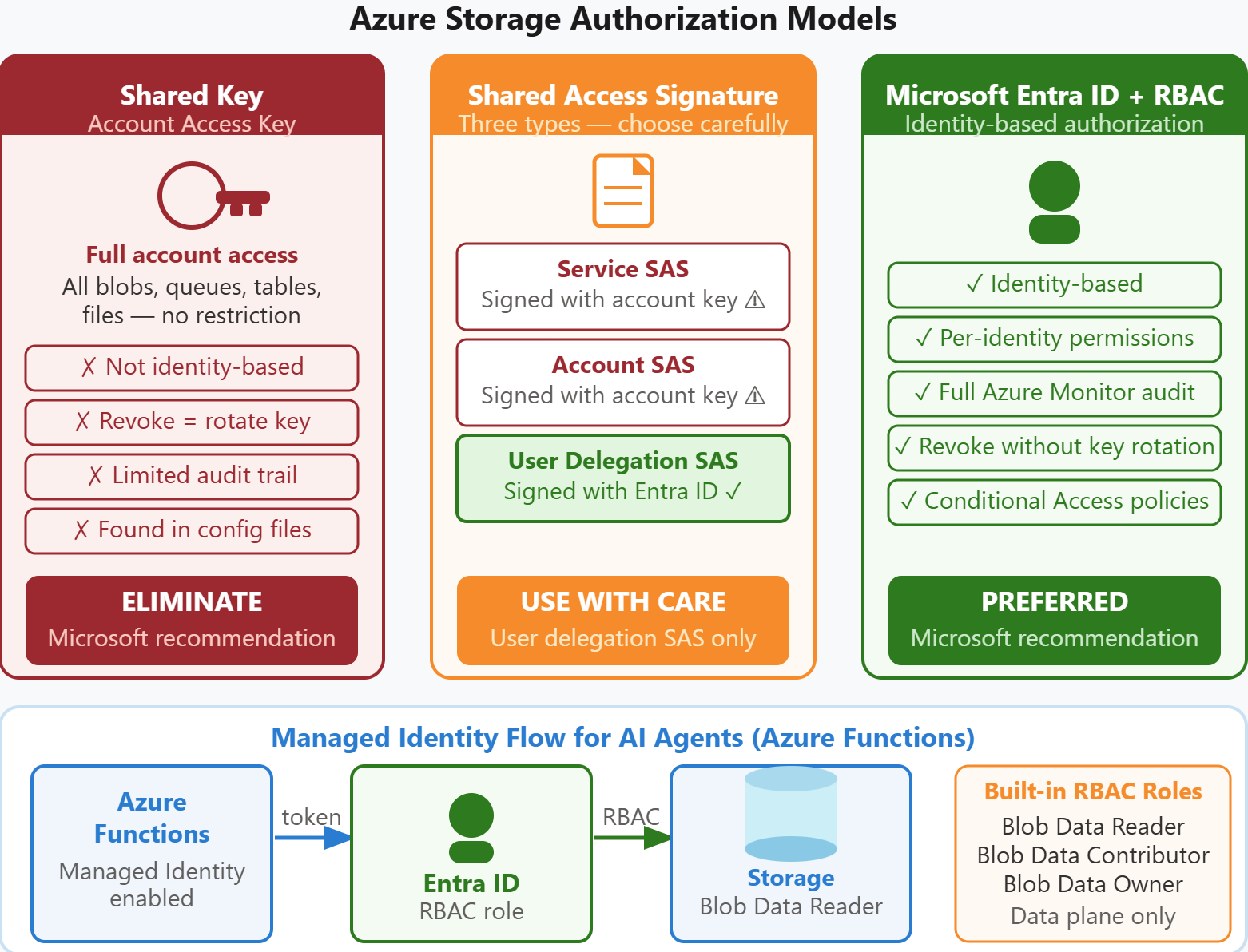
Authorization models overview
Azure Storage supports Shared Key authorization, Shared Access Signatures (SAS), and Microsoft Entra ID with role-based access control (RBAC). The choice you make affects your security posture, operational complexity, and audit capabilities.
| Authorization Model | Identity-Based | Revocable Without Key Rotation | Audit Trail | Microsoft Recommendation |
|---|---|---|---|---|
| Shared Key (Account Key) | No | No | Limited | Eliminate |
| Shared Access Signature (SAS) | Partial | Depends on type | Partial | Use user delegation SAS only |
| Microsoft Entra ID + RBAC | Yes | Yes | Full | Preferred |
Shared Key authorization uses the storage account access keys—two 512-bit secrets that grant full access to the entire account. Any application or user with an account key has unrestricted access to all blobs, queues, tables, and files in the storage account. These keys appear in connection strings and are often embedded in application configuration files, making them vulnerable to exposure. Additionally, revoking access requires rotating the keys, which breaks all applications using those keys until they're reconfigured. Microsoft recommends eliminating Shared Key authorization entirely.
Shared Access Signatures
Shared Access Signatures provide time-limited, granular access to specific storage resources. Azure Storage supports three types of SAS, each with different security implications.
Service SAS targets a single service (Blob, Queue, Table, or File) and is signed with a storage account key. You specify the resource (container or blob), permissions (read, write, delete), and expiration time. Service SAS tokens provide more limited access than full account keys, but they share a critical weakness—they're signed with the account key. If you need to revoke a service SAS token, you must rotate the account key, breaking all other applications using that key. However, when you associate a service SAS with a stored access policy, you gain revocation capability without key rotation (covered in the next unit).
Account SAS provides broader access across multiple services and resource types, also signed with a storage account key. Account SAS tokens are useful for cross-service operations but carry the same revocation challenge as service SAS tokens. Because they're signed with the account key, you can't revoke them without key rotation, and no stored access policy mechanism exists for account SAS.
User delegation SAS is signed with Microsoft Entra ID credentials instead of the storage account key. This approach combines the granular, time-limited access of SAS with the security benefits of identity-based authorization. When you create a user delegation SAS, Azure Storage issues a user delegation key that's valid for up to seven days. The SAS token is signed with this delegation key, not the storage account key. If you need to revoke access, you revoke the Microsoft Entra ID credentials used to create the delegation key, and all associated SAS tokens immediately stop working. User delegation SAS is the only SAS type Microsoft recommends.
Microsoft Entra ID with RBAC
Microsoft Entra ID authorization with role-based access control is the preferred approach for Azure Storage. This model uses identities (users, groups, service principals, managed identities) and assigns them roles that define specific permissions. Unlike Shared Key authorization, RBAC provides per-identity access control with full audit trails in Azure Monitor.
Azure Storage provides several built-in RBAC roles for data access. Storage Blob Data Reader grants read access to containers and blobs. Storage Blob Data Contributor grants read, write, and delete access. Storage Blob Data Owner grants full control including the ability to set permissions. These roles apply only to data plane operations (reading and writing blobs)—they don't grant access to storage account management operations like changing configuration settings.
For Contoso's AI document processing pipeline, the Azure Functions hosting the AI agents should use a managed identity assigned the Storage Blob Data Reader role. Managed identities eliminate the need to store credentials in application configuration. The Azure Functions runtime obtains tokens from Microsoft Entra ID automatically, and these tokens are used to authenticate storage requests.
Implement managed identity access
When Azure Functions uses a managed identity to access storage, the application code uses the Azure Identity library and the DefaultAzureCredential class. This credential type automatically discovers the managed identity in the Azure Functions environment and obtains tokens without any explicit credential management in code.
You enable managed identity on the Azure Function App in the portal under Identity > System assigned > Status: On. Then you assign the managed identity the Storage Blob Data Reader role on the storage account using Access Control (IAM) > Add role assignment. After role assignment propagates (allow up to 30 minutes), the Azure Functions code authenticates to storage using the managed identity.
Tip
Azure supports two managed identity types: system-assigned and user-assigned. A system-assigned identity is tied to a single resource and deleted when that resource is deleted—a good fit for single-agent scenarios like Contoso's. A user-assigned identity exists independently and can be shared across multiple compute resources. Consider a user-assigned identity if your AI architecture runs several agent instances or if you plan to migrate agents to a different compute type, such as Azure Container Apps. All agents share one auditable identity, which simplifies role assignment and makes audit logs easier to review.
This approach eliminates storage account keys from application configuration entirely. The AI agents access storage using identity-based tokens that expire and refresh automatically. Conditional access policies, audit logs, and identity lifecycle management all apply. For Contoso's security team, this migration from account keys to managed identities resolves the vulnerability identified in the security audit.