Manage access with stored access policies
While Microsoft Entra ID with managed identities is the preferred authorization model, some scenarios require shared access signatures—particularly when external parties need time-limited access to specific resources. Shared access signatures have a critical weakness: once issued, they can't be revoked unless you rotate the storage account key, which breaks all applications using that key. Stored access policies solve this problem.
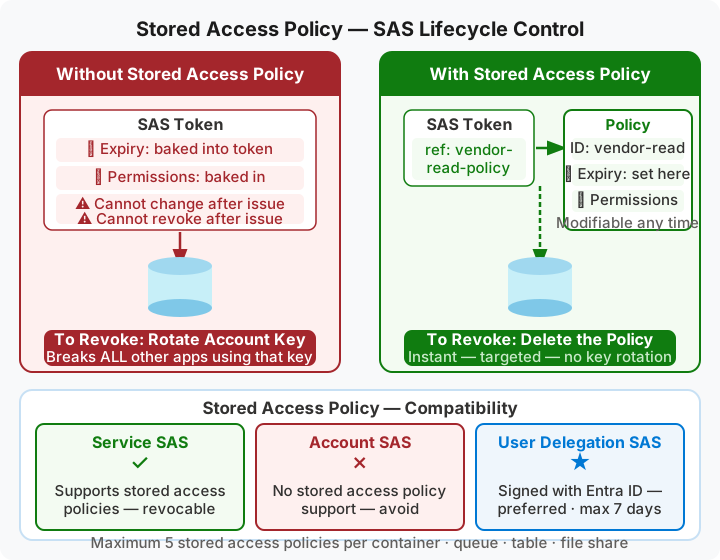
What stored access policies provide
A stored access policy is a server-side policy associated with a container (or queue, table, or file share) that defines start time, expiry time, and permissions. When you create a service SAS token, you can reference a stored access policy instead of embedding these parameters directly in the SAS token. This indirection gives you the ability to modify or revoke the SAS after issuance.
With a stored access policy, you change the expiry time, narrow the permissions, or delete the policy entirely—and these changes immediately affect all SAS tokens that reference the policy. Without a stored access policy, a SAS token's parameters are fixed at creation time, and the only way to invalidate the token is to rotate the storage account key.
Create a stored access policy
You create stored access policies at the container level using the Azure portal, Azure CLI, or Azure PowerShell. In the portal, navigate to the storage account, select Containers, choose the target container, and select Access policy from the container menu.
Under Stored access policies, select Add policy. Provide a unique identifier (for example, "vendor-read-policy"), set the start and expiry times, and select the permissions (Read, Write, Delete, List). You can define up to five stored access policies per container.
| Component | Purpose | Example |
|---|---|---|
| Identifier | Unique name for the policy | vendor-read-policy |
| Start time | When access begins (optional) | 2026-04-01 00:00 UTC |
| Expiry time | When access ends | 2026-05-01 00:00 UTC |
| Permissions | Allowed operations | Read, List |
After creating the policy, you generate a service SAS token that references the policy identifier. The SAS token itself doesn't contain the start time, expiry time, or permissions—it only contains the reference to the stored access policy. Azure Storage retrieves the policy parameters when evaluating each request.
Associate a SAS token with a stored access policy
When generating a service SAS token, you specify the stored access policy identifier in the signedidentifier parameter. Tools like Azure Storage Explorer and the Azure CLI az storage blob generate-sas command support this parameter.
For example, using Azure CLI to generate a SAS token that references a stored access policy:
az storage blob generate-sas \
    --account-name contosodocs \
    --container-name invoices \
    --name document.pdf \
    --policy-name vendor-read-policy \
    --account-key <key>
The resulting SAS token includes the policy identifier but not the start time, expiry time, or permissions. When a client uses this SAS token, Azure Storage looks up the policy and applies its parameters.
Revoke access
You revoke access by deleting the stored access policy or modifying its parameters to deny access. In the Azure portal, navigate to the container's Access policy settings, find the stored access policy, and select Delete. All SAS tokens that reference the deleted policy immediately stop working—clients receive an authorization error when they attempt to access storage.
Alternatively, you can modify the policy's expiry time to a past date, or change the permissions to remove all capabilities. These changes also take effect immediately for all associated SAS tokens.
The stored access policy approach provides Contoso with a solution for scenarios where external vendors need temporary document access. The security team generates service SAS tokens tied to stored access policies with short expiry windows. When vendor engagement ends, the team deletes the stored access policy, instantly revoking all issued tokens without affecting other storage account access.
Limitations
Stored access policies work only with service SAS tokens. Account SAS tokens and user delegation SAS tokens don't support stored access policies. For user delegation SAS, you revoke access by revoking the Microsoft Entra ID credentials used to create the delegation key.
Each container, queue, table, or file share supports a maximum of five stored access policies. If you need more than five different access patterns, you need to create more containers or use other authorization mechanisms.
Stored access policies provide operational flexibility for service SAS tokens, but user delegation SAS remains the recommended SAS type because it relies on Microsoft Entra ID credentials instead of storage account keys.