Ingest data with Lakeflow Connect
Data engineers face a common challenge: getting data from diverse sources into analytics platforms efficiently and reliably. Whether your data lives in SQL Server, Salesforce, SharePoint, or cloud storage, you need consistent, governed pipelines that minimize manual effort. Lakeflow Connect addresses this challenge by providing managed ingestion connectors that bring data directly into Unity Catalog tables.
Lakeflow Connect connector types
Lakeflow Connect provides three categories of managed connectors, each suited to different source types and ingestion requirements.
| Connector type | Description |
|---|---|
| SaaS connectors | Ingest data from enterprise SaaS applications including Salesforce, HubSpot, Jira, and Workday. The connector handles extraction directly through the source API. |
| Database connectors (CDC) | Ingest data from relational databases like MySQL, PostgreSQL, and SQL Server using change data capture. These connectors use an ingestion gateway to continuously extract changes from the source binlog. |
| Query-based connectors | Ingest data from databases by querying the source directly on a schedule, without requiring CDC configuration. These connectors use a cursor column—a monotonically increasing timestamp or integer column—to track which rows are new or updated since the last run. No gateway or staging storage is required. |
The rest of this unit focuses on CDC database connectors as the primary example. For databases where CDC or binlog access isn't available, query-based connectors provide a simpler alternative that runs direct queries against source tables on a schedule.
Understand ingestion pipelines
Lakeflow Connect is a collection of managed connectors in Azure Databricks that simplify data ingestion from external sources. Rather than writing custom extraction code, you configure pipelines through either a graphical interface or declarative definitions.
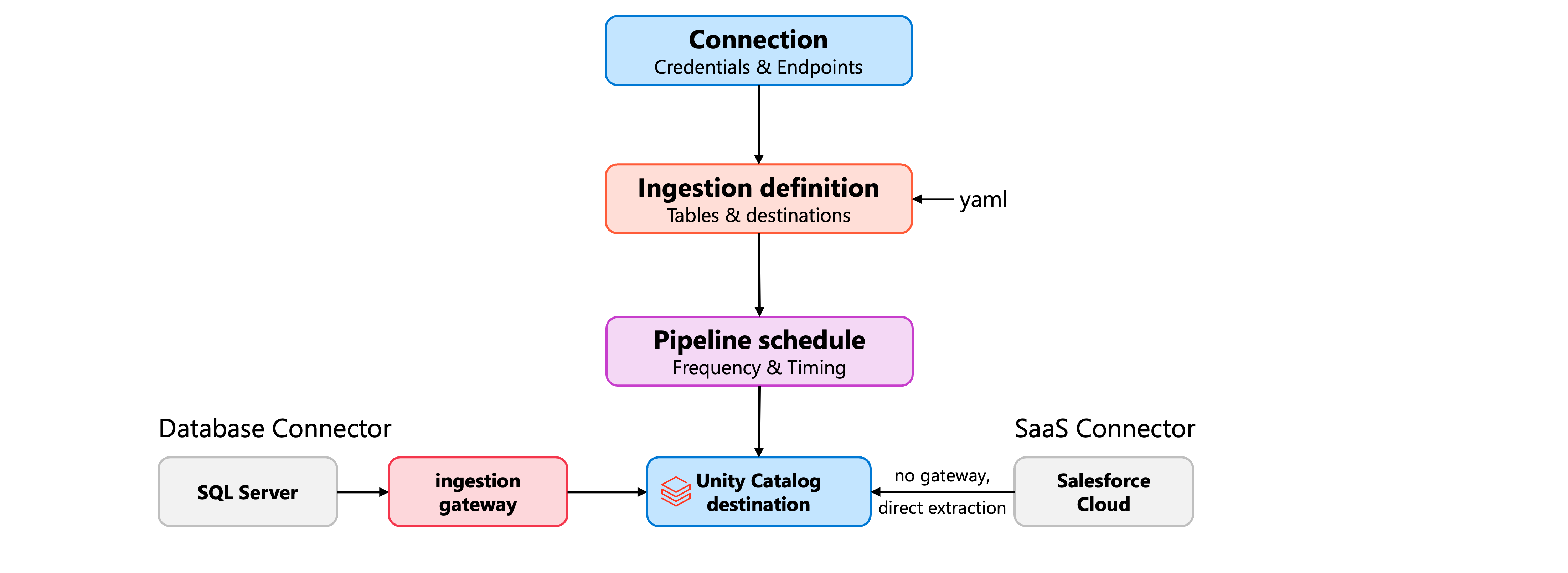
Each pipeline consists of three core components:
- Connection: Stores credentials and endpoint information for the source system. You create connections once and reuse them across multiple pipelines.
- Ingestion definition: Specifies which tables or objects to extract, along with their destination catalogs and schemas in Unity Catalog.
- Pipeline schedule: Controls when and how frequently data flows from source to destination.
When you create an ingestion pipeline for a database connector like SQL Server, Lakeflow Connect also creates an ingestion gateway. This gateway continuously extracts change data from the source database and stages it for processing. For SaaS connectors like Salesforce, the connector handles extraction directly without a separate gateway.
Configure ingestion pipelines
You can create ingestion pipelines through the Databricks UI, Asset Bundles, notebooks, or the CLI. The UI provides the simplest approach for initial setup.
Consider a scenario where you need to ingest customer order data from SQL Server. In the Azure Databricks workspace, you navigate to Data Ingestion and select SQL Server. The wizard guides you through creating an ingestion gateway, selecting the connection, and choosing the tables to ingest. You specify a destination catalog and schema where the ingested data lands as streaming tables.
resources:
  pipelines:
    pipeline_sqlserver:
      name: customer-orders-pipeline
      catalog: sales
      schema: bronze
      ingestion_definition:
        ingestion_gateway_id: ${resources.pipelines.gateway.id}
        objects:
          - table:
              source_schema: dbo
              source_table: orders
              destination_catalog: sales
              destination_schema: bronze
With this configuration, the pipeline extracts the orders table from the source database and loads it into sales.bronze.orders in Unity Catalog.
Control data extraction behavior
Lakeflow Connect offers several options for controlling how data flows from source to destination. The most important choice is between snapshot and incremental extraction patterns.
For database connectors, the gateway uses change data capture (CDC) to track modifications at the source. When CDC is enabled on the source database, the gateway captures inserts, updates, and deletes incrementally. This means subsequent pipeline runs process only changed records rather than reloading entire tables.
The SCD type setting determines how the destination table handles changes:
- SCD type 1: Overwrites existing records when updates occur. The destination table always reflects the current state of the source data.
- SCD type 2: Preserves historical versions of records. When a row changes, the pipeline marks the previous version as inactive and adds the new version. This approach tracks how data evolves over time.
table_configuration:
  scd_type: SCD_TYPE_2
  sequence_by: last_modified
When you enable SCD type 2, the destination table includes __START_AT and __END_AT columns that record each version's active period.
Optimize column selection and refresh strategies
Not every column in your source tables may be relevant for analytics. Lakeflow Connect lets you specify exactly which columns to include or exclude from ingestion.
table_configuration:
  include_columns:
    - customer_id
    - order_date
    - total_amount
With explicit column selection, you reduce data transfer volumes and storage costs. If you use include_columns, newly added source columns won't automatically appear in the destination. With exclude_columns, new columns are included by default.
For situations where incremental processing can't recover from schema changes or data inconsistencies, you can trigger a full refresh. This operation clears the destination table and reloads all records from scratch. Lakeflow Connect minimizes downtime during full refresh by maintaining the existing data until the new snapshot completes.
You can also configure a full refresh window to schedule when these operations occur, avoiding disruption during peak business hours.
Scale with multiple destinations
A single ingestion pipeline can write to multiple destination catalogs and schemas. This capability proves useful when different teams need isolated copies of the same source data.
objects:
  - table:
      source_table: customers
      destination_catalog: sales
      destination_schema: analytics
  - table:
      source_table: customers
      destination_catalog: marketing
      destination_schema: campaigns
You can even ingest the same source table to multiple destinations within the same schema by specifying a custom destination_table name.
Once your pipelines are running, you can monitor ingestion progress, set up failure notifications, and adjust schedules through the pipeline details page. Lakeflow Connect automatically creates jobs for each schedule you define, allowing you to add additional processing tasks after ingestion completes.