Ingest data with CDC feed
When source systems generate millions of transactions daily, reloading entire tables becomes impractical. You need a way to capture only the changes—inserts, updates, and deletes—and apply them efficiently to your destination tables. This pattern, known as change data capture (CDC), forms the foundation of modern incremental data pipelines.
Understand CDC ingestion patterns
Change data capture ingestion involves reading a stream of change records from a source system and applying those changes to a target table. Unlike full table reloads, CDC processes only what has changed since the last sync, reducing both processing time and resource consumption.
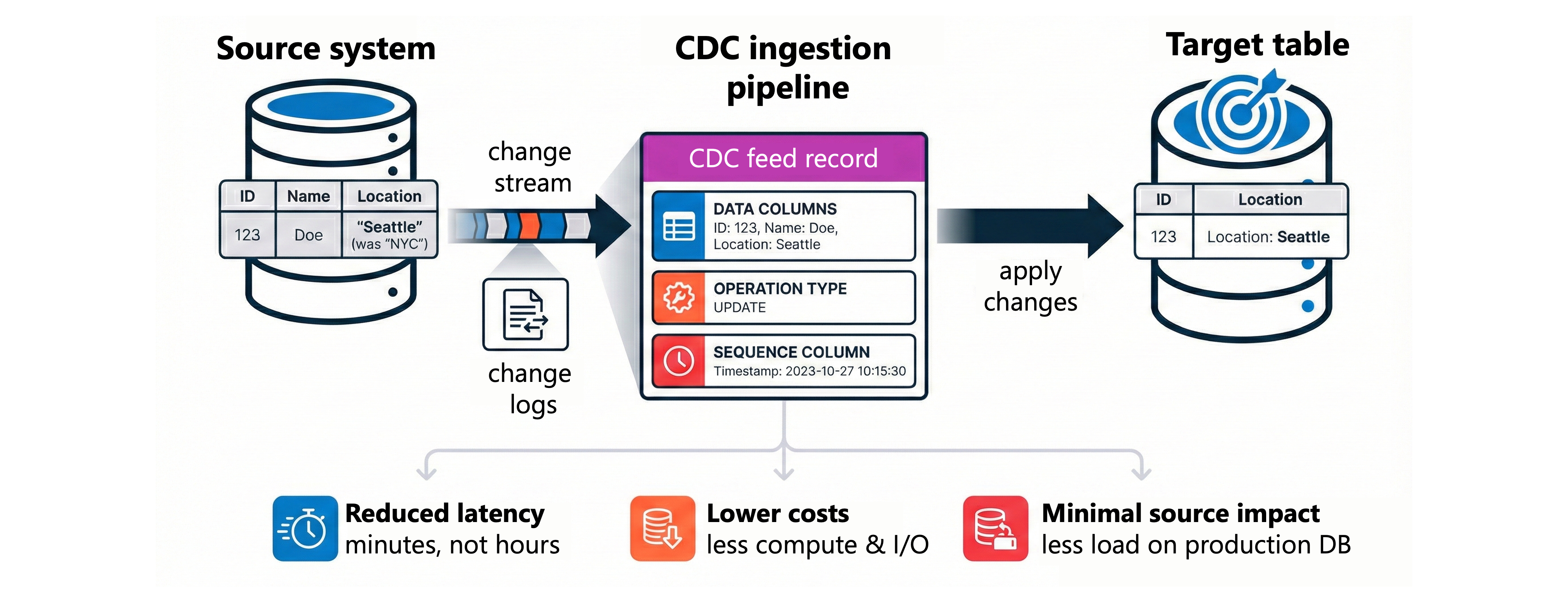
A typical CDC feed contains records with the following structure:
- Data columns: The actual values for each field in the source table
- Operation type: Indicates whether the record is an INSERT, UPDATE, or DELETE
- Sequence column: A timestamp or sequence number that determines the order of changes
Consider an employee table that tracks name and location. When you update an employee's city, the CDC feed doesn't send the entire table—it sends a single record with the new city value, the operation type UPDATE, and a sequence number. Your ingestion pipeline reads this record and applies the change to the corresponding row in the destination table.
This approach offers several advantages for data engineers:
- Reduced latency: Changes flow to the destination within minutes rather than hours
- Lower costs: Processing fewer records means less compute time and storage I/O
- Minimal source impact: Reading change logs puts less load on production databases than full table scans
Process CDC with the AUTO CDC API
Azure Databricks provides the AUTO CDC API in Lakeflow Spark Declarative Pipelines to simplify change data processing. This API handles the complexity of out-of-order records, deduplication, and change application automatically.
To implement CDC processing, you first create a streaming table as the target. Then you define a flow that reads change records from your source and applies them using the appropriate slowly changing dimension (SCD) type.
SCD Type 1 keeps only the current version of each record:
from pyspark import pipelines as dp
from pyspark.sql.functions import col, expr

@dp.temporary_view
def employees_cdf():
    return spark.readStream.table("bronze.employee_changes")

dp.create_streaming_table("employees")

dp.create_auto_cdc_flow(
    target="employees",
    source="employees_cdf",
    keys=["employee_id"],
    sequence_by=col("sequence_num"),
    apply_as_deletes=expr("operation = 'DELETE'"),
    except_column_list=["operation", "sequence_num"],
    stored_as_scd_type=1
)
With SCD Type 1, when an employee moves from Seattle to Portland, the destination table updates the city column directly. The Seattle record disappears—only Portland remains.
SCD Type 2 preserves the complete history of changes:
dp.create_streaming_table("employees_history")

dp.create_auto_cdc_flow(
    target="employees_history",
    source="employees_cdf",
    keys=["employee_id"],
    sequence_by=col("sequence_num"),
    apply_as_deletes=expr("operation = 'DELETE'"),
    except_column_list=["operation", "sequence_num"],
    stored_as_scd_type=2
)
SCD Type 2 adds __START_AT and __END_AT columns to track when each version was active. The Seattle record remains with an end date, while a new Portland record appears with no end date. Analysts can query the table to see exactly when and how employee data changed over time.
Some source systems emit partial update records that include only the changed columns rather than full row snapshots. In these cases, applying the update directly would overwrite unchanged columns with null values. The ignore_null_updates parameter (Python) or IGNORE NULL UPDATES clause (SQL) prevents this: when a CDC event matches an existing row, any null values in the incoming record leave the existing column values intact rather than overwriting them.
Configure CDC flows in SQL
The same CDC patterns work in SQL using declarative syntax. SQL flows integrate naturally with medallion architecture pipelines where you define bronze, silver, and gold layers.
CREATE OR REFRESH STREAMING TABLE employees;

CREATE FLOW employees_cdc_flow
AS AUTO CDC INTO employees
FROM stream(bronze.employee_changes)
KEYS (employee_id)
APPLY AS DELETE WHEN operation = 'DELETE'
SEQUENCE BY sequence_num
COLUMNS * EXCEPT (operation, sequence_num)
STORED AS SCD TYPE 1;
The SQL syntax mirrors the Python API. You specify the target table, source stream, key columns, delete condition, sequencing column, and SCD type. Columns you don't need in the destination—like the operation and sequence columns—get excluded with the EXCEPT clause.
For historical tracking with SCD Type 2, you can also limit which columns trigger new history records:
CREATE FLOW employees_history_flow
AS AUTO CDC INTO employees_history
FROM stream(bronze.employee_changes)
KEYS (employee_id)
SEQUENCE BY sequence_num
COLUMNS * EXCEPT (operation, sequence_num)
STORED AS SCD TYPE 2
TRACK HISTORY ON * EXCEPT (last_login);
With this configuration, changes to the last_login column update the existing record in place. Only changes to other columns—like name or department—create new historical versions.
Handle out-of-order events
Distributed systems often deliver events out of order. A network delay might cause an older update to arrive after a newer one. The AUTO CDC API handles this scenario automatically using the sequence column you specify.
When two updates arrive for the same key, the API compares their sequence values. If the newer update (higher sequence number) has already been applied and an older update arrives late, the API ignores the late-arriving record. This ensures your destination table always reflects the correct final state.
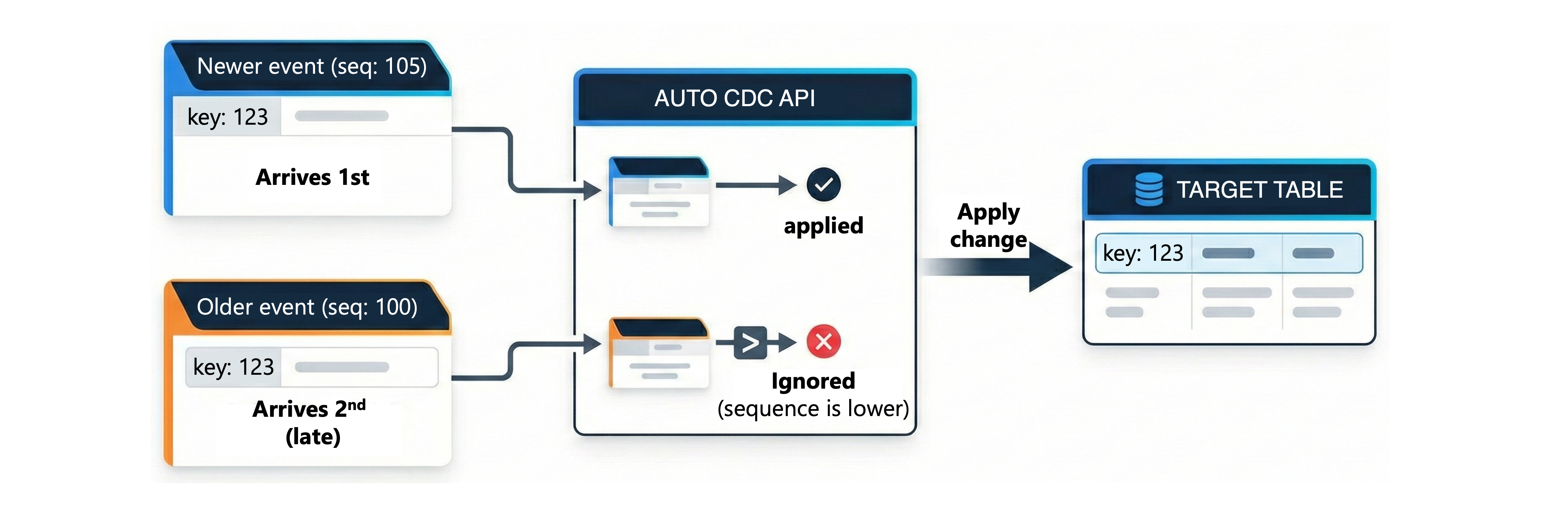
Without this built-in handling, you would need to write complex merge logic that checks timestamps, compares versions, and conditionally applies updates. The AUTO CDC API encapsulates all this logic, letting you focus on your business requirements rather than edge case handling.