Integrate code-first agents with Power Platform data
The fulfillment agent from the introduction coordinates approvals and routes replacement devices. But that coordination only means something if the agent works from the actual request, device, employee, and allowance records in Dataverse, not a copy and not a guess. This unit moves you from knowing that a code-first agent exists to understanding how it reaches that data directly, through a governed, standard protocol. It also explores how you weigh that approach against a broader option.
Giving a code-first agent a standard way into Dataverse
Every agent that touches business data needs some way to read and write it. The traditional approach is custom integration code: a client library here, a REST wrapper there, one bespoke connection per data source and per agent.
The Model Context Protocol (MCP) replaces that pattern with something standardized. MCP is an open protocol that connects LLM-powered applications and agents to external data sources and tools in a consistent way. An agent that speaks MCP can work with any MCP server without custom plumbing for each one.
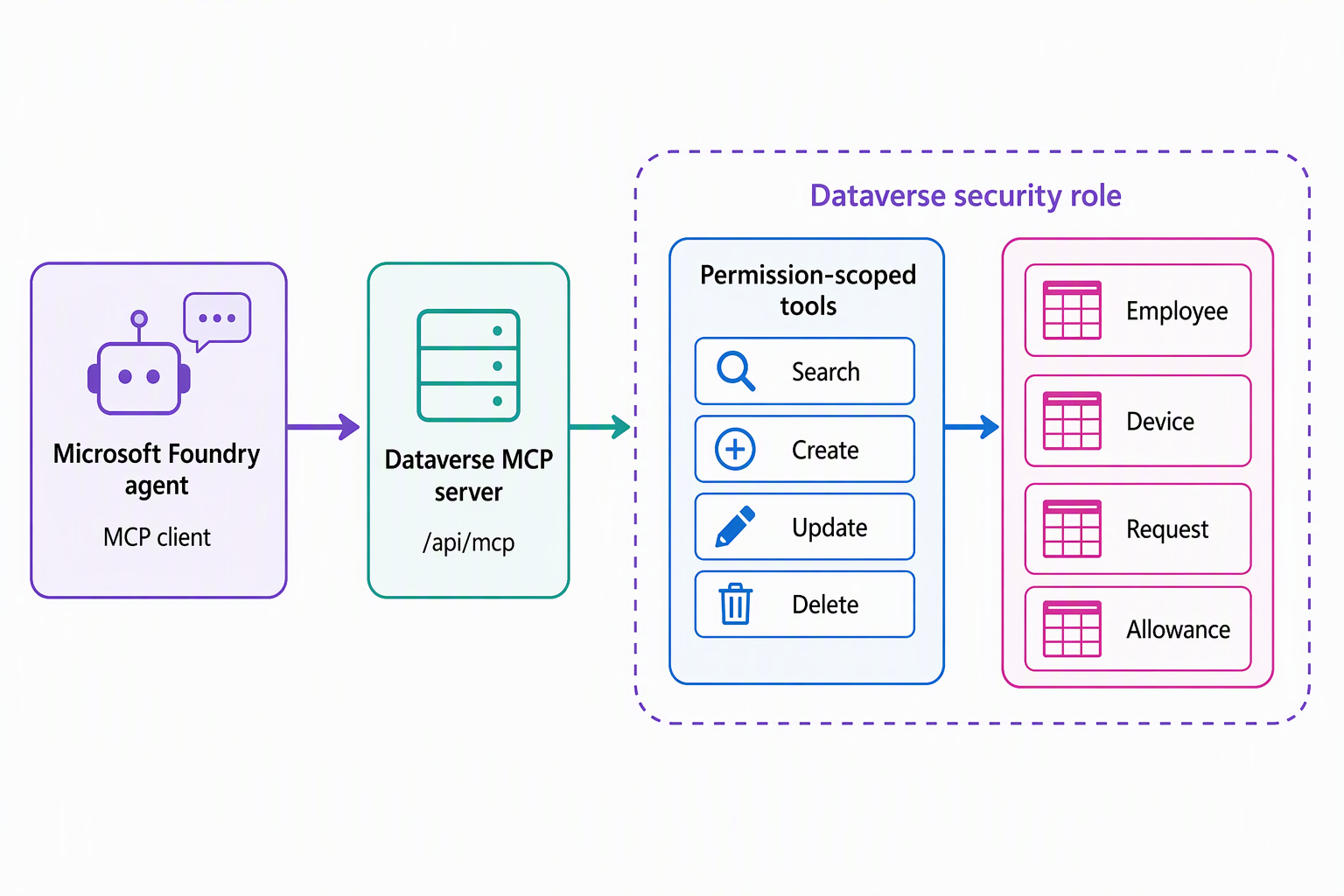
Dataverse can act as one of those servers. The Dataverse MCP server exposes your tables and records (in this scenario, employee, device, request, and allowance) to any MCP client: Copilot Studio agents, GitHub Copilot in Visual Studio Code, GitHub Copilot CLI, Claude Desktop and Claude Code, and a code-first agent such as the supplied Foundry agent.
The agent doesn't need a Dataverse-specific SDK or hand-rolled API calls; it connects as an MCP client and calls the same standard verbs any other client would use.
A Dataverse environment that's configured for MCP exposes a remote server URL that follows this pattern:
https://{dataverseOrgName}.crm.dynamics.com/api/mcp
Configuring the server for an environment is an administrative task outside the scope of this unit. What matters here is the shift it represents: once that server exists, the Foundry agent coordinating fulfillment logic connects to it as a client and reaches live request, device, employee, and allowance data directly. This replaces one-off integration code with a single, governed connection point.
Matching the right tool to the task
Connecting to the Dataverse MCP server doesn't hand an agent unrestricted access to Dataverse. Instead, it exposes a defined, permission-scoped set of tools: verbs the agent can call, each doing one specific thing. Thinking in terms of categories, rather than memorizing every tool name, helps you reason about what an agent can and can't do through this connection.
| Category | Representative tools | What it's for |
|---|---|---|
| Search and query | search_data, search, read_query, describe |
Find records and schema information. search_data searches structured and unstructured data; search looks up table schemas and business skills by keyword (metadata, not records); read_query runs supported Dataverse SQL SELECT statements; describe returns details on tables, records, schemas, skills, and apps |
| Data changes | create_record, update_record, delete_record |
Insert, modify, or remove rows. Deleting a record requires explicit user approval |
| Schema changes | create_table, update_table, delete_table |
Create or modify table structure. Deleting a table also requires explicit user approval |
| Skills and playbooks | upsert_skill, delete_skill |
Add, update, or remove reusable Dataverse skills that guide how an agent interprets a process |
| File handling | init_file_upload, commit_file_upload, file_download |
Move file attachments into and out of Dataverse records |
Applied to the scenario, the Foundry agent doesn't need every tool in this list. Reading an open request and the eligible allowance behind it is a search-and-query task. Marking a request fulfilled once a device ships is a data-change task. Separating these categories in your own thinking is what lets you reason about scope: an agent that only ever reads and updates requests needs a narrower set of permissions than one that also manages schema or skills.
Guiding question: Looking at the table, which category of tools would the fulfillment agent need for its core job of moving a request from submitted to fulfilled? Which categories would you deliberately leave out of its permission scope, and why?
Learn more about the full Dataverse MCP server tool list.
Factoring cost into the decision
Governed access isn't free in every case, and that's worth weighing before you commit to this integration path. Starting December 15, 2025, Dataverse MCP tool use by agents created outside Copilot Studio is billed, unless it's covered by certain Dynamics 365 Premium licenses or a Microsoft 365 Copilot license.
Within that billing, search_data draws on the Tenant graph grounding Copilot Credit rate, while the remaining tools draw on the Text and generative AI tools (basic) rate, billed per 10 responses. A code-first agent like the supplied Foundry agent falls into that "outside Copilot Studio" category. Licensing and usage patterns become a real planning input, not an afterthought you discover after the integration is live.
Deciding between a direct connection and Work IQ (preview)
The Dataverse MCP server solves one problem well: a single agent that needs governed access to one Dataverse environment's data. But it isn't the only integration point available, and it's worth knowing where it sits relative to the broader option.
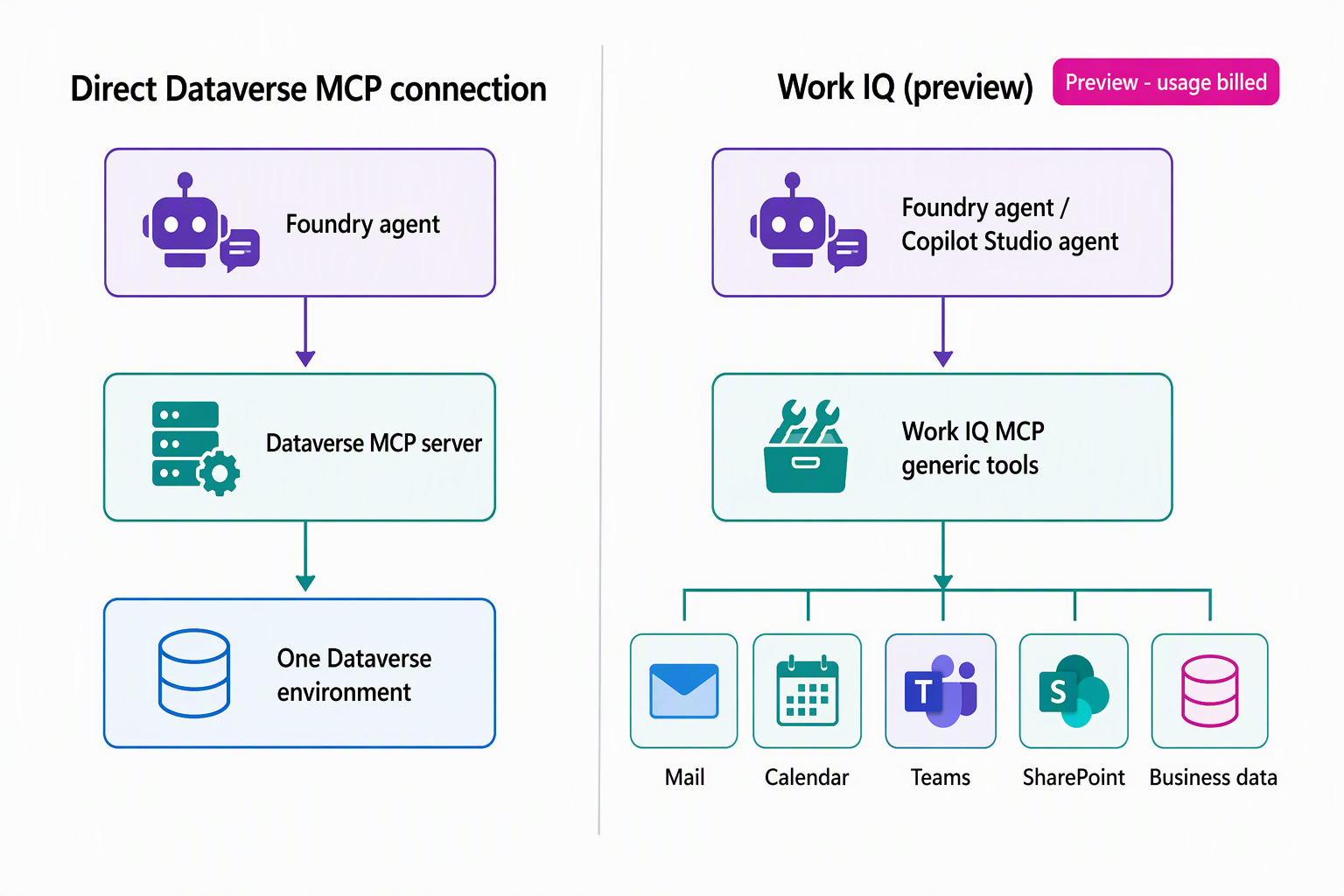
Work IQ is a workplace intelligence layer, larger in scope than the Dataverse MCP server, that continuously builds a permission-aware, semantic understanding of organizational and business data. That understanding spans Microsoft 365 productivity data such as mail, calendar, files, and Teams, alongside business-application data including Dynamics 365 and Power Platform. It's organized around four areas:
- Chat for conversational intelligence.
- Context for pre-assembled, agent-ready information, so an agent doesn't have to build its own retrieval pipeline.
- Tools for a small set of generic, composable actions exposed through Work IQ MCP.
- Workspaces for persistent storage that supports long-running agent work.
Work IQ MCP is a preview capability at the time of writing. API access to Work IQ MCP is independent of Microsoft 365 Copilot licensing and is available through usage-based billing. Users who hold a Microsoft 365 Copilot license get Work IQ surfaced directly inside Copilot experiences and agents.
But calling Work IQ MCP from a custom or third-party agent, such as the supplied Foundry agent, still draws on that usage-based billing rather than the license alone. Users without a Microsoft 365 Copilot license can also call Work IQ MCP, and that use is billed the same way, by usage.
Microsoft Foundry and Copilot Studio are the documented integration surfaces where a code-first agent invokes Work IQ MCP tools. The Microsoft 365 admin center is different: it's the centralized surface for governance, policy, access, and spending and cost management, not where the agent itself invokes those tools.
Rather than exposing Dataverse and Dynamics 365 as one server among several, Work IQ MCP offers a compact set of generic tools. These tools act on governed resource paths spanning mail, calendar, Teams, SharePoint, and available business data. New workloads extend those paths, instead of adding hundreds of workload-specific operations.
A related preview capability, Business Applications in Work IQ, extends this understanding further into business-application data, with Dataverse environments as an early focus. It adds a shared semantic model and reusable business skills, so agents interpret business processes consistently.
That breadth is exactly what makes the choice a deliberate one rather than an automatic upgrade. If the Foundry agent in this scenario only ever needs request, device, employee, and allowance data, the direct Dataverse MCP server connection is the simpler, license-independent option available today.
Suppose the organization later wants this agent (or others) to reason across Dataverse data and Microsoft 365 context together, such as an employee's calendar or Teams messages. In that case, under one centrally governed umbrella, Work IQ becomes the layer worth evaluating.
That evaluation holds whether the use is covered by a Microsoft 365 Copilot license or billed by usage. Keep in mind that it's still a preview capability and not something this module's held lab configures.
Reflect: Picture a scenario in your own work where an agent needs data from more than one system. Would a direct, single-purpose MCP connection like the Dataverse MCP server meet that need, or does the scenario call for evaluating a broader layer like Work IQ? What tips the decision one way or the other?
Learn more about Work IQ (preview).
You now have a clear picture of how a code-first agent reaches Dataverse data directly, and when a broader layer is worth evaluating instead. You're ready to look at the other half of this scenario: connecting that same custom agent to the Copilot Studio agent that already answers status questions.