Connect custom agents, Copilot Studio agents, and applications
You now know how the Foundry agent reaches live Dataverse records directly through the Dataverse MCP server. You also know how Work IQ fits as a broader option when an agent needs more than one system's data. That solves access to data.
It doesn't yet solve coordination between agents, or give any other application a way to ask the status agent a question. This unit picks up there. You connect the Foundry agent to the existing Copilot Studio status agent. You also let application code, including the Foundry agent's own code and a separate front-end app, consume that status agent directly.
Attaching the Foundry agent as a connected agent
Recall that the equipment-provisioning scenario already has a Microsoft Copilot Studio agent answering employee questions about request status. The Foundry agent that coordinates fulfillment is a separate, code-first agent built with the Microsoft 365 Agents SDK. Left alone, these two agents don't know about each other: an employee asking the status agent "what's happening with my request?" gets whatever the status agent already knows, not the fulfillment logic running inside the Foundry agent.
The Microsoft 365 Agents SDK agent connection, currently a preview capability, closes that gap. You attach a code-first agent to a Copilot Studio agent as a connected, child agent. That way, the Copilot Studio agent can call it whenever a user's request needs that agent's capability.
Conceptually, the connection comes down to two things the Copilot Studio agent needs: the custom agent's messaging endpoint, and the authentication that lets the Copilot Studio agent call it securely. Once that connection exists, the status agent can hand off part of a conversation to the Foundry agent and return its answer as part of the same interaction.
The maker-portal steps for wiring up that connection sit outside this unit's scope; what matters here is the shape of the relationship, not the click path to create it.
Guiding question: In this scenario, the status agent already handles general questions well. What kind of employee question would be better routed to the Foundry agent instead of answered directly by the status agent?
This pattern has a name worth recognizing even though it's not the one taught here. The Agent2Agent (A2A) protocol is a separate, genuinely documented way to connect an agent to a Copilot Studio agent, intended for agents that natively implement the open A2A protocol.
The Foundry agent in this scenario isn't one of those; it's built with the Microsoft 365 Agents SDK. For that kind of agent, the Microsoft 365 Agents SDK connection described above is the documented, recommended path. Treat A2A as a distinct alternative for a different category of agent, not as an interchangeable label for the connection you just learned.
| Connection mechanism | Agent type it fits | Where it applies in this scenario |
|---|---|---|
| Microsoft 365 Agents SDK agent connection | Code-first agents built with the Microsoft 365 Agents SDK | How the Foundry agent attaches to the status agent |
| Agent2Agent (A2A) protocol | Agents that natively implement the open A2A protocol | Not used here; a distinct alternative for a different agent type |
Learn more about connecting a Microsoft 365 Agents SDK agent to a Copilot Studio agent.
Letting application code consume the status agent directly
Connecting the two agents solves one direction of the problem: the status agent reaching into the Foundry agent's logic. The other direction is just as common. Suppose the fulfillment coordination running inside the Foundry agent itself needs to ask the status agent a question.
Or suppose a separate web application wants to surface that same status information to employees, without going through the status agent's own chat surface at all. Both cases need application code, not a maker-portal configuration, to talk to a Copilot Studio agent.
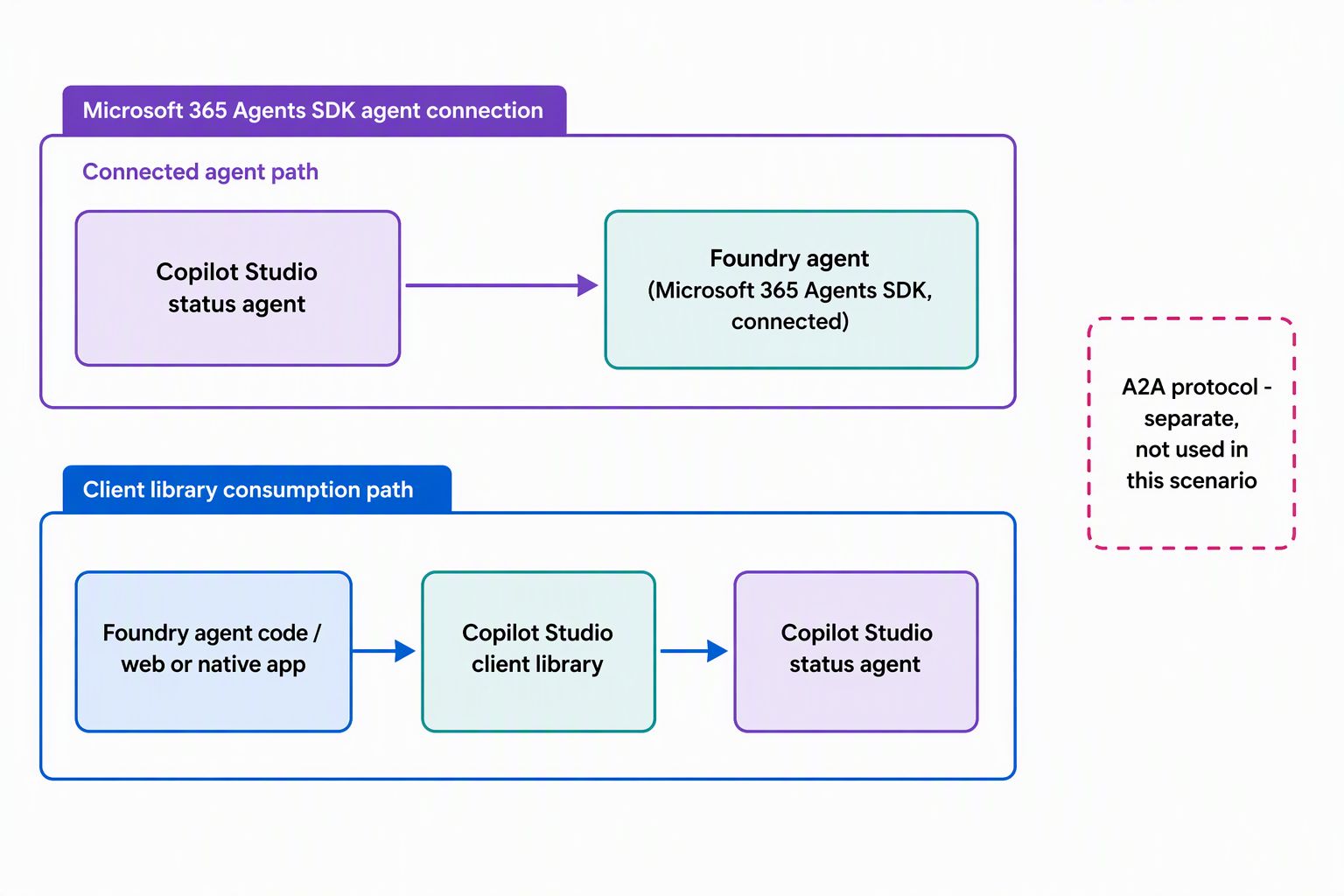
The Copilot Studio client library, part of the Microsoft 365 Agents SDK, is the supported mechanism for exactly that. It's not a separate or undocumented "direct" integration between Foundry and Copilot Studio; it's this specific client library, called from whatever code needs it.
When the supplied Foundry agent's own code needs an answer from the status agent, it embeds this client library and calls the status agent as a client would. The same library, used the same way, lets a standalone web or native application consume the status agent too. You're looking at one underlying pattern applied in two places: agent-to-agent and app-to-agent.
Try it yourself: Open the documentation for the Copilot Studio client library and skim the sample console app for a language you use. Trace how few lines of code it takes to send a message to a Copilot Studio agent and read back its reply.
Finding the connection details and knowing the current limits
Whichever direction you're integrating, the Copilot Studio client needs a few specific details to find and authenticate against the right agent: an environment ID, an agent identifier, and authentication credentials. You find these on the Copilot Studio agent's Channels page, where the agent exposes itself for consumption by external code.
This unit doesn't walk through gathering those values step by step. What matters conceptually is that they originate from the agent's own channel configuration, not from guesswork or a hardcoded endpoint.
The table below summarizes the two consumption directions this scenario touches, since they share a mechanism but differ in who's calling.
| Direction | Who calls the status agent | Typical reason |
|---|---|---|
| Agent-to-agent | The Foundry agent's own code, using the embedded Copilot Studio client | Fulfillment logic needs a status answer without a human asking |
| App-to-agent | A separate web or native application, using the same client library | Employees get status answers from a surface other than the status agent's own chat |
A related channel, Direct Line, exists as an alternative for cases the Agents SDK client doesn't cover, such as scenarios built around service principal tokens. It's worth knowing the name exists. But this unit's focus stays on the Agents SDK and Copilot Studio client path, since that's what fits the Foundry agent and most application scenarios.
One current limit is worth carrying forward: today, this client library supports Copilot Studio agents built on the standard harness. Confirm that detail against current documentation before you rely on it for a specific agent.
Learn more about integrating a Copilot Studio agent into a web or native app.
The Foundry agent is now connected to the status agent. A consistent client library also lets any application ask the status agent a question. The equipment-provisioning scenario now has a coherent set of agents, instead of several isolated ones. The same pattern applies just as well the next time you connect a custom agent into a Power Platform environment of your own. That pattern combines a governed data connection, an agent-to-agent link, and a shared client library for application code.