Explore contact center architecture
Most organizations arrive at a contact center modernization project carrying the weight of years of accumulated point solutions: a separate IVR (Interactive Voice Response) system, multiple chat bots for different channels, social bots, a CRM, and a workforce management tool. Each operates independently, and each requires its own integrations and maintenance. Agents switch between tools constantly. Customer data is scattered across systems. When something breaks, it's not always clear where to look.
This fragmented model doesn't just frustrate representatives. It drives up handle times, reduces first-contact resolution, and makes it nearly impossible to deliver a consistent customer experience across channels. Understanding how Dynamics 365 Contact Center addresses this problem through its architecture helps you explain the platform's value and guides important implementation decisions.
A unified, composable architecture
Dynamics 365 Contact Center replaces the fragmented stack with a platform organized into four composable layers that share common data and AI:
- Self-service layer: AI agents and conversational IVR handle incoming interactions autonomously. Customers get answers without waiting for a human. Copilot Studio powers this layer, letting you build agents that operate across voice, chat, SMS, and other channels.
- Unified intelligent routing layer: Every incoming work item—whether it's a voice call, a chat message, an email, or a social message—passes through a single routing engine. The engine classifies the work item and assigns it to the most suitable agent based on skills, capacity, and customer context.
- Assisted service layer: Copilot Service workspace brings together everything a representative needs in one interface, including the customer's full interaction history, case details, and real-time AI assistance. Representatives handle multiple concurrent conversations from this single view, with Copilot reducing the time spent on routine tasks.
- Operations layer: Analytics, workforce management, and AI controls provide supervisors and administrators with the visibility they need. Real-time dashboards, historical reports, and forecasting tools are built into the platform—no separate analytics deployment required.
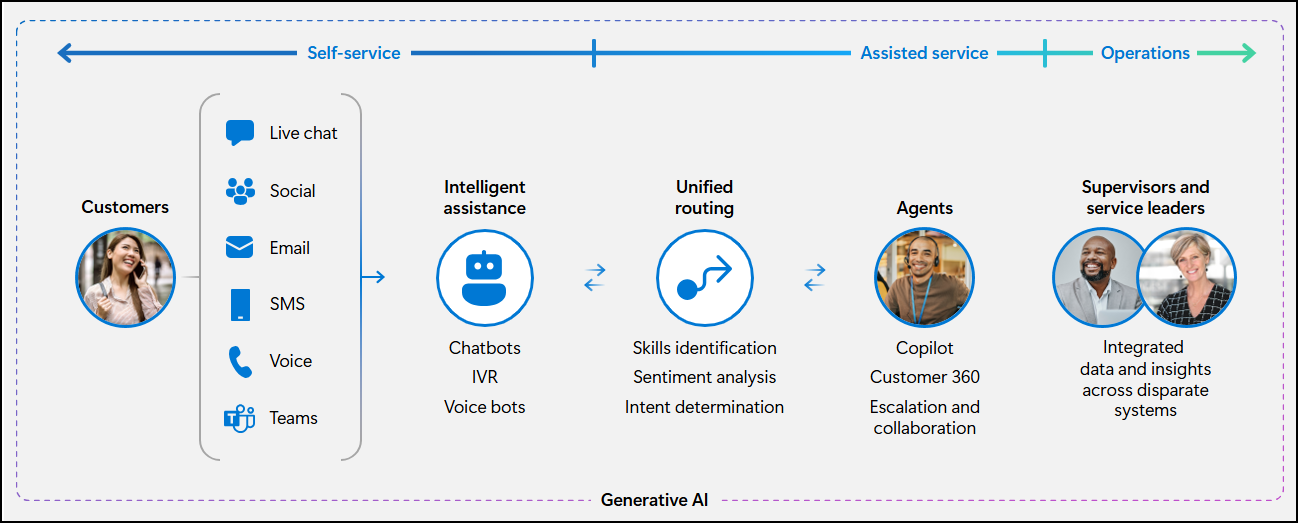
All four layers share a common data model in Dataverse. This means insights from one layer improve the performance of others. Intents discovered during self-service interactions improve routing accuracy. Quality evaluations from the operations layer generate coaching suggestions that appear in the agent desktop.
Infrastructure designed for enterprise reliability
The platform is built on a cell-based architecture that provides enterprise-grade availability:
- Azure Availability Zones: Traffic is distributed across isolated datacenter groups within a region. If one zone experiences a disruption, others continue operating without interruption because data is replicated synchronously across zones.
- Cross-region disaster recovery: Island data is replicated across paired Azure regions—for example, US West and US East. Organizations configure their recovery objectives based on business requirements through a self-service capability.
- Elastic autoscaling: The platform responds automatically to demand spikes. There's no manual intervention required when contact volumes increase.
- IC3 media platform: The same media platform that powers Microsoft Teams (with over 320 million monthly active users) handles voice interactions in Dynamics 365 Contact Center.
The platform is designed to support 100,000 or more concurrent calls at 99.999% availability for core calling scenarios.
Integration across the Microsoft ecosystem
Dynamics 365 Contact Center integrates with the Microsoft ecosystem through well-defined touchpoints that matter during implementation planning:
| Platform | Integration |
|---|---|
| Microsoft Teams | Teams Phone for telephony backbone; Teams as a customer channel; agent consultation and transfer |
| Dynamics 365 | Hub-spoke model connecting Contact Center to Sales, Field Service, Supply Chain, Finance, and Customer Insights |
| Power Platform | Dataverse for data storage, Power BI for analytics, Power Automate for workflow automation |
| Azure | Azure Communication Services for telephony, Azure OpenAI Service for generative AI capabilities |
| Copilot Studio | Agent authoring, conversational IVR, multi-channel deployment, and agent orchestration |
For organizations working with non-Microsoft CRMs, the CRM Connector architecture provides an embeddable conversation widget that works with Salesforce, ServiceNow, and custom solutions. Reference implementations are available on GitHub.
Deployment models
Understanding the two deployment models, standalone or embedded, helps you match the implementation approach to the customer's existing environment.
Standalone deployment
Contact Center operates independently, connecting to any CRM via a widget. The widget surfaces the contact center experience inside the non-Microsoft CRM, so agents work in their familiar environment. This is the right choice for organizations that are satisfied with their existing CRM and want to upgrade their contact center capabilities.
Embedded within Dynamics 365 Customer Service
Contact Center capabilities are embedded directly within the Dynamics 365 Customer Service experience. This is the preferred path for organizations already using Dynamics 365 for their CRM operations, and the foundation for the Customer Service Premium bundle.
Both deployment modes share the same underlying platform: Dataverse as the data layer and Omnichannel services as the orchestration layer.
Four reference architecture scenarios
Every implementation starts by identifying where the customer is today and what they need to change. Four recognized scenarios cover the most common starting points:
| Scenario | Recommended solution | When to use it |
|---|---|---|
| Replace both CRM and CCaaS | Dynamics 365 Customer Service Premium | Full-stack modernization (the customer needs to upgrade both systems) |
| Replace CRM, keep existing CCaaS | Dynamics 365 Customer Service Enterprise | Satisfied with CCaaS, needs CRM upgrade |
| Replace CCaaS, keep existing CRM | Dynamics 365 Contact Center (standalone) | Satisfied with CRM, needs CCaaS upgrade |
| Add AI to an existing stack | Copilot Studio | Wants Microsoft AI capabilities without replacing current platforms |
Understanding which scenario applies helps you recommend the right entry point and set realistic expectations for the implementation scope. With the architecture in mind, the next unit covers the security, governance, and compliance capabilities that protect the platform and the data it handles.