Discover the prebuilt AI agents and AI maturity model
The phrase "AI-first contact center" is common in product descriptions. But what does it actually mean in practice, and how does Dynamics 365 Contact Center deliver on it?
A traditional contact center uses AI as an add-on: a chatbot here, a sentiment score there, perhaps an autosummarization feature bolted onto an existing agent desktop. An AI-first contact center is architecturally different. AI is embedded in every layer of the experience, from how customers get self-service answers to how agents handle interactions to how supervisors evaluate quality and plan staffing. It's not a separate system you add later. It's how the platform was designed from the start.
AI maturity in service: three levels
Microsoft describes the progression toward an AI-first contact center across three maturity levels:
| Level | Name | What it looks like |
|---|---|---|
| Level 1 | AI assistant | Every agent has Copilot available, helping them work faster and better. AI assists but doesn't act independently. |
| Level 2 | Digital colleagues | AI agents handle specific tasks alongside humans, such as discovering customer intents, drafting knowledge articles, or automating case closure. |
| Level 3 | Agent-operated | Humans set the strategy and direction; AI agents run entire service processes, checking in with humans at configured approval points. |
Most organizations begin at level one, deploying Copilot for individual agent productivity, then expand to levels two and three as confidence and operational maturity grow. Dynamics 365 Contact Center supports all three levels through its prebuilt agents, Copilot capabilities, and Copilot Studio integration.
Prebuilt AI agents
Dynamics 365 Contact Center includes three prebuilt contact center AI agents. Each targets a distinct part of the service lifecycle.
Customer Assist Agent
The Customer Assist Agent combines autonomous self-service with real-time representative assistance. The agent discovers customer intents by mining conversations across all channels, builds a dynamic intent library that powers self-service routing, and identifies intent in real time to route customers to the most suitable resource, or resolves the issue autonomously. When escalation is needed, the agent hands off with full context. The agent also initiates proactive outbound engagement through voice and SMS channels.
Quality Assurance Agent
The Quality Assurance Agent evaluates conversations in real time and after completion with AI-generated quality scores. It monitors active conversations for quality issues, alerts supervisors for timely intervention, provides coaching recommendations, and populates a centralized evaluation dashboard. Supervisors can scale quality management well beyond what's possible through manual conversation sampling.
Service Operations Agent (preview)
The Service Operations Agent supports administrators with contact center configuration, validation, and troubleshooting through natural language conversation. Administrators describe what they need, and the agent walks through the steps while keeping a human in the loop. The agent also supports conversation orchestration using AI-powered playbooks that dynamically adjust priority and handle overflow based on evolving conditions.
Note
The Customer Knowledge Management Agent and Case Management Agent are available in Dynamics 365 Customer Service. They aren't part of the Contact Center agent portfolio but may be available in environments that include both products.
The AI learning loop
These three agents don't operate in isolation. They form a continuous improvement cycle that gets better the more you use it:
- The Customer Assist Agent discovers what customers need and resolves issues autonomously or with representative assistance
- The Quality Assurance Agent evaluates every interaction and surfaces coaching opportunities
- The Service Operations Agent helps administrators optimize routing and orchestration based on the patterns these interactions reveal
- Insights feed back into intent discovery and quality standards, improving the entire loop
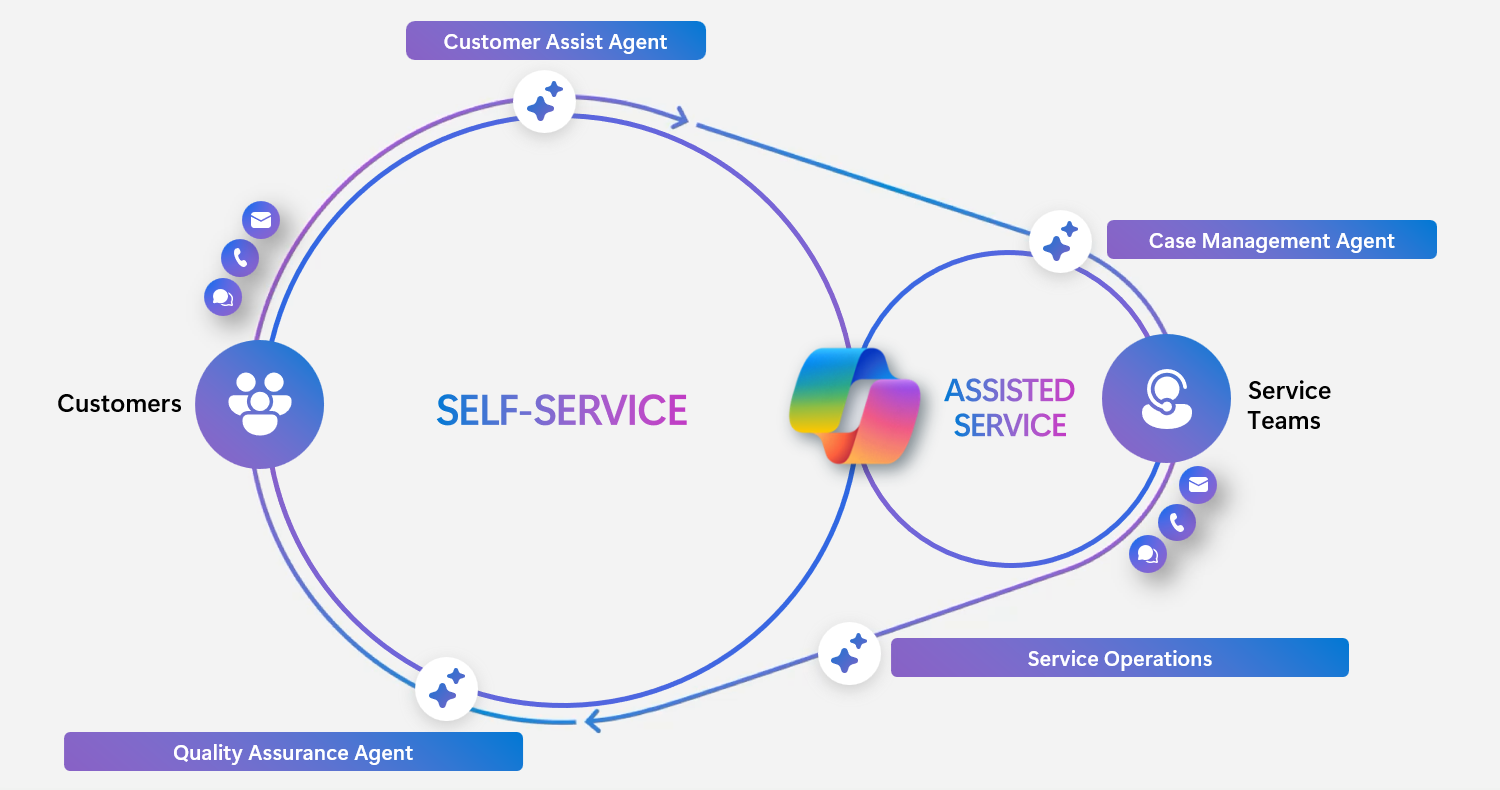
This architecture is the foundation for the "shift left" model, moving simple, repetitive issues to autonomous AI resolution so human agents can focus on the complex, high-value scenarios where human judgment matters most. Gartner projects that by 2029, agentic AI will autonomously resolve 80% of common customer service issues without human intervention, leading to a 30% reduction in operational costs.
Copilot Studio: building and extending AI agents
While the prebuilt agents cover common contact center scenarios, Copilot Studio lets you build custom AI experiences tailored to your organization's specific needs.
Copilot Studio is the authoring platform for all AI agents in Dynamics 365 Contact Center, including the platform's prebuilt agents and any custom agents you create. You can:
- Build self-service agents that resolve customer inquiries autonomously before routing to a human
- Create conversational IVR flows that collect customer intent through natural dialog before transferring a call
- Connect agents to your organizational knowledge bases, case data, and external systems via connectors
- Orchestrate multiple specialized agents for complex, multi-step service scenarios
Copilot Studio agents support all channels—voice, chat, SMS, social, and Microsoft Teams—from a single authoring environment. Configuration changes deploy consistently across every channel where the agent is active.
Extend your existing platform with Microsoft Contact Center AI
Not every organization is ready to replace their entire contact center platform. Microsoft Contact Center AI (CCAI) is an AI overlay that adds Microsoft's generative AI, self-service, and analytics capabilities on top of existing CCaaS platforms from providers such as Genesys, NICE, and Five9 — without requiring a platform migration.
The CCAI path allows incremental adoption:
- Keep the existing CCaaS infrastructure; zero disruption to current operations
- Add self-service agents and analytics to deliver immediate deflection ROI
- Expand to AI-assisted tools for agents to boost productivity
- Optionally migrate to full Dynamics 365 Contact Center when ready
This incremental model recognizes that AI innovation cycles happen every six months, but CCaaS platform replacements take 12 to 24 months. CCAI closes the adoption gap for organizations locked into multi-year contracts with existing vendors.
With a clear picture of what makes Dynamics 365 Contact Center AI-first, the next unit covers how to license and cost-plan your implementation.