Explore capabilities and architecture
This unit explores how Azure DocumentDB is built and what features it provides. Understanding the architecture helps you make informed decisions about cluster sizing, security, and feature selection.
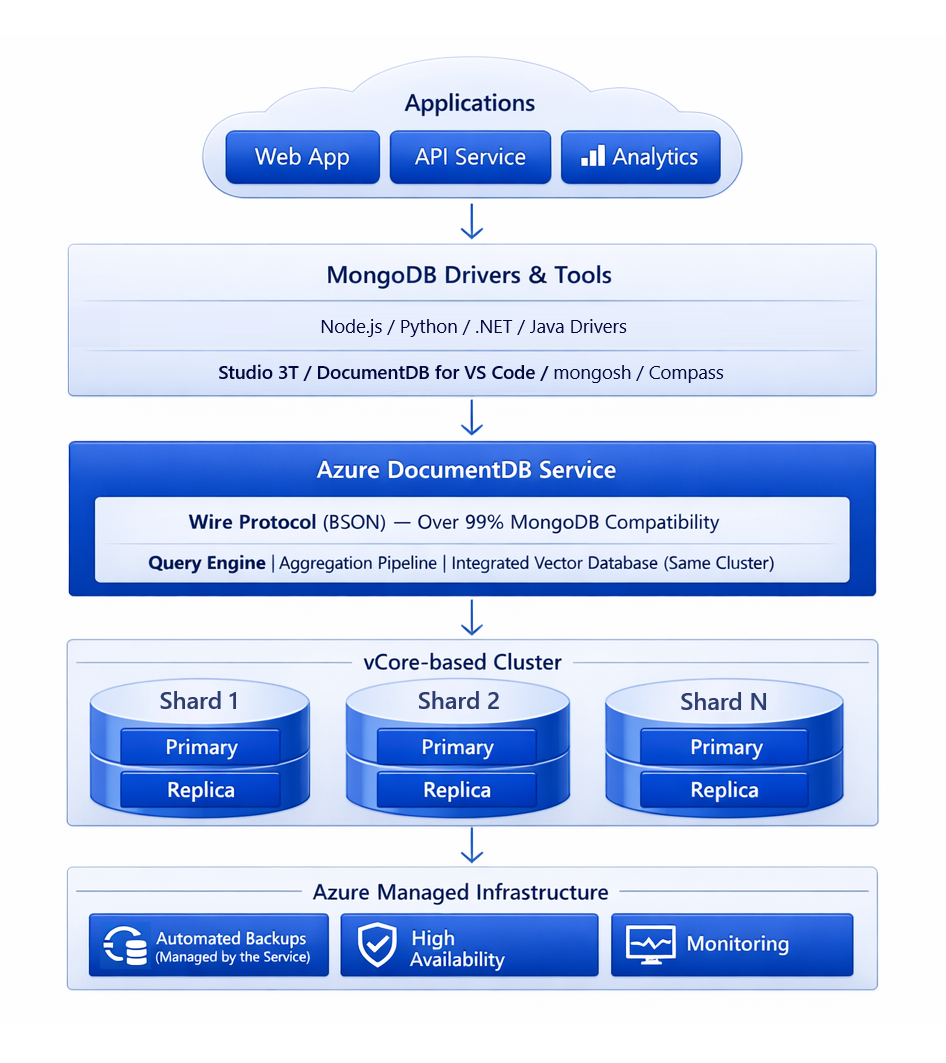
vCore-based cluster architecture
Azure DocumentDB uses a vCore-based architecture where compute and storage is provisioned independently. A cluster consists of one or more physical shards. Each shard is an individual node that stores a portion of your data and handles queries against that data. Every shard in a cluster runs the same compute tier and storage configuration.
Compute tiers range from burstable options for development and testing to high-performance tiers for production workloads:
| Tier | vCores | RAM (GiB) | Type |
|---|---|---|---|
| M10 | 1 | 2 | Burstable |
| M20 | 2 | 4 | Burstable |
| M25 | 2 | 8 | Burstable |
| M30 | 2 | 8 | Provisioned |
| M40 | 4 | 16 | Provisioned |
| M50 | 8 | 32 | Provisioned |
| M60 | 16 | 64 | Provisioned |
| M80 | 32 | 128 | Provisioned |
| M200 | 64 | 256 | Provisioned |
Burstable tiers (M10, M20, M25) provide minimal CPU performance during idle periods and scale up to full CPU power when demand increases. These tiers are cost-effective for development, testing, and light workloads. Provisioned tiers (M30+) provide consistent performance for production workloads.
Storage scales from 32 GiB to 32 TiB per shard. Input/output operations per second (IOPS) capacity increases with storage size, and storage up to 512 GiB includes free disk bursting. You can increase storage at any time without downtime, though storage can't be decreased after provisioning.
Tip
For optimal performance, ensure your working set (frequently accessed data and indexes) fits in RAM. If your working set exceeds available memory, the database reads from disk more frequently, which increases query latency.
Scaling options
Azure DocumentDB supports both vertical and horizontal scaling:
- Vertical scaling: Change the compute tier to increase or decrease vCores and RAM. For example, you can move from M50 to M60 as your workload grows. Tier changes happen without interruption.
- Horizontal scaling: Add physical shards to distribute data across multiple nodes. No shard key is required until the database surpasses terabytes of data. You can automatically shard existing databases with no downtime.
This flexibility means you can start with a small burstable tier for development, scale up vertically for production, and scale out horizontally as your data volume grows.
Integrated vector database
Azure DocumentDB includes an integrated vector database at no extra cost. This capability enables you to store, index, and query high-dimensional vector data alongside your operational data in the same database.
Vector search is useful for AI-driven applications, including:
- Semantic search across documents.
- Retrieval-augmented generation (RAG) patterns for generative AI.
- Recommendation engines that find similar items based on vector proximity.
Because vector data lives in the same database as your application data, you don't need to maintain a separate vector store or synchronize data between systems. Even the free tier includes vector database capabilities.
Security features
Azure DocumentDB provides multiple layers of security:
- Encryption at rest: All data is encrypted by default using service-managed keys. You can also configure customer-managed keys (CMK) through Azure Key Vault for extra control.
- Encryption in transit: Transport Layer Security (TLS) is enforced for all client and service connections.
- Authentication: The service supports both native MongoDB authentication (SCRAM-SHA-256) and Microsoft Entra ID for centralized identity management. You can create database-level users and roles, or use managed identities for service-to-service authentication.
- Network security: Configure firewall rules to restrict access by IP address, or use Azure Private Link to expose your cluster through private endpoints inside your virtual network.
Important
For production workloads, use Azure Private Link for network connectivity and Microsoft Entra ID for authentication. These configurations provide the strongest security posture for your database.
High availability and disaster recovery
You can enable in-region high availability (HA) on your cluster. When HA is enabled, the service maintains a standby shard for every primary shard using synchronous replication. If a primary shard becomes unresponsive, the service automatically redirects connections to the standby with zero data loss. Read operations continue uninterrupted, while write operations could experience brief slowness during the switch.
For cross-region protection, Azure DocumentDB supports multicloud and hybrid architectures. The open-source DocumentDB engine can run on-premises or in other clouds, and cross-cloud replication enables failover across environments.
Native Azure integration
As a fully managed Azure service, Azure DocumentDB integrates with the Azure ecosystem:
- Azure Monitor: Track cluster performance metrics like CPU, memory, storage utilization, and IOPS.
- Azure CLI and Bicep: Automate cluster creation and management through infrastructure as code.
- Diagnostic logging: Send logs to Azure Monitor, Log Analytics, or your security information and event management (SIEM) solution for auditing and incident detection.
This integration means you manage your database alongside other Azure resources using the same tools, dashboards, and access controls your team already uses.