Define GHAS and the importance of its integral features
In this unit we'll be covering:
- Secret scanning
- Code scanning
- Dependabot
- Creating a More Secure Software Development Life Cycle with key Features
Let’s start with a quick review of GHAS.
What is GHAS?
GitHub Advanced Security (or GHAS) is an application security solution that helps developers secure their code and manage risks without disrupting their workflow.
GHAS includes capabilities now offered as two distinct products: GitHub Secret Protection and GitHub Code Security. This separation allows organizations to enable the features that best match their security priorities and licensing.
Advanced Security is embedded right into your workflow to help prevent vulnerabilities and credential leaks without slowing development. GitHub Advanced Security is like having your personal security consultant review every line of code with insights from security experts from around the world.
Ensuring the security of applications and the software supply chain has never been more important. Gartner predicts that 45% of global organizations will be impacted by a supply chain attack by 2025. According to the 2022 Verizon Data Breach Investigation Report, applications continue to be a top attack vector and are at the center of more than 40% of all data breaches.
Incorporating security into your software development process may seem like a daunting process, so let's go over 3 key features of GHAS and how they help your team stay on top of the latest security threats: Secret scanning, Code scanning, and Dependabot.
Secret scanning

Secret scanning is a critical GitHub security feature that identifies and helps prevent the accidental exposure of sensitive information, such as API keys and tokens, within your source code. Secret scanning is available for all public repositories for free, and can also be enabled for private repositories with a GitHub Advanced Security (GHAS) license.
This helps prevent unauthorized access and protects confidential data. Secret scanning operates by searching for predefined patterns and signatures indicative of sensitive information, ensuring that potential security risks are promptly addressed. By default, secret scanning looks for highly accurate patterns that have been provided by a GitHub Partner. However, custom patterns can be created for other use cases.
Secret scanning includes:
- Push protection proactively prevents secret leaks by scanning code on commit and blocking a push if a secret is present.
- The ability to easily view alerts and remediate them without ever having to leave GitHub.
In a secure software development life cycle, secret scanning detects exposed secrets, allowing teams to revoke or rotate them as early as possible—often before they can be used for malicious purposes, reducing the risk of data breaches and preserving confidentiality throughout development.
Next, let’s review code scanning.
Code scanning

Code scanning is an integral feature of GHAS that analyzes source code for security vulnerabilities and coding errors. It employs static analysis techniques to identify potential issues such as SQL injection, cross-site scripting, and buffer overflows. By providing automated feedback directly within the pull request workflow, code scanning enables developers to address vulnerabilities early in the development process.
Code scanning improves code quality and helps minimize security threats by identifying and addressing issues early in the development lifecycle. Because scanning rules are continuously updated, code scanning can also detect vulnerabilities that may already exist in production.
Dependabot
Dependabot is an automated dependency management tool, responsible for keeping project dependencies up-to-date. It regularly checks for updates to libraries and frameworks used in a project and automatically opens pull requests to update dependencies to their latest, secure versions.
Dependabot includes:
- Alerts for known vulnerabilities
- Security updates for vulnerable packages
- Version updates to keep dependencies current
Dependabot works closely with the Dependency Graph to determine which dependencies are in use and cross-reference them against the GitHub Advisory Database to detect vulnerabilities.
With GitHub Advanced Security, Dependabot’s capabilities are enhanced by Dependency Review, enabling you to preview any vulnerable packages introduced in a pull request and prevent the addition of insecure dependencies before merging.
Where to enable Secret scanning, Code scanning, and Dependabot alerts
To enable any of the alerts from a repository level first navigate to your repository’s security tab.

Next, enable your alerts in the Security overview.
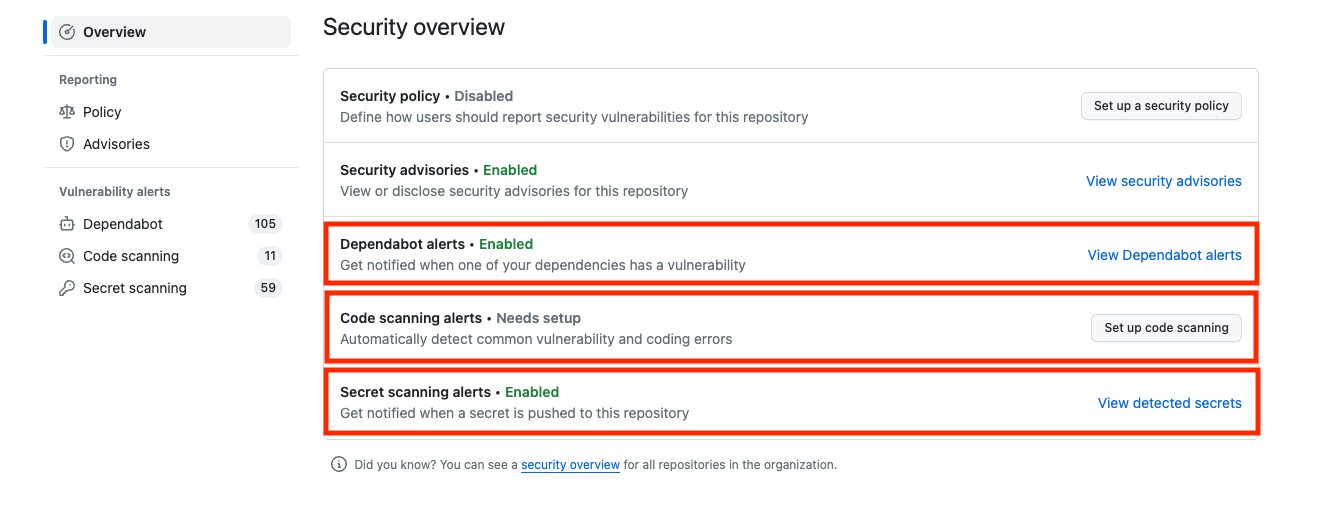
Now that we’ve reviewed and enabled all 3 of GHAS’s integral features, let's talk about how to implement all of them to create a more secure software development life cycle.
Creating a more secure software development life cycle with all 3 features
Secret scanning, code scanning, and Dependabot collectively contribute to creating a more secure software development life cycle. Secret scanning prevents inadvertent exposure of sensitive information. Code scanning identifies and addresses security vulnerabilities in the codebase. And Dependabot automates dependency management.
By integrating these features, development teams can proactively address security concerns at every stage of the development life cycle. This proactive approach minimizes the likelihood of security incidents reaching production, resulting in a more resilient, secure, and efficient software development process.
The combined impact of these integral features ensures that security is not a standalone consideration but an integral part of the entire development workflow.
Security features for open source projects
Public projects on GitHub benefit from certain default security features, such as secret scanning and dependency graphs. GitHub automatically scans public repositories for partner patterns and provides alerts to repository administrators. Public projects can also choose to enable code scanning, Dependabot, and Dependency Review without a GitHub Advanced Security license.
However, these features are foundational and may not provide the depth of protection needed for more complex projects or enterprise environments.
When GitHub Advanced Security (GHAS) is paired with GitHub Enterprise Cloud (GHEC), the comprehensive set of security features becomes available for internal and private projects as well:
- Code scanning - Search for potential security vulnerabilities and coding errors in your code.
- Secret scanning - Detect secrets, for example, keys and tokens, that have been checked into private repositories. Secret scanning alerts for users and partners are available and free of charge for public repositories on GitHub.com. If push protection is enabled, it also detects secrets when they are pushed to your repository.
- Dependency review - Show the full impact of changes to dependencies and see details of any vulnerable versions before you merge a pull request.
The table below summarizes the availability of GitHub Advanced Security features for public and private repositories.
| Feature | Public repository | Private repository without Advanced Security | Private repository with Advanced Security |
|---|---|---|---|
| Code scanning | ✅ | ❌ | ✅ |
| Secret scanning | ✅ | ❌ | ✅ |
| Dependency review | ✅ | ❌ | ✅ |