The shift towards local hybrid AI
Imagine an application that needs to analyze images, summarize text, or recognize patterns in real time—while running on a laptop with limited or unreliable connectivity. In a cloud‑only model, these tasks depend on network availability and round‑trip latency.
With local and hybrid AI, those same workloads can run directly on the device, using available CPU, GPU, or NPU resources. This allows applications to deliver faster responses, keep sensitive data on the device, and continue functioning even when connectivity is limited—while still using cloud services when scale or centralized processing is required.
This shift changes how developers design AI applications on Windows, moving from cloud‑first assumptions to architectures that balance performance, privacy, and resilience.
Windows as a development platform
According to the 2024 Stack Overflow Developer Survey, Windows is the most popular operating system for developers across both personal and professional environments. Nearly half of professional developers report using Windows as their primary development platform.
With nearly one billion monthly active Windows 11 devices, solutions developed for Windows can reach organizations and users across a large global install base. This scale allows developers to build applications that serve enterprises, small businesses, and individual users.
Because Windows devices exist across many industries—including healthcare, manufacturing, finance, education, and retail—developers building on Windows can design solutions that support a wide variety of real-world scenarios.
The growing impact of AI
Artificial intelligence is rapidly reshaping how software is developed and how organizations operate. Across industries, businesses are increasingly investing in AI-driven applications to improve efficiency, automate workflows, and uncover new insights from data.
Research indicates that a large majority of Fortune 500 companies—over 80%—are already using AI in some form, with organizations increasingly investing in AI‑driven applications to improve efficiency and decision‑making. Global economic forecasts also suggest that AI solutions and services could generate trillions of dollars in economic value over the coming years.
Developers are responding to this transformation by building a new generation of intelligent applications. Industry forecasts suggest that hundreds of millions of new applications will be created in the coming years, with a significant portion expected to incorporate AI capabilities.
At the same time, the hardware ecosystem is evolving to support these workloads. A growing percentage of PCs now include AI acceleration hardware, such as Neural Processing Units (NPUs), enabling AI capabilities to run directly on devices rather than relying entirely on cloud infrastructure.
Why this matters: As AI capabilities move closer to users and data, where workloads run becomes increasingly important. Running inference directly on Windows devices can improve responsiveness, support privacy‑sensitive scenarios, and reduce reliance on constant network connectivity—key factors driving the shift toward local and hybrid AI architectures.
The rise of hybrid AI architectures
To support these evolving workloads, developers are increasingly adopting hybrid AI architectures that combine cloud and device capabilities.
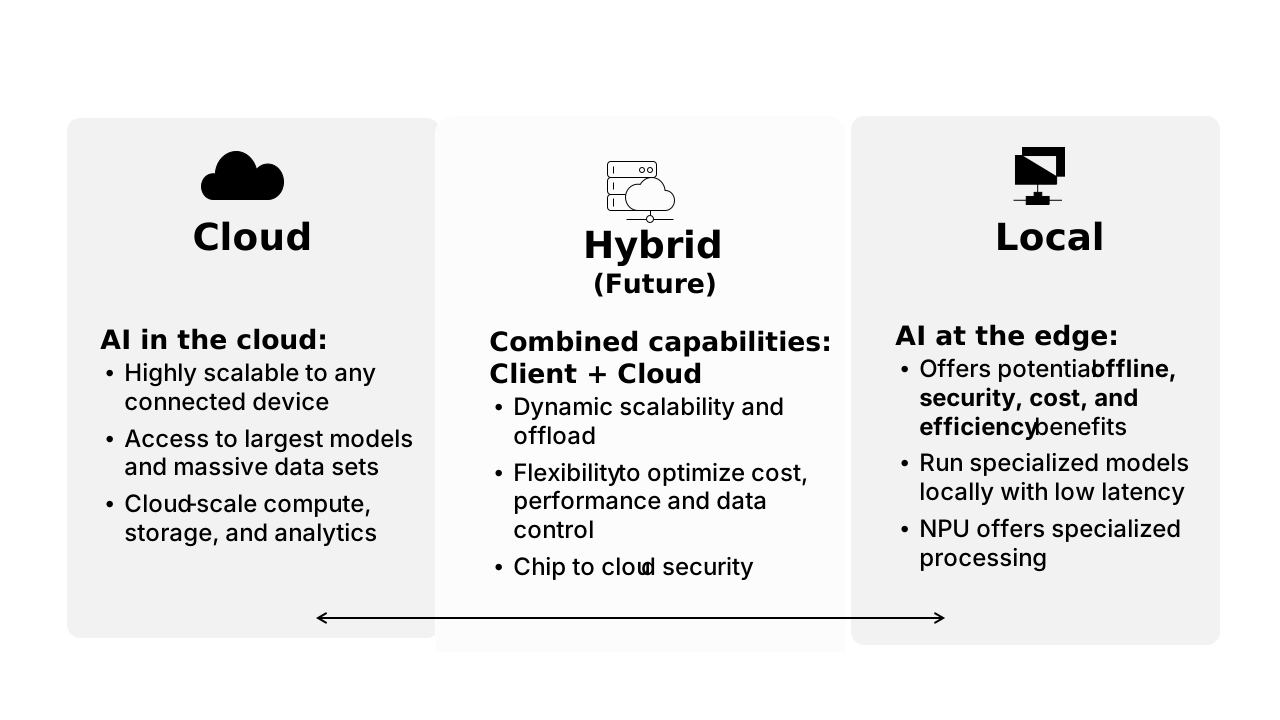
Cloud AI platforms provide powerful advantages. They offer access to large models, large-scale datasets, and unlimited compute capacity. Cloud infrastructure is ideal for training models, running large-scale workloads, and supporting applications that require massive processing resources.
However, running AI entirely in the cloud isn't always the best approach for every scenario.
Running specific AI workloads directly on the device can offer several practical advantages, depending on the application and environment:
| Consideration | Why local AI helps |
|---|---|
| Latency | Running inference on the device reduces round trips to cloud services |
| Privacy and security | Sensitive data can remain on the device during processing |
| Connectivity | Applications can continue functioning with limited or no network access |
| Cost management | Local inference can reduce reliance on cloud-based processing |
Note
Microsoft Foundry on Windows is primarily designed for AI inference—running models to generate results. Large-scale model training typically remains a cloud-based workload.
Because of these benefits, many modern AI systems use a hybrid approach. Some workloads run locally on the device, while others run in the cloud. This model allows developers to optimize applications for performance, cost, and security while maintaining flexibility across environments.
Why local AI matters
As hybrid AI architectures become more common, developers increasingly evaluate where AI workloads should run—on the device, in the cloud, or across both.
Running AI models directly on devices introduces a set of trade-offs that can improve application performance, data handling, and reliability depending on the scenario.
For example, processing data locally can help keep sensitive information on the device, reducing the need to transmit it to external services. It can also improve responsiveness by minimizing round trips to the cloud, which is especially important for real-time or interactive experiences.
Local execution can also support resilience. Applications that rely entirely on cloud services may be affected by network availability, while local AI allows key functionality to continue even when connectivity is limited.
These benefits can also influence cost considerations. By running smaller inference workloads locally, developers can reduce reliance on cloud-based processing while reserving cloud resources for tasks such as training or large-scale analytics.
Rather than replacing cloud AI, local AI works alongside it. This balance allows developers to design applications that optimize for performance, privacy, cost, and reliability across different environments.
Hardware enabling local AI
Modern Windows devices are increasingly equipped with hardware designed to support AI workloads directly on the device.
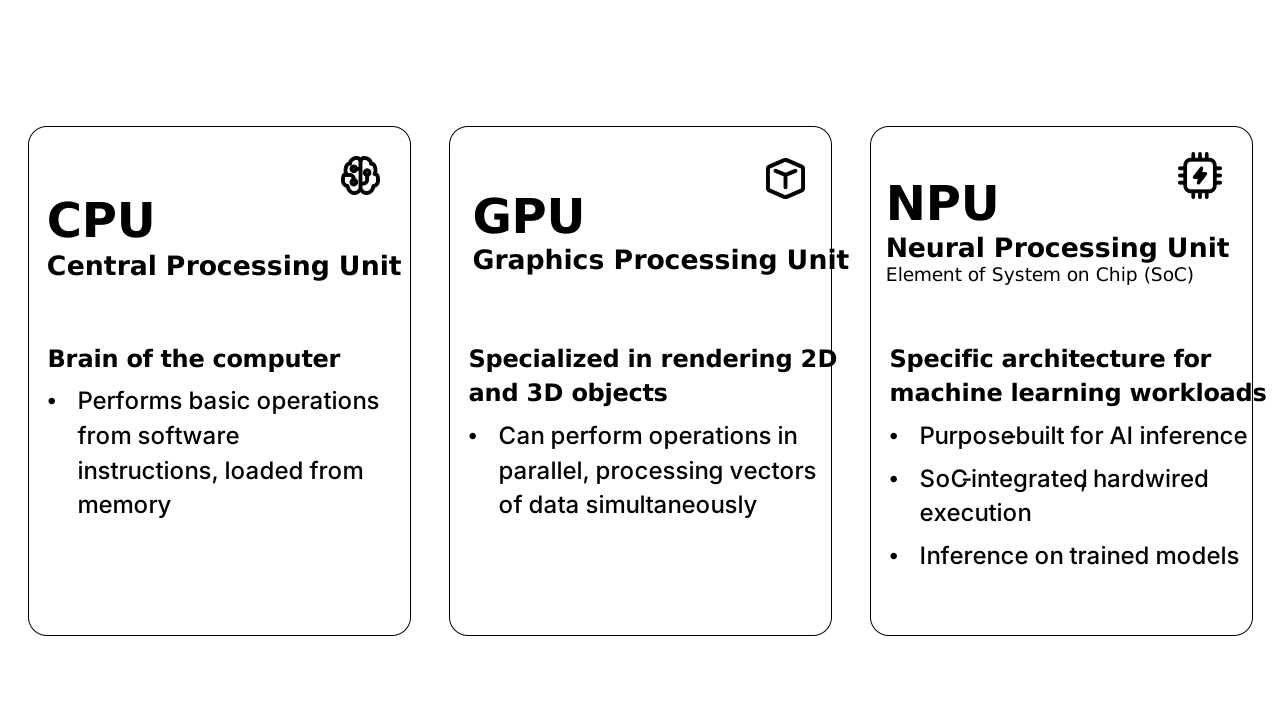
Running AI locally can offer several practical advantages, depending on the application and environment:
| Processor | Primary role in local AI | Key strengths |
|---|---|---|
| CPU (Central Processing Unit) | General-purpose processing for AI workloads | Broad device compatibility and reliable execution across all Windows systems |
| GPU (Graphics Processing Unit) | Parallel processing for compute-intensive AI tasks | High performance for image processing, video workloads, and larger model inference |
| NPU (Neural Processing Unit) | Dedicated acceleration for machine learning workloads | Power-efficient AI execution optimized for sustained local inference |
Together, these processors allow Windows devices to run across AI workloads many scenarios—from productivity tools and enterprise software to healthcare applications, security systems, and industrial automation.
Note
Not all Windows devices include every type of processor. AI workloads can take advantage of available hardware such as CPU, GPU, or NPU depending on the device configuration and supported capabilities.
Enabling the next generation of AI development on Windows
As AI adoption grows, developers need platforms that help them build intelligent applications while managing complexity across models, hardware, and deployment environments.
Developers must consider questions such as:
- How should AI workloads be distributed between device and cloud?
- How can models run efficiently across different hardware configurations?
- How can applications support privacy-sensitive or regulated environments?
- How can developers integrate AI capabilities into existing applications?
Understanding these trends helps explain why platforms like Microsoft Foundry on Windows are emerging to support modern AI development.
Before exploring how the platform works, it’s helpful to understand what Microsoft Foundry on Windows is and how it supports AI development.