How Microsoft Foundry on Windows works
Microsoft Foundry on Windows is designed as a layered platform that enables developers to integrate AI capabilities into Windows applications at different levels of complexity.
Rather than requiring developers to manage models, runtimes, and hardware acceleration independently, the platform provides a structured stack that simplifies how AI workloads are developed and deployed on Windows devices.

At a high level, Microsoft Foundry on Windows consists of three primary layers:
- Windows AI APIs
- Foundry Local
- Windows ML
These layers work together to enable AI workloads to run efficiently across Windows devices using available hardware resources such as CPUs, GPUs, and NPUs.
Tip
The layered design allows developers to choose the level of control they need. Some applications can use ready-made AI APIs, while others may require open models or fully custom models.
Microsoft Foundry on Windows architecture
Microsoft Foundry on Windows uses a layered architecture that helps developers choose the right level of AI integration for their application. Each layer serves a distinct purpose, while working together to enable efficient local and hybrid AI workloads on Windows devices.
The architecture consists of three primary layers:
- Application layer – Windows applications that integrate AI capabilities.
- AI platform layer – Windows AI APIs, Foundry Local, and Windows ML, which provide AI models, runtimes, and tools.
- Hardware layer – CPU, GPU, and NPU resources that accelerate AI workloads.
Rather than forcing a single development approach, this layered design allows applications to start with built-in AI capabilities and adopt more flexible or customized models as requirements evolve. Developers can move between layers without changing the overall platform or deployment model.
Starting with built-in AI capabilities
Windows AI APIs allow developers to integrate AI functionality into Windows applications by using models that are included with the operating system. These models power some of the local AI features available on Copilot+ PCs.
These APIs expose task-specific AI capabilities powered by Windows inbox models. Because the models are already present on the device and optimized for Windows hardware, developers can focus on integrating AI features without needing to manage model packaging or runtime setup.
Common tasks supported by Windows AI APIs include:
- Text summarization and rewriting
- Optical character recognition (OCR)
- Image description and segmentation
- Image and video super resolution
- Object erase
Using Windows AI APIs is appropriate when an application requires standard AI functionality that can be provided by built-in models. This approach reduces the need for additional model distribution and simplifies deployment across supported Windows devices.
Note
Currently Windows AI APIs are only available to run on Copilot+ PCs.
Running open models locally on Windows
When built-in APIs don't meet an application’s requirements, Microsoft Foundry on Windows includes Foundry Local to support running open-source AI models on Windows devices.
Foundry Local enables developers to access a curated catalog of open models and run them directly on the device. This allows applications to use models beyond those included with the operating system while remaining integrated with the Windows AI platform. Models made available through Foundry Local are validated for compatibility with Windows and optimized to run across supported hardware.
Developers interact with these models using a set of tools that support local development and integration, including:
- A command-line interface (CLI)
- Software development kits (SDKs)
- Model catalog access
- Local model caching and management services
These tools support common workflows such as discovering available models, downloading them to the device, testing behavior locally, and integrating models into applications.
Because models run on the device, applications can process data locally and continue to function in environments with limited or no network connectivity. This approach is useful for scenarios where latency, data handling, or deployment constraints influence where AI workloads should run.
Scaling custom models across hardware
Windows ML provides the runtime layer that supports running custom AI models across Windows devices.
Developers can bring their own models—such as models created using PyTorch or models converted to ONNX—and run them by using Windows ML.
The runtime integrates with ONNX Runtime and provides a hardware abstraction layer, allowing applications to execute models across CPUs, GPUs, and NPUs without maintaining separate implementations for each hardware vendor.
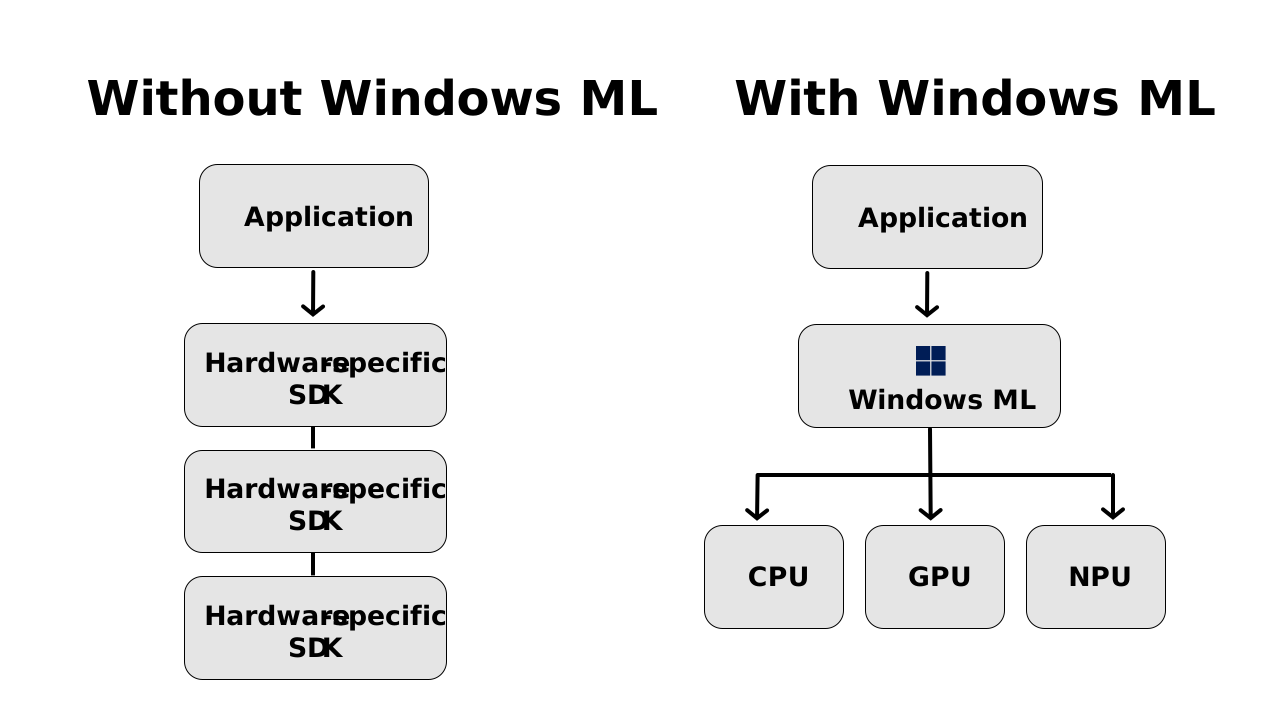
Without this abstraction, applications would need to include and manage multiple hardware-specific runtimes or SDKs to support different silicon providers. Windows ML reduces this complexity by offering a single runtime environment that works with supported Windows hardware.
Windows ML also includes validation and compatibility processes for execution of providers across devices and drivers. This helps applications continue to run as hardware capabilities and model implementations change over time.
Hardware acceleration across the Windows ecosystem
Microsoft Foundry on Windows is built to work with the Windows hardware ecosystem.
Modern Windows devices include several types of processors that can be used to run AI workloads:
- CPU (Central Processing Unit) – supports broad compatibility and allows AI workloads to run across a wide range of Windows devices.
- GPU (Graphics Processing Unit) – supports parallel processing for workloads such as image analysis and model inference.
- NPU (Neural Processing Unit) – specialized hardware designed for machine learning inference with an emphasis on power efficiency.
These processors can be used individually or together, depending on the device and workload. This enables Windows applications to support a range of AI scenarios, from lightweight inference tasks to more advanced AI workloads that benefit from hardware acceleration.
Bringing the layers together
Microsoft Foundry on Windows uses a layered architecture that allows developers to integrate AI capabilities at different levels, depending on application requirements.
Developers can choose to:
- Use Windows AI APIs to integrate common AI capabilities using built-in models.
- Use Foundry Local to run open-source models directly on Windows devices.
- Use Windows ML to deploy custom models and run them across diverse hardware configurations.
By combining these layers, applications can use local processing, available hardware acceleration, and cloud connectivity where appropriate. This approach supports a range of development scenarios while providing flexibility in how AI workloads are designed and deployed.
Key takeaway
This layered architecture allows developers to start with simple AI capabilities and expand to more advanced scenarios as their applications evolve.
Now that you’ve explored the platform architecture, the next step is understanding when Microsoft Foundry on Windows is the right choice.