Prompt engineering foundations and best practices
In this unit, we'll cover:
- What is prompt engineering?
- Foundations of prompt engineering
- Best practices in prompt engineering
- How Copilot learns from your prompts
What is prompt engineering?
Prompt engineering is the process of crafting clear instructions to guide AI systems, like GitHub Copilot, to generate context-appropriate code tailored to your project's specific needs. This ensures the code is syntactically, functionally, and contextually correct.
Now that you know what prompt engineering is, let's learn about some of its principles.
Principles of prompt engineering
Before we explore specific strategies, let's first understand the basic principles of prompt engineering, summed up in the 4 Ss below. These core rules are the basis for creating effective prompts.
- Single: Always focus your prompt on a single, well-defined task or question. This clarity is crucial for eliciting accurate and useful responses from Copilot.
- Specific: Ensure that your instructions are explicit and detailed. Specificity leads to more applicable and precise code suggestions.
- Short: While being specific, keep prompts concise and to the point. This balance ensures clarity without overloading Copilot or complicating the interaction.
- Surround: Utilize descriptive filenames and keep related files open. This provides Copilot with rich context, leading to more tailored code suggestions.
These core principles lay the foundation for crafting efficient and effective prompts. Keeping the 4 Ss in mind, let's dive deeper into advanced best practices that ensure each interaction with GitHub Copilot is optimized.
Best practices in prompt engineering
The following advanced practices, based on the 4 Ss, refine and enhance your engagement with Copilot, ensuring that the generated code isn't only accurate but perfectly aligned with your project's specific needs and contexts.
Provide enough clarity
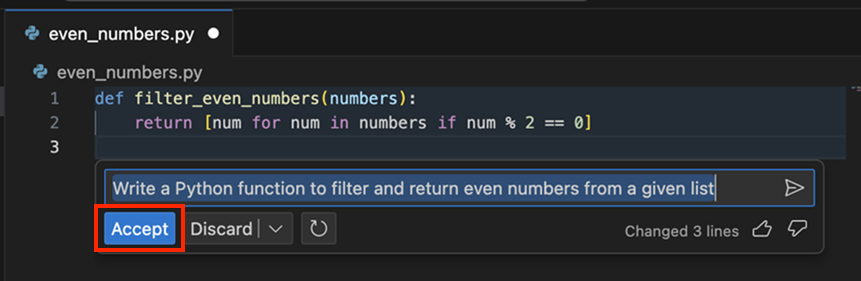
Building on the 'Single' and 'Specific' principles, always aim for explicitness in your prompts. For instance, a prompt like "Write a Python function to filter and return even numbers from a given list" is both single-focused and specific.
Provide enough context with details
Enrich Copilot's understanding with context, following the 'Surround' principle. The more contextual information provided, the more fitting the generated code suggestions are. For example, by adding some comments at the top of your code to give more details to what you want, you can give more context to Copilot to understand your prompt, and provide better code suggestions.
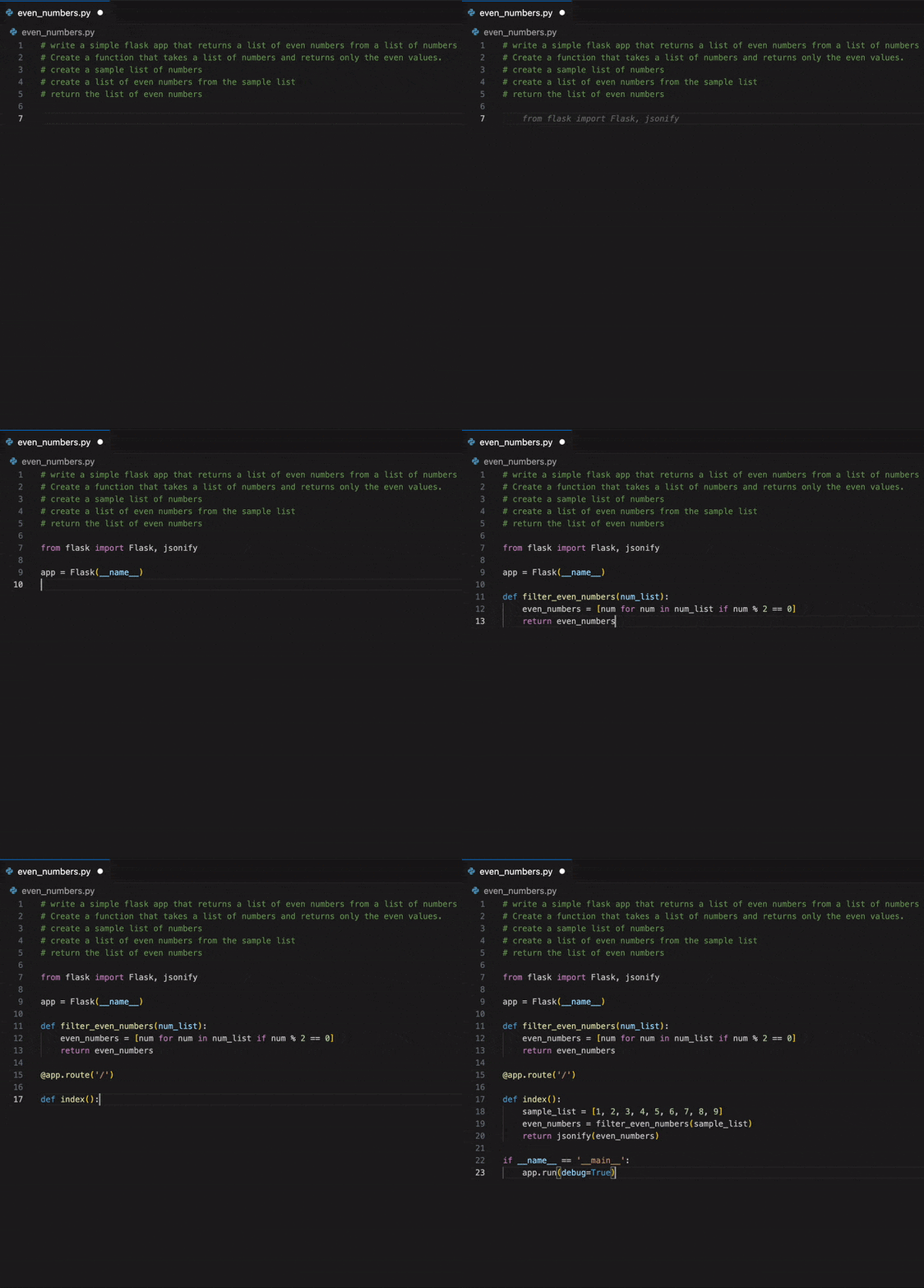
In the example above, we used steps to give more detail while keeping it short. This practice follows the 'Short' principle, balancing detail with conciseness to ensure clarity and precision in communication.
Note
Copilot also uses parallel open tabs in your code editor to get more context on the requirements of your code.
Provide examples for learning
Using examples can clarify your requirements and expectations, illustrating abstract concepts and making the prompts more tangible for Copilot. Well-crafted examples help Copilot understand patterns quickly, leading to more accurate initial suggestions that require fewer revision cycles. This approach is particularly effective for generating boilerplate code, test templates, and repetitive implementations that form the foundation of larger features.

Assert and iterate
One of the keys to unlocking GitHub Copilot's full potential and accelerating your development workflow is the practice of strategic iteration. Your first prompt might not always yield production-ready code, and that's perfectly fine. Rather than spending time manually refining the output, treat it as the beginning of an efficient dialogue with Copilot.
If the first output isn't quite what you're looking for, don't start from scratch. Instead, erase the suggested code, enrich your initial comment with added details and examples, and prompt Copilot again. This iterative approach often gets you to high-quality, deployment-ready code faster than traditional development methods, as each iteration builds on Copilot's understanding of your specific requirements.
Now that you learned best practices to improve your prompting skills, let's take a closer look at how you can provide examples Copilot can learn from.
How Copilot learns from your prompts
GitHub Copilot operates based on AI models trained on vast amounts of data. To enhance its understanding of specific code contexts, engineers often provide it with examples. This practice, commonly found in machine learning, led to different training approaches such as:
Zero-shot learning
Here, GitHub Copilot generates code without any specific examples, relying solely on its foundational training. This approach is ideal for rapidly implementing common patterns and standard functionality. For instance, suppose you want to create a function to convert temperatures between Celsius and Fahrenheit. You can start by only writing a comment describing what you want, and Copilot might be able to generate production-ready code for you, based on its previous training, without any other examples.

One-shot learning
With this approach, a single example is given, aiding the model in generating more context-aware responses that follow your specific patterns and conventions. This is particularly effective for creating consistent implementations across your codebase, accelerating feature development while maintaining code standards. Building upon the previous zero-shot example, you might provide an example of a temperature conversion function and then ask Copilot to create another similar function. Here's how it could look:

Few-shot learning
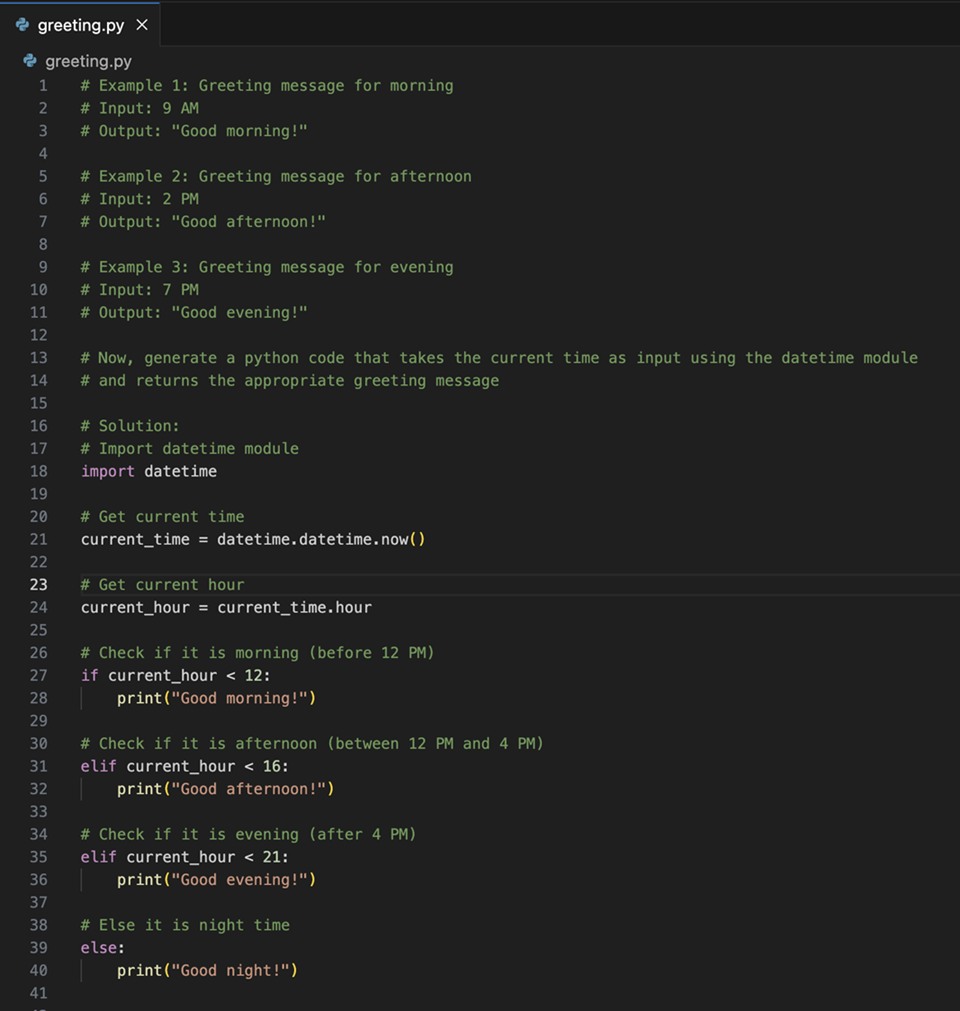
In this method, Copilot is presented with several examples, which strike a balance between zero-shot unpredictability and the precision of fine-tuning. This approach excels at generating sophisticated implementations that handle multiple scenarios and edge cases, reducing the time spent on manual testing and refinement. Let's say you want to generate code that sends you a greeting depending on the time of the day. Here's a few-shot version of that prompt:
Chain prompting and managing chat history
When working on complex features that require multiple steps, you might engage in extended conversations with GitHub Copilot Chat. While detailed context helps Copilot understand your requirements, maintaining long conversation histories can become inefficient and costly in terms of processing.
For example, you might start with a basic implementation, then iteratively add error handling, tests, documentation, and optimizations. Each turn builds on the previous context, but the full history grows longer:
Turn 1: "Create a user authentication function"
Turn 2: "Add error handling for invalid credentials"
Turn 3: "Add unit tests for the authentication function"
Turn 4: "Add JSDoc comments to document the function"
Turn 5: "Optimize the function for better performance"
Note
Long prompts with full conversation history can consume 2–3 PRUs per turn. Summarizing context or resetting the conversation can keep it closer to 1 PRU per request.
To manage this efficiently:
- Summarize context when conversations become lengthy: "Based on our previous discussion about user authentication, now add rate limiting to prevent brute force attacks"
- Reset and provide focused context for new features: Start fresh with essential details rather than carrying forward the entire conversation
- Use concise references to previous work instead of repeating full implementations
Role prompting for specialized tasks
Role prompting involves instructing GitHub Copilot to act as a specific type of expert, which can significantly improve the quality and relevance of generated code for specialized domains. This approach helps accelerate development by getting more targeted solutions on the first try.
Security expert role
When working on security-critical features, prompt Copilot to think like a security expert:
"Act as a cybersecurity expert. Create a password validation function that checks for common vulnerabilities and follows OWASP guidelines."
This approach typically generates code that includes:
- Input sanitization
- Protection against common attacks
- Industry standard validation patterns
- Security best practices
Performance optimization role
For performance-critical code, use a performance expert role:
"Act as a performance optimization expert. Refactor this sorting algorithm to handle large datasets efficiently."
This often results in:
- Optimized algorithms and data structures
- Memory-efficient implementations
- Scalability considerations
- Performance monitoring suggestions
Testing specialist role
When creating comprehensive test suites, leverage a testing expert perspective:
"Act as a testing specialist. Create comprehensive unit tests for this payment processing module, including edge cases and error scenarios."
This typically produces:
- Thorough test coverage
- Edge case handling
- Mock implementations
- Error condition testing
Role prompting helps you get production-ready code faster by incorporating domain expertise into initial implementations, reducing the need for multiple revision cycles.
Now that you know how Copilot uses your prompts to learn, let's take an in-depth look at how it actually uses your prompt to suggest code for you.