Explore the secure DevOps pipeline
The goal of a Secure DevOps pipeline is to enable development teams to work fast without introducing unwanted security vulnerabilities into their projects. This balance between velocity and security requires embedding security practices throughout the pipeline rather than treating security as a separate phase.
Secure DevOps pipeline workflow
A comprehensive Secure DevOps pipeline integrates security checks at multiple stages of the software delivery process:
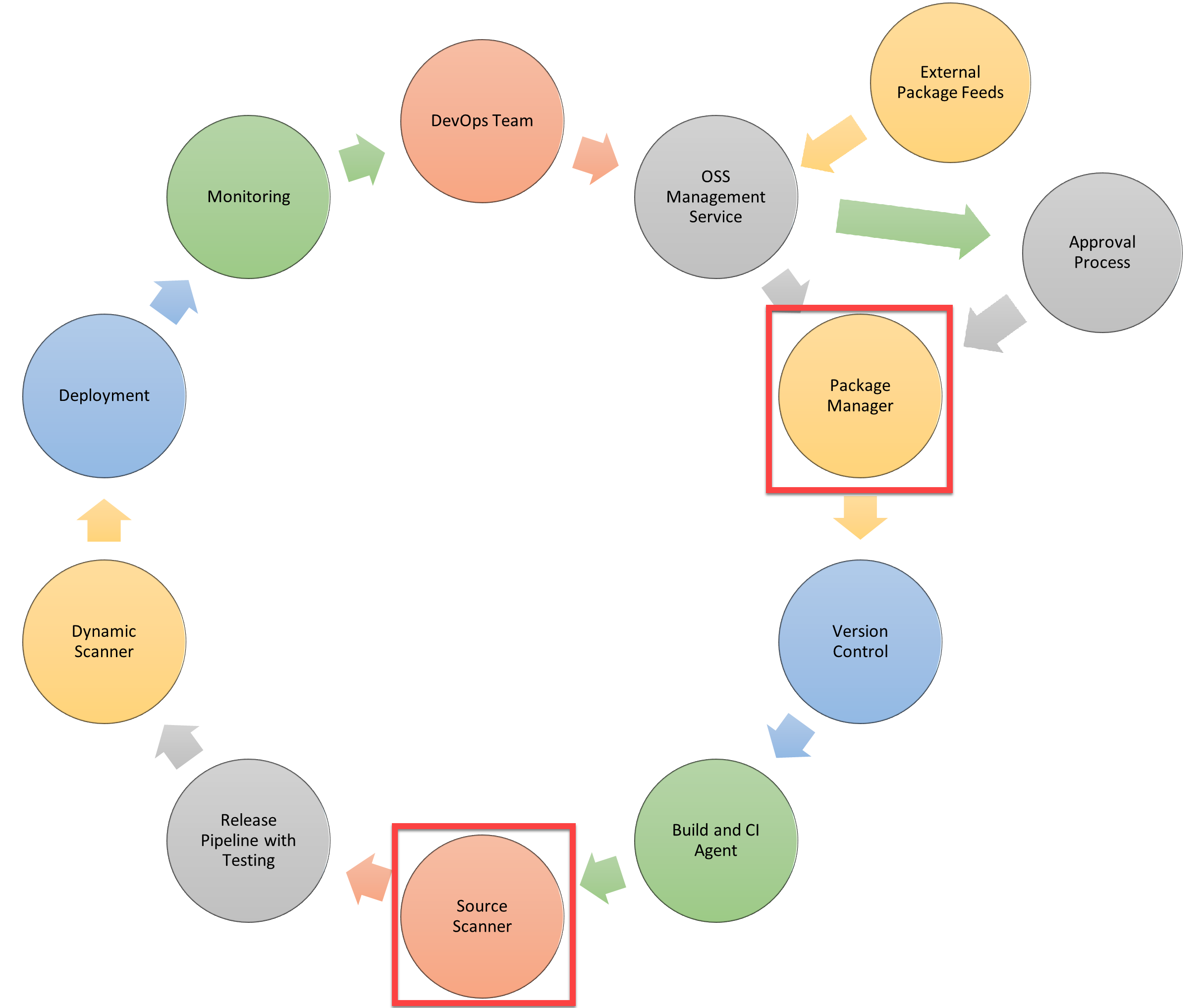
The workflow ensures that security validation occurs continuously from code commit through production deployment. Each stage includes appropriate security controls that execute automatically without requiring manual intervention for routine checks.
Essential security features beyond standard pipelines
Secure DevOps pipelines incorporate additional security features that aren't typically found in standard CI/CD pipelines. These features address common security vulnerabilities that traditional pipelines miss:
Package management with security approval
The challenge: Modern applications depend on numerous third-party packages, libraries, and components. These dependencies introduce security risks:
- Known vulnerabilities: Third-party packages may contain known security vulnerabilities that attackers can exploit.
- Malicious packages: Attackers sometimes publish malicious packages with names similar to popular packages, hoping developers will install them by mistake (typosquatting).
- Supply chain attacks: Compromised package repositories or maintainer accounts can result in malicious code being distributed through legitimate update channels.
- License compliance: Some package licenses may not be compatible with your intended use, creating legal risks.
- Unmaintained packages: Packages that are no longer maintained won't receive security updates, creating long-term vulnerabilities.
The solution: Package management with approval processes adds security gates for dependencies:
Approval workflow steps:
- Package request: Developers request approval to add new packages or update existing ones.
- Security scanning: Automated tools scan packages for known vulnerabilities using vulnerability databases like CVE (Common Vulnerabilities and Exposures) and NVD (National Vulnerability Database).
- License review: Automated tools check package licenses against organizational policies.
- Dependency analysis: Tools analyze transitive dependencies (dependencies of dependencies) for security issues.
- Manual review: Security team reviews high-risk packages or packages requesting elevated permissions.
- Approval or rejection: Packages are approved for use, rejected, or flagged for remediation before approval.
- Continuous monitoring: Approved packages are continuously monitored for newly discovered vulnerabilities.
Early identification benefits: These steps should be implemented early in the pipeline to identify issues sooner in the development cycle:
- Issues found early are less expensive to fix than those found in production.
- Developers can choose alternative packages before building significant functionality around vulnerable dependencies.
- Security reviews don't become bottlenecks when they occur incrementally rather than all at once before release.
Example tools:
- Azure Artifacts: Provides package management with upstream sources and vulnerability scanning.
- GitHub Dependabot: Automatically detects vulnerable dependencies and creates pull requests to update them.
- Snyk: Scans dependencies for vulnerabilities and license issues.
- WhiteSource: Provides software composition analysis for open source components.
Source code security scanning
The challenge: Application source code may contain security vulnerabilities that aren't immediately obvious during development:
- Injection flaws: SQL injection, command injection, and other injection vulnerabilities.
- Authentication issues: Weak authentication mechanisms, hard-coded credentials, or improper session management.
- Sensitive data exposure: Accidental inclusion of secrets, API keys, or personal information in code.
- Security misconfiguration: Insecure default configurations, unnecessary features enabled, or missing security patches.
- Using components with known vulnerabilities: Outdated libraries or frameworks with security issues.
- Insufficient logging and monitoring: Lack of adequate security event logging for incident detection and response.
The solution: Source code scanning adds automated security analysis to the build process:
Static Application Security Testing (SAST):
- Analyzes source code without executing it.
- Identifies potential security vulnerabilities in the code.
- Detects common vulnerability patterns like SQL injection, cross-site scripting (XSS), and buffer overflows.
- Provides specific code locations and remediation guidance.
- Runs quickly enough to provide feedback during the build process.
Secret scanning:
- Detects accidentally committed secrets like API keys, passwords, and certificates.
- Prevents credentials from being deployed to production.
- Alerts developers immediately when secrets are detected.
- Can automatically revoke detected credentials when integrated with secret management systems.
Code quality analysis:
- Identifies code quality issues that can lead to security vulnerabilities.
- Detects complex code paths that are difficult to secure properly.
- Highlights areas that need additional security review.
Scanning timing: Source code scanning occurs after the application is built but before release and pre-release testing:
- After build: The complete application code is available for analysis including generated code.
- Before testing: Vulnerabilities are identified before security testing resources are invested.
- Before deployment: Issues are caught before reaching staging or production environments.
Benefits of early detection:
- Source scanning identifies security vulnerabilities earlier in the development cycle.
- Developers receive immediate feedback on security issues in their code.
- Security issues are resolved while the code is fresh in developers' minds.
- The cost of fixing vulnerabilities is significantly lower than fixing them in production.
Example tools:
- GitHub CodeQL: Semantic code analysis engine that discovers vulnerabilities across a codebase.
- SonarQube: Continuous inspection tool that detects bugs, code smells, and security vulnerabilities.
- Checkmarx: Static application security testing platform.
- Veracode: Security analysis platform with SAST capabilities.
- Microsoft Security Code Analysis: Extension for Azure DevOps that runs security analysis tools.
Integration with continuous delivery
Both package management approval and source code scanning integrate seamlessly into continuous delivery pipelines:
Automated gates: Security checks become automated pipeline gates that must pass before the pipeline proceeds. Failed security checks prevent insecure code from advancing.
Fast feedback: Developers receive security feedback within minutes rather than days or weeks. This rapid feedback enables quick fixes before context is lost.
Security visibility: Security teams gain visibility into all code and dependencies being deployed without needing to manually review every change.
Compliance documentation: Automated security checks create audit trails documenting security validation at each pipeline stage.
Addressing the complete lifecycle
In the following sections of this module, we'll explore these essential security features in detail:
- Key validation points where security checks should occur.
- Continuous security validation strategies.
- Implementation approaches for different pipeline types.
- Tools and techniques for effective security automation.
- How to balance security thoroughness with delivery velocity.