Explore key validation points
Continuous security validation should be integrated at each step from development through production to ensure applications remain secure throughout their lifecycle. This approach transforms how security teams interact with development, shifting from manual approval of each release to continuous monitoring and auditing of the entire CI/CD process.
Transforming the security conversation
Traditional approach: Security teams manually review and approve each release before it can proceed to production. This creates bottlenecks, delays releases, and doesn't scale with modern deployment frequencies.
Secure DevOps approach: Security teams consent to the CI/CD process itself rather than individual releases. They define security requirements, implement automated validation, and monitor the process continuously. Security becomes integrated rather than a separate gate.
Benefits of this shift:
- Releases proceed automatically when they meet security criteria.
- Security teams focus on improving the process rather than reviewing individual changes.
- Security validation scales to support multiple deployments per day.
- Audit trails document security validation automatically.
- Security issues are detected immediately rather than at review time.
Critical validation points in the pipeline
The diagram below highlights critical validation points in a CI/CD pipeline for building applications from the ground up:
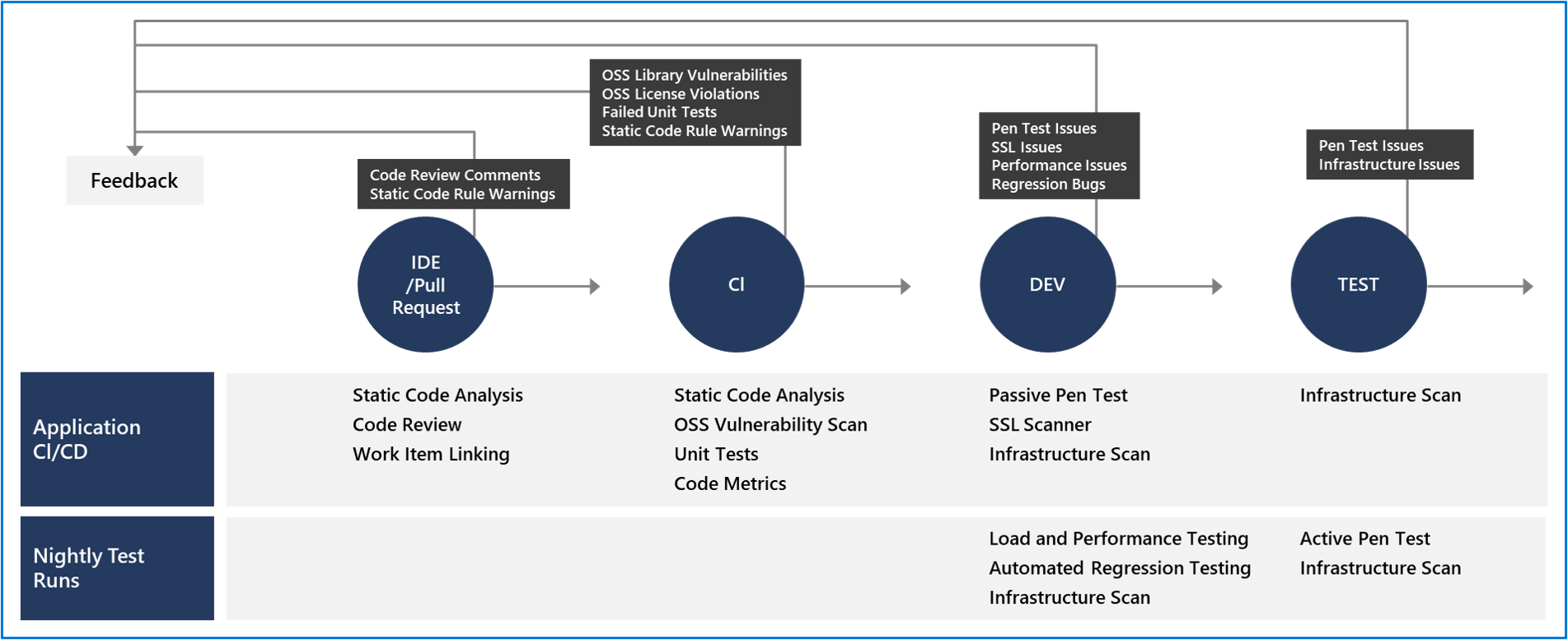
Gradual implementation: You may gradually implement security validation tools depending on your platform and your application's lifecycle stage. This phased approach is especially important if your product is mature and you haven't previously run security validation against your site or application. Introducing all security checks at once can overwhelm teams with findings.
Prioritization strategy: When implementing security validation in existing applications:
- Start with the most critical security checks (secret detection, known vulnerabilities).
- Address findings in high-risk areas first.
- Gradually expand coverage to additional security checks.
- Tune tools to reduce false positives before adding more checks.
- Build developer trust by demonstrating value from security automation.
IDE and pull request validation
Security validation begins before developers commit their code to the shared repository. This "shift left" approach catches issues as early as possible when they're easiest and least expensive to fix.
IDE-level security checks
Static code analysis in the IDE: Static code analysis tools integrated into the IDE provide the first line of defense to ensure that security vulnerabilities aren't introduced into the CI/CD process.
Real-time feedback: Developers receive immediate feedback about security issues as they write code:
- Security vulnerabilities are highlighted directly in the code editor.
- Suggestions for secure coding practices appear as developers type.
- Quick fixes for common security issues are available with a single click.
- Explanations help developers understand why certain patterns are problematic.
Example IDE security tools:
- Visual Studio Code security extensions: Extensions like Snyk, SonarLint, and GitHub Copilot provide security guidance while coding.
- IntelliJ IDEA security plugins: Security-focused plugins analyze code in real-time.
- Visual Studio security analyzers: Built-in analyzers detect security issues during development.
Benefits of IDE-level checks:
- Issues are caught when code is being written, not days or weeks later.
- Developers learn secure coding practices through immediate feedback.
- Security issues are fixed before code is committed, reducing pipeline failures.
- The feedback loop is measured in seconds, not hours or days.
Repository commit controls
Preventing vulnerable code from entering the codebase: The process for committing code into a central repository should have controls that prevent security vulnerabilities from being introduced.
Git branch policies: Using Git source control in Azure DevOps, GitHub, or similar platforms with branch policies provides a gated commit experience that enforces security validation:
Branch protection enforcement: Enabling branch policies on shared branches (like main or develop) requires a pull request to start the merge process. Direct commits to protected branches are blocked, ensuring all code changes flow through the validation process.
Pull request requirements: Pull requests should enforce several security-relevant requirements:
Code review requirement:
- At least one other developer must review code changes.
- This manual review is crucial for identifying security issues that automated tools might miss.
- Reviewers should specifically look for security concerns including:
- Proper input validation.
- Appropriate authentication and authorization checks.
- Secure handling of sensitive data.
- Correct use of security libraries and frameworks.
- Absence of hard-coded secrets or credentials.
Work item linkage:
- Commits should be linked to work items (stories, tasks, bugs) for auditing.
- This linkage documents why the code change was made.
- Audit trails help security teams understand the context of changes during incident investigations.
- Work item linkage enables traceability from requirements through deployment.
Continuous Integration (CI) build requirement:
- A CI build process must succeed before the pull request can be merged.
- The CI build includes automated security checks (covered in the next section).
- Failed security checks block the merge, preventing vulnerable code from entering the main branch.
- Build results are visible in the pull request, giving reviewers security context.
Status checks:
- External security tools can report status checks on pull requests.
- All required status checks must pass before merging.
- Security teams can add new required checks without modifying pipeline definitions.
Example branch policy configuration:
In Azure DevOps or GitHub, branch policies might require:
- Minimum of 1 reviewer approval (2 for critical branches).
- Linked work items for all changes.
- Successful build validation.
- All comments resolved before merging.
- Up-to-date branches (must incorporate latest changes before merging).
- Required status checks from security tools passing.
Benefits of pull request validation:
- Security checks occur before code enters the shared codebase.
- Multiple perspectives review code for security issues.
- Audit trails document who approved potentially risky changes.
- Developers receive security feedback within their normal workflow.
- The team builds a culture of security awareness through code reviews.
Automated security checks in pull requests:
Pull requests can trigger automated security analysis:
- Static analysis: Code is scanned for security vulnerabilities.
- Dependency checks: New or updated dependencies are checked for known vulnerabilities.
- Secret detection: Scans detect accidentally committed credentials.
- Code quality checks: Analysis identifies code quality issues that may lead to security problems.
Results appear directly in the pull request interface, allowing reviewers and authors to address issues before merging.