Exercise - Maintain Spring Boot application
Now that you deployed the Spring PetClinic application on Azure Container Apps, you can enhance its performance by enabling Azure's built-in Java support features, known collectively as the Java stack. One of these features, Java metrics, can help to collect and monitor data, including memory usage, garbage collection, and thread count of your JVM. This unit guides you through the Java stack to enhance your Spring Boot application on Azure Container Apps.
Enable built-in Java features in Azure Container Apps
To enable built-in Java features in Azure Container Apps, use the following steps:
Open the Azure portal and find your deployed container app.
Next to Development stack, select manage.
In the Development stack pane, select Java. This turns on the Java stack to enhance your Java applications.
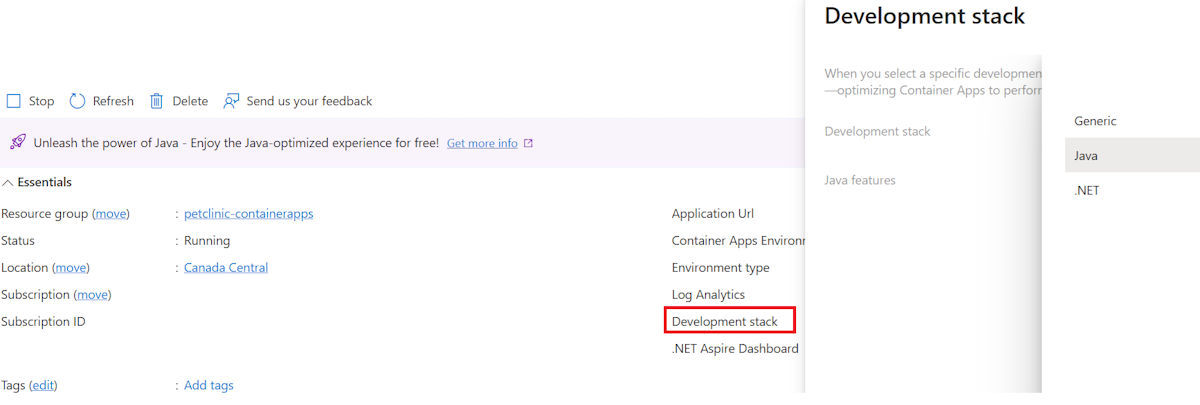
Select Apply to confirm the change.
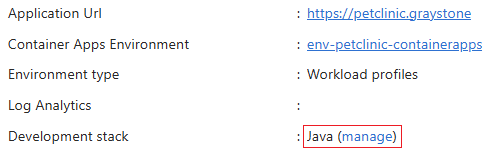
The Development stack field is now set to Java.
Explore the enhanced Java experiences on Azure
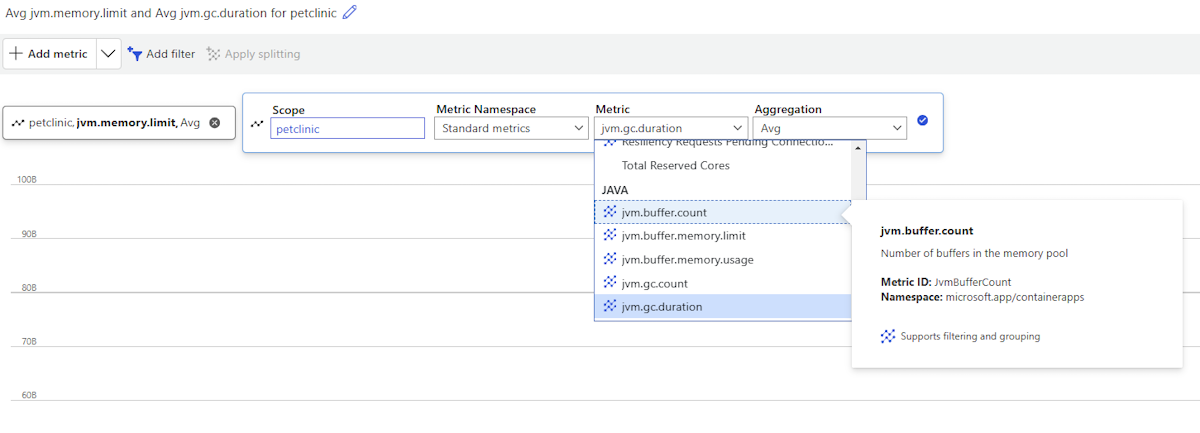
To view metrics for your application, use the following steps:
In the Azure portal, navigate to Azure Container Apps and select your container apps instance.
Go to Monitoring > Metrics.
A chart is shown that plots the metrics you're tracking in your application.
View log streams via the Azure CLI
You can view the log streams for your container app in the Azure CLI by using the az containerapp logs show command. You can view your container app's environment system log stream by using the az containerapp env logs show command. To view logs within the Azure CLI, use the following command:
az containerapp logs show \
    --resource-group petclinic-containerapps \
    --name petclinic
The command produces the following output:
{"TimeStamp": "2024-12-13T08:16:41.11806", "Log": "Connecting to the container 'petclinic'..."}
{"TimeStamp": "2024-12-13T08:16:41.20563", "Log": "Successfully Connected to container: 'petclinic' [Revision: 'petclinic--kx4kswa-7988849646-554xk', Replica: 'petclinic--kx4kswa']"}
{"TimeStamp": "2024-12-13T08:16:11.328+00:00", "Log": "INFO 1 --- [           main] o.apache.catalina.core.StandardService   : Starting service [Tomcat]"}
{"TimeStamp": "2024-12-13T08:16:11.329+00:00", "Log": "INFO 1 --- [           main] o.apache.catalina.core.StandardEngine    : Starting Servlet engine: [Apache Tomcat/10.1.30]"}
{"TimeStamp": "2024-12-13T08:16:11.373+00:00", "Log": "INFO 1 --- [           main] o.a.c.c.C.[Tomcat].[localhost].[/]       : Initializing Spring embedded WebApplicationContext"}
{"TimeStamp": "2024-12-13T08:16:11.375+00:00", "Log": "INFO 1 --- [           main] w.s.c.ServletWebServerApplicationContext : Root WebApplicationContext: initialization completed in 2313 ms"}
{"TimeStamp": "2024-12-13T08:16:11.695+00:00", "Log": "INFO 1 --- [           main] com.zaxxer.hikari.HikariDataSource       : HikariPool-1 - Starting..."}
{"TimeStamp": "2024-12-13T08:16:11.976+00:00", "Log": "INFO 1 --- [           main] com.zaxxer.hikari.pool.HikariPool        : HikariPool-1 - Added connection conn0: url=jdbc:h2:mem:98e8760a-b48e-414c-8117-520195a6d22f user=SA"}
{"TimeStamp": "2024-12-13T08:16:11.978+00:00", "Log": "INFO 1 --- [           main] com.zaxxer.hikari.HikariDataSource       : HikariPool-1 - Start completed."}
{"TimeStamp": "2024-12-13T08:16:12.187+00:00", "Log": "INFO 1 --- [           main] o.hibernate.jpa.internal.util.LogHelper  : HHH000204: Processing PersistenceUnitInfo [name: default]"}
{"TimeStamp": "2024-12-13T08:16:12.283+00:00", "Log": "INFO 1 --- [           main] org.hibernate.Version                    : HHH000412: Hibernate ORM core version 6.5.3.Final"}
{"TimeStamp": "2024-12-13T08:16:12.325+00:00", "Log": "INFO 1 --- [           main] o.h.c.internal.RegionFactoryInitiator    : HHH000026: Second-level cache disabled"}
{"TimeStamp": "2024-12-13T08:16:12.681+00:00", "Log": "INFO 1 --- [           main] o.s.o.j.p.SpringPersistenceUnitInfo      : No LoadTimeWeaver setup: ignoring JPA class transformer"}
{"TimeStamp": "2024-12-13T08:16:13.722+00:00", "Log": "INFO 1 --- [           main] o.h.e.t.j.p.i.JtaPlatformInitiator       : HHH000489: No JTA platform available (set 'hibernate.transaction.jta.platform' to enable JTA platform integration)"}
For more information, see View log streams in Azure Container Apps.
Azure Container Apps can run any containerized Java application in the cloud while giving flexible options for how you deploy your applications. With the support of the Java stack, you can enhance your application with automatic memory fitting, different deployment options, and built-in Java diagnostics tools. For more information, see Java on Azure Container Apps overview.