Document tenant changes and establish operational baselines
When a widespread issue occurs, the first question leadership asks is, "What changed?" For example, a sudden spike in helpdesk calls about failed device enrollments. Without a documented operational baseline and a clear log of admin actions, you spend hours hunting through logs to answer that question.
Baselines define what normal looks like for your Microsoft Intune environment. When the environment drifts from normal, your change log shows which recent policy change is the likely cause.
Establish operational baselines
A baseline is a snapshot of your environment's health during a period of normal, stable operation. After you record these metrics, you can create automated alerts. You can also run weekly comparisons to detect regressions, which are unintended negative changes.
Key baselines to track in Intune
- Device compliance rate.
- Example baseline: 96% of all active enrolled devices show as "Compliant."
- Regression: If the rate drops to 88% overnight, a recent compliance policy change or a new OS update is the likely cause. The change might trigger false negatives or expose real security failures.
- Enrollment success rate.
- Example baseline: 98% of Windows Autopilot and Apple ADE enrollments finish within 45 minutes.
- Regression: A sudden rise in enrollment timeouts or failures often points to a broken app package on the Enrollment Status Page (ESP). It can also point to an expired Apple Push Notification service (APNs) certificate.
- App deployment success.
- Example baseline: Core line-of-business apps install successfully on 99% of targeted devices.
- Regression: If one app drops to an 80% success rate, the installation wrapper might be broken. A new antivirus policy might also block the executable.
- Endpoint analytics user experience.
- Example baseline: Average Windows boot time is 32 seconds. App reliability score is 95/100.
- Regression: If boot time jumps to 55 seconds, a recently deployed security agent or a heavy startup script is likely affecting the user experience.
Why document changes when Intune has audit logs?
Microsoft Intune has built-in audit logs that track what changed, who changed it, and when. However, audit logs lack context.
An audit log shows that Admin J.Smith updated DeviceConfiguration Profile ID 12345. It doesn't show:
- Why the change was made and the business justification.
- Who approved the change.
- What the expected effect is.
- How to roll back the change if it breaks the environment.
For these reasons, a formal change log is required in enterprise environments. Teams often track this log in a SharePoint list, Jira, ServiceNow, or a shared Excel tracker.
Intune change-log template
Use the following template to document changes to your Intune tenant. Add a new entry every time an admin changes a baseline policy, deploys a new application, or changes a security configuration.
| Date | Ticket / change ID | Admin name | Component changed | Description of change | Business justification | Expected impact / target scope | Rollback plan |
|---|---|---|---|---|---|---|---|
| 2026-03-17 | CHG-9021 | Jane Doe | Config profile: Win11-BitLocker-Base |
Changed PIN requirement from 4 digits to 6 digits. | InfoSec audit finding (SEC-442) that requires stronger encryption keys. | All Windows devices. Users are prompted to update the PIN at next sign-in. | Revert the setting in the profile to 4 digits and force a device sync. |
| 2026-03-15 | CHG-9018 | John Smith | App: Cisco Secure Client |
Updated deployment from v4.1 to v5.0. | Vendor deprecated v4.1. Required for the new firewall. | macOS users. Silent install in the background. App requires a restart to bind. | Pause the v5.0 deployment ring and reactivate the v4.1 deployment assignment. |
| 2026-03-12 | CHG-9005 | Alice Lee | Enrollment restriction | Blocked Android personal devices (BYOD). | Corporate policy change that prevents personal Androids from reaching email. | Affects only new enrollments. Existing devices are grandfathered. | Remove the "Block" checkmark from the Android platform restriction policy. |
Integrate baselines and changes
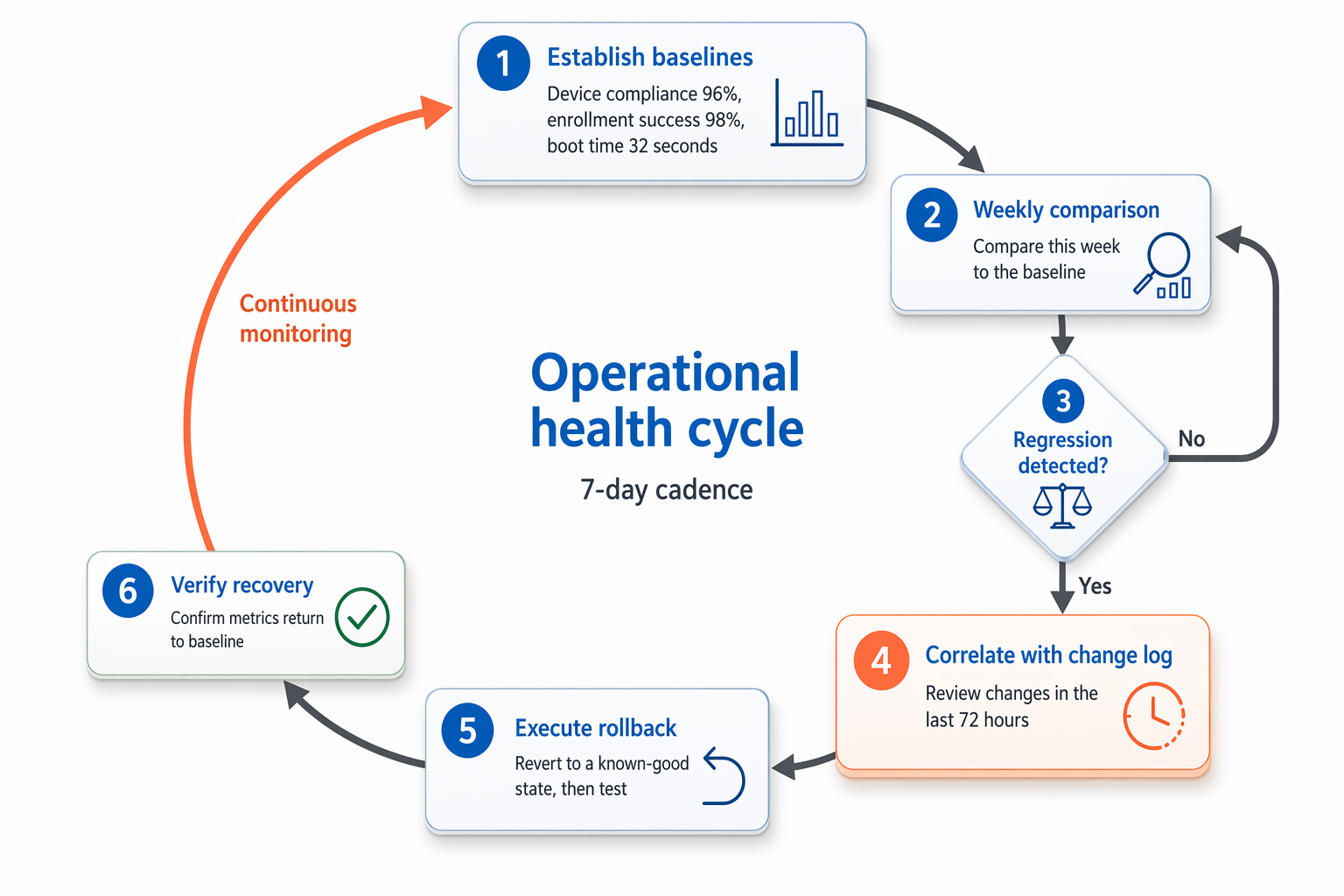
To make this operational data actionable, follow these steps:
- Review weekly. In your weekly IT operations meeting, compare this week's baseline metrics against last week's.
- Correlate regressions. If the compliance baseline drops, open the change log. Look for changes made in the last 72 hours that affect compliance policies or Conditional Access.
- Execute the rollback. Use the documented rollback plan to revert the environment to a known-good state. Then investigate the failure in a test group.
The following diagram shows these steps as a continuous weekly cycle.