Optimize AI spend without lowering value
You can now say what Relecloud's AI estate costs. That's a different thing from saying whether it should cost that. A reconciled number answers the finance team's question. It doesn't answer the harder one leadership asks next: can Relecloud get the same value for less, without telling people to stop using the tools that are finally working?
That question has a discipline attached to it. AI FinOps is the practice of connecting what AI costs to what it produces, and then acting on the gap. It isn't a dashboard you open. It's a sequence of decisions, and the order matters more than most teams expect.
Three questions, in order
AI FinOps matures through three stages, and each one only works if the one before it is in place.
| Stage | The question it answers | What it looks like in practice |
|---|---|---|
| Manage spend | Where is the money going, and is anything running away? | Visibility into consumption, guardrails that actually enforce, and a lower cost for the same work |
| Optimize value | Is what we spend producing something worth the spend? | Spend attributed to an owner, demand forecast ahead of time, and cost compared against outcomes |
| Allocate deliberately | Where should the next increment of AI capacity go? | Investment decisions made from evidence rather than enthusiasm |
Relecloud has already done most of stage one across this module. You picked the right report source, separated licensed access from real adoption, reconciled cost across the Microsoft 365 and Azure surfaces, and saw where a spending policy stops access rather than just reporting on it.
The rest of this unit is the part almost nobody does deliberately: reducing cost before it's incurred, rather than reacting to it afterward.
Predict before you read on: Three levers can lower Relecloud's AI bill: choosing a cheaper model for work that's already running, making each task consume less, or not automating the work at all. Which one usually saves the most?
The cheapest credit is the one you never spend
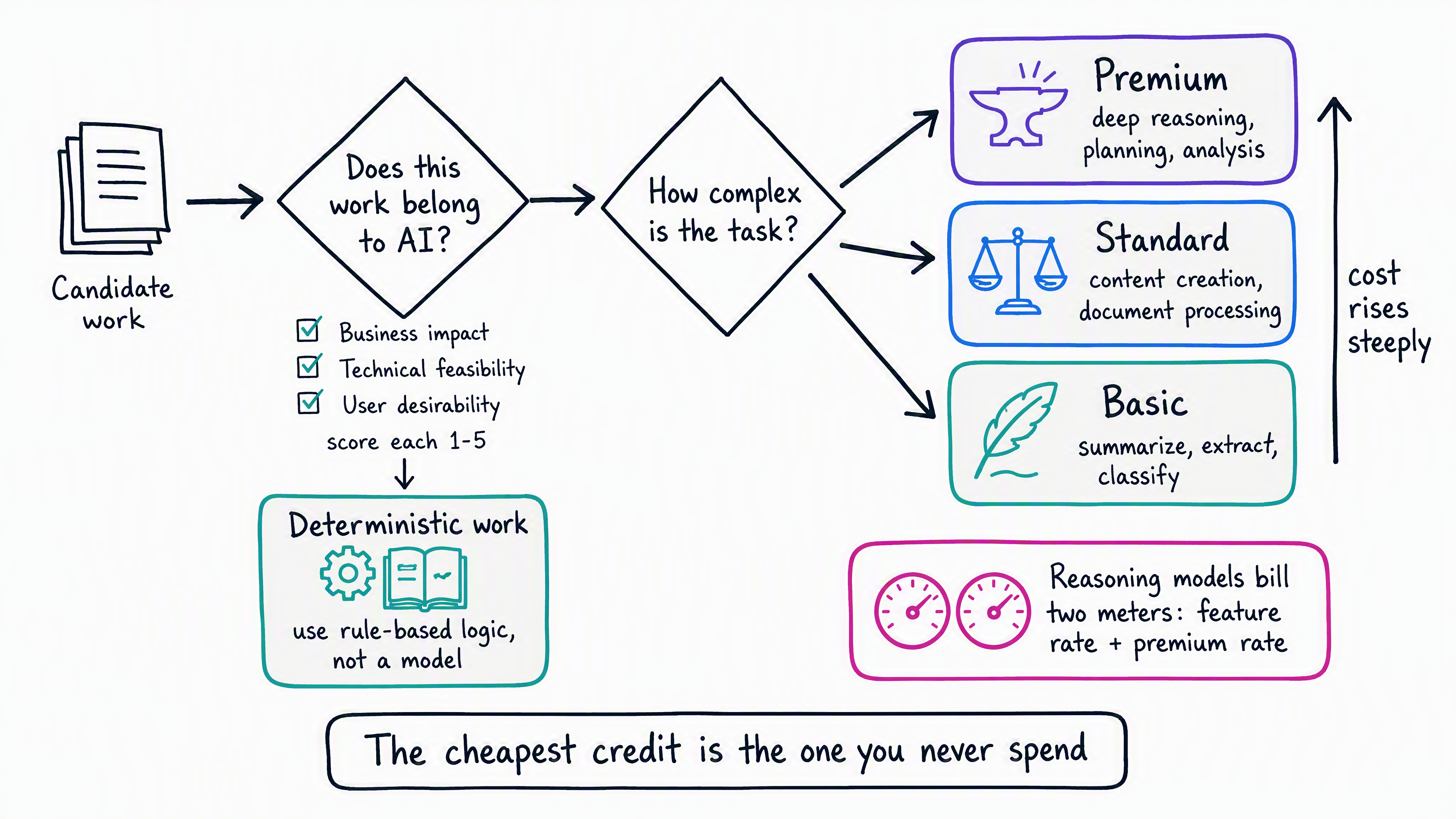
The answer is the third one, and it's the lever teams reach for last. Optimizing a workload that shouldn't exist is a rounding error compared with not building it. That makes use-case selection a cost control, not just a planning exercise.
Decide whether the work belongs to AI at all
Not every process that can be delegated to an agent should be. Scoring candidate use cases across three dimensions keeps enthusiasm from setting the roadmap. Rate each one from 1 (low) to 5 (high):
- Business impact. Does the use case support a funded priority with visible leadership backing? Does it lower cost, shorten a workflow, improve a decision, or improve a customer experience? How much change management does adoption require? If a use case doesn't support strategy, pause it early rather than optimizing it later.
- Technical feasibility. Are the implementation and operational risks named, with mitigations? Are compliance, security, and responsible AI safeguards mature? Does the work fit the systems and data access Relecloud already has? If you can't name the risks, you can't manage them.
- User desirability. Are the affected personas well understood? Do users see a benefit that solves a real pain point? How much resistance will the rollout meet? Early use cases with motivated users build momentum. Reluctant ones burn it.
A high score on one dimension doesn't rescue a low score on another. A use case with strong business impact, weak feasibility, and hostile users is a budget line waiting to be written off.
One more filter costs nothing to apply: if the work is deterministic, it doesn't need a language model. A lookup, a rule, a threshold check, or a report that already exists is cheaper, faster, and more predictable handled by conventional logic. Routing deterministic steps away from model inference is one of the highest-return optimizations available, and it usually improves reliability at the same time.
Best practice: Validate value with a small pilot before committing. Pilot the hardest step in the workflow. If an agent handles that, the rest follows. If it can't, you learned it for the price of a pilot instead of a program.
Choose the model that fits the task
Once the work is worth doing, the next decision moves cost more than any other: which model runs it.
A task's credit cost is calculated from four inputs: the model it runs on, the context it retrieves, the tools it calls, and the runtime it occupies. Of those, model choice is both the largest lever and the easiest one to get wrong, because reaching for the most capable model available always works. It just costs more than the task required.
Defaulting to the largest model carries two penalties, not one:
- Unnecessary cost. Routine summarization, extraction, and classification don't need top-tier reasoning. Smaller, optimized models handle them at a fraction of the consumption and often with lower latency.
- Constrained scale. High-end models carry stricter rate limits. An estate that routes everything to a premium model hits throughput ceilings during peak load, so the cost problem becomes an availability problem.
The gap isn't marginal. Copilot Studio bills generative AI tools at three published rates, basic, standard, and premium, and the premium rate runs roughly two orders of magnitude above the basic rate for the same volume of tokens. Choosing a tier is therefore a budgeting decision, not a technical preference.
| Cost tier | Fits | Typical trade-off |
|---|---|---|
| Basic | Summarization, extraction, classification, routine drafting | Lowest cost and fastest responses, with less headroom for complex work |
| Standard | Advanced content creation, document and image processing | Balanced capability and cost for most production work |
| Premium | Deep reasoning, planning, multistep analysis | Highest capability, highest cost, and stricter rate limits |
Reasoning models deserve separate attention, because they bill differently. When an agent uses a reasoning-capable model, Copilot Studio charges the ordinary feature rate for the action and a premium generative AI tools rate for the extra computation that reasoning, planning, and multistep inference require. Two meters run at once, so a reasoning model applied to routine work is the most expensive mistake available in the catalog.
Rates change as models are added and retired, so treat the tier names as durable and check the current billing rates before you size a budget.
Mixed or unpredictable workloads are the exception to picking one tier. Dynamic routing sends each request to a model sized to it, which usually beats standardizing on a single model in either direction.
In Copilot Studio, you select an agent's primary model directly, with separate settings for generative orchestration, deep reasoning, and the prompt builder. In Microsoft Foundry, the model catalog and model leaderboards let teams compare capability against cost before committing, and a model router can optimize that choice per request.
Best practice: Mandate small-scale validation with representative queries before any model reaches production. That single step prevents both expensive failures: deploying a premium model for simple work, and undersizing a model for work that genuinely needs the capability.
Reduce what each task consumes
Model choice isn't the only input you control. Each of the four cost inputs has a corresponding lever:
| Cost input | Lever |
|---|---|
| Model | Route routine work to smaller models and reserve premium models for genuine reasoning |
| Context | Shorten system prompts and summarize long conversation history rather than resending it in full |
| Tools | Send deterministic steps to rule-based logic instead of model-driven tool calls |
| Runtime | Cache frequent responses so repeated work doesn't re-run, and retire agents nobody uses |
Two governance habits protect those gains over time.
Govern the environment, not just the published agent. Consumption starts at design time. Makers building, previewing, testing, and evaluating agents consume credits before anything reaches production, and an environment used purely for experimentation can accrue real cost even when none of its agents ever ship. Classify each environment by purpose (exploration, test, or funded production), then apply controls that match: a bounded prepaid allocation for exploration, time-bound controls for testing, and an accountable owner with intentional funding for production.
Audit the estate on a schedule. Agents that stay deployed but unused still consume allocation and still carry security exposure. A recurring review that retires agents no longer delivering value prevents the slow accumulation of cost that nobody decided to spend.
Read the shape of consumption, not just the total
Consumption is almost never distributed evenly. In most organizations, a small cohort of users accounts for a disproportionate share of credits, and how Relecloud interprets that pattern determines whether its next action helps or hurts.
The reflex is to restrict the heavy users. That's usually the wrong call, and the Cost Management consumption views give you what you need to check it. Look at heavy users alongside what they produce:
- If heavy users are getting proportionate value, they aren't a cost problem. They're the working template. The useful action is to study what they do differently and help everyone else do it, which raises the return on seats Relecloud already pays for.
- If heavy users are consuming heavily without corresponding value, the action is targeted: coaching on prompt and model choice, or a per-user limit scoped to that group.
Blanket restriction punishes proficiency and rarely reaches the actual inefficiency. Precision requires knowing which of those two patterns you're looking at, which is exactly why the per-user, per-group, and per-service views exist.
Reflect: Cost Management shows one Relecloud department consuming far more credits than any other. Name two follow-up questions you'd want answered before recommending any change to that department's spending policy.
Attribute spend to someone who can act on it
Optimization only sticks when someone owns the number. A total that belongs to "IT" belongs to nobody in particular.
Attribution is a configuration decision made when policies are created, not a report you generate afterward:
- Scope spending policies to groups that match how the business is organized, so consumption rolls up to a department that recognizes it as theirs.
- Point policies at distinct Azure subscriptions or resource groups where cost needs separating. That's the setup-time decision the previous unit flagged.
- Name a cost owner for every funded environment, so a spike has someone to investigate it rather than an alert nobody claims.
That structure supports either posture. Showback reports each team's consumption without moving money, which is usually enough to change behavior on its own. Chargeback bills consumption back to the team's own subscription, which makes the trade-off concrete for teams that need it. The mechanics are the same. The decision is how much accountability Relecloud wants to apply.
Between them, central IT and business leads close the loop: IT sets the guardrails, leads review usage against value, and both adjust spend and policy from what they find. Neither half works alone. Guardrails without context throttle useful work, and context without guardrails just documents overspending.
Closing the gap between cost and value
Relecloud can now do more than report its AI bill. It can decide which work deserves AI, size the model to the task, reduce what each task consumes, read consumption patterns without overreacting, and put every credit under an owner who can act on it.
That discipline is ongoing rather than a one-time cleanup. Each new agent, environment, and use case re-opens the same questions.