Configure multifactor authentication in Microsoft Entra ID
With Contoso's authentication strategy defined, your team is ready to enforce multifactor authentication (MFA) for users, services, and emerging AI-driven workloads. For organizations with Microsoft Entra ID P1 or P2 licenses, Conditional Access policies remain the recommended way to require MFA in context, not on every sign-in.
Deploy MFA with the right enforcement model
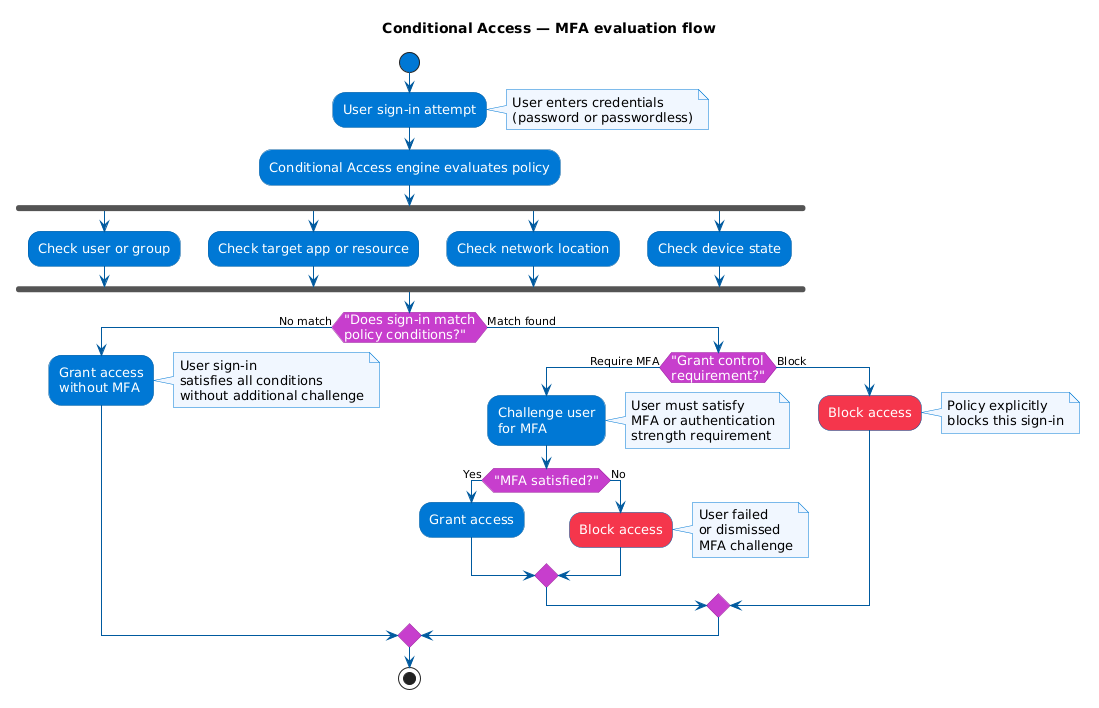
Conditional Access gives you precise control over when MFA is required. You create a policy, target users or groups, select cloud apps or user actions, and set the grant control to Require multifactor authentication. The policy evaluates each sign-in and applies MFA only when conditions match.
Most organizations should start with Conditional Access. If your tenant doesn't include Conditional Access licensing, security defaults provide baseline MFA with minimal configuration, but with less flexibility.
You may also encounter per-user MFA (legacy) in older environments. It still works, but it doesn't integrate well with modern, policy-based controls and is difficult to manage at scale.
Configure named locations and trusted IP boundaries
One of the first refinements Contoso's security team makes is defining named locations. Named locations are logical groupings of IP ranges or areas that represent trusted boundaries, such as corporate offices and VPN egress addresses.
When named locations are used in Conditional Access, you can reduce friction for trusted sign-ins while still requiring MFA for sign-ins outside those boundaries. This helps balance usability and security.
Note
Named locations in Conditional Access are the recommended approach for trusted IP configuration because they support IPv6 and integrate with all Conditional Access conditions. The legacy Trusted IPs setting in MFA service settings is still available but doesn't support IPv6 and is harder to manage at scale.
To define a named location, go to Microsoft Entra admin center > Entra ID > Conditional Access > Named locations, create an IP ranges location, and select Mark as trusted location.
Configure authentication methods that match risk
After you decide when MFA is required, configure which methods users can use through the Authentication methods policy.
Contoso prioritizes stronger and more phishing-resistant methods, then keeps limited fallback methods for coverage.
- Microsoft Authenticator: Primary method for most users. Enable number matching and app context to reduce accidental approval and MFA fatigue attacks.
- OATH tokens: Useful for users in regulated environments or users who can't use a smartphone.
- SMS and voice calls: Keep as backup for selected populations, because they are more vulnerable to attacks such as SIM swapping.
- Third-party OATH tokens: Useful when your organization already has token investments and rollout processes.
This layered method strategy lets Contoso keep high assurance for privileged users while still supporting workforce realities.
Secure registration and enrollment
A policy can only challenge users after they register methods. Microsoft Entra ID supports combined registration, where users enroll MFA and self-service password reset (SSPR) methods in one experience.
Because registration is a high-impact workflow, protect it explicitly. A compromised password can be used to register a rogue MFA method if registration isn't controlled.
Use a Conditional Access policy targeting the Register security information user action, and then require one of the following controls:
- Sign-in from a trusted network boundary.
- A Temporary Access Pass (TAP) for bootstrap and recovery.
TAP is especially useful for onboarding, lost-device recovery, and first-time setup of stronger methods.
You can also use registration campaign settings to nudge or require users to complete enrollment within a defined number of days.
Apply MFA strategy to workload identities and AI agents
Human users are only part of the risk surface. Service principals, automation accounts, and AI agents can carry privileged access and must be governed with the same rigor.
For Azure-hosted workloads, prefer managed identities instead of stored secrets. Managed identities remove credential storage from code and configuration, reducing secret exposure and operational overhead.
For service principals that must run outside Azure, use certificate-based authentication instead of long-lived client secrets whenever possible.
Microsoft Entra ID also supports Conditional Access for workload identities (with Microsoft Entra Workload ID Premium licensing), which enables policy controls for service principals.
For advanced AI-agent scenarios, Microsoft Entra Agent ID (Preview) can provide dedicated agent identities and clearer audit boundaries between human, workload, and agent activity.
Contoso implementation sequence
Contoso rolls out MFA in phases to reduce user disruption and operational risk:
- Enforce MFA for administrators and other privileged roles.
- Enforce MFA for healthcare staff accessing patient data and high-impact apps.
- Expand to all users with staged communication and support.
- Migrate service workloads to managed identities where possible.
- Add workload identity and agent-specific controls for sensitive automations.
Contoso also keeps Microsoft Authenticator as the standard method, limits SMS and voice fallback, and tracks enrollment weekly to close registration gaps.
Monitor adoption and improve continuously
After rollout, operational monitoring determines whether your design is working.
Review sign-in and authentication method reports to answer practical questions:
- Are users completing registration on time?
- Which methods are most common, and are weaker methods overused?
- Where are failures happening: user confusion, policy gaps, or technical issues?
Use those findings to tune policy scope, update user communications, and improve help desk readiness.
With MFA deployed, methods governed, and enrollment secured, you're ready for the next major step in Contoso's identity journey: expanding passwordless authentication.