Implement passwordless authentication in Microsoft Entra ID
MFA significantly reduces breach risk at Contoso, but password-based sign-in still leaves phishing as a possible attack path. The next step is moving users to passwordless authentication, where sign-in is based on possession of a trusted device and a local biometric or PIN rather than a reusable secret.
In practical terms, passwordless improves both security and user experience. Users complete sign-in faster, help desk teams see fewer password reset requests, and security teams reduce exposure to credential theft and replay attacks.
Match passwordless methods to user personas
Microsoft Entra ID supports multiple passwordless methods. The best deployment strategy is to assign methods by persona instead of enforcing one method for everyone.
| Persona | Recommended method | Alternative |
|---|---|---|
| Administrators and regulated users | FIDO2 security key | Windows Hello for Business |
| Office workers on corporate Windows devices | Windows Hello for Business | Passkey in Microsoft Authenticator |
| Mobile and cross-platform users | Passkey in Microsoft Authenticator | Synced passkey |
| Frontline or shared-device workers | FIDO2 security key | Passkey in Microsoft Authenticator |
| BYOD users | Synced passkey or Authenticator passkey | FIDO2 security key |
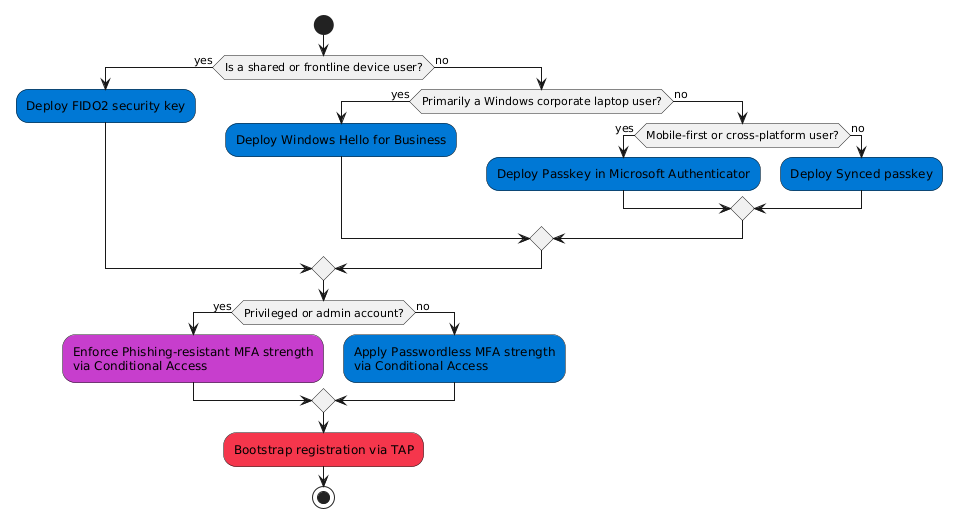
At Contoso, privileged roles that manage sensitive systems receive FIDO2 security keys, while most knowledge workers use Windows Hello for Business on managed laptops and Authenticator passkeys on mobile.
Deploy Windows Hello for Business for managed Windows devices
Windows Hello for Business (WHfB) creates a cryptographic credential protected by device hardware and unlocked locally with a PIN or biometric gesture. Because no password is sent during sign-in, phishing resistance is significantly improved.
WHfB is best for Microsoft Entra joined or hybrid joined Windows devices managed by Intune or Group Policy. For best compatibility and experience, validate supported Windows versions and TPM availability before broad rollout.
Use a phased enablement approach:
- Enable Windows Hello for Business policy for a pilot group.
- Validate biometric and PIN setup on target hardware.
- Expand to all corporate Windows users.
- Track sign-in success and user support trends.
Enable passkeys in Microsoft Authenticator for mobile and cross-platform users
For users who work across platforms, Passkey in Microsoft Authenticator provides a portable phishing-resistant credential. The credential is hardware-backed on the mobile device and unlocked with local biometric or PIN.
In Microsoft Entra admin center, configure the Passkey (FIDO2) authentication method policy and target the right user groups. Users register from their Security info page.
Tip
Use Temporary Access Pass (TAP) to bootstrap first-time passwordless registration for new hires and recovery scenarios.
Issue FIDO2 security keys for high-assurance scenarios
FIDO2 security keys are ideal for privileged administrators, regulated users, and shared workstation environments. They provide strong phishing resistance and are not tied to one device platform.
When configuring FIDO2 in policy:
- Scope keys to the highest-risk populations first.
- Restrict to approved or attested keys where possible.
- Validate procurement choices against Microsoft's compatibility and attestation guidance.
For Contoso, this is the default method for administrators and compliance-focused teams that access highly sensitive data and management surfaces.
Plan for synced passkeys where convenience is a priority
Synced passkeys (preview support scenarios may vary) can improve adoption for users with multiple personal devices. They trade some enterprise control characteristics for convenience and broad ecosystem support.
Use synced passkeys for lower-risk, general-user populations where usability is a primary adoption driver. Continue to use hardware-bound credentials (WHfB or FIDO2) for privileged users.
Extend passwordless strategy to applications and service workloads
Most modern applications that use Microsoft Entra ID with OAuth 2.0/OpenID Connect can use passwordless sign-ins without app code changes. Validate user journeys for each client platform to confirm behavior.
For non-human identities and backend services:
- Prefer managed identities for Azure-hosted workloads.
- Use certificate-based authentication rather than long-lived client secrets when managed identity isn't available.
- Apply workload identity controls and monitoring to high-privilege service principals.
Roll out in phases and measure adoption
A phased rollout helps Contoso reduce disruption while improving security outcomes.
- Pilot: IT and security early adopters.
- Privileged roles: Administrators and high-impact users.
- Business-critical teams: Healthcare and operations staff.
- General workforce: Broad enablement with registration campaigns.
- Optimization: Reduce password dependence where feasible.
Monitor progress with a small, consistent set of signals:
- Percentage of sign-ins completed with passwordless methods.
- Registration completion rate by user group.
- Sign-in failure trends by method.
- Help desk ticket volume tied to authentication.
At Contoso, these metrics guide policy tuning, user communications, and support readiness so passwordless remains both secure and practical. With passwordless methods mapped to personas and deployed in phases, Contoso is positioned to reduce phishing risk while giving users faster, lower-friction access.