Manage secrets in Azure Key Vault
With key rotation addressed, the next gap in Contoso Health's audit is just as common and far more dangerous: database connection strings stored as secrets with no expiry dates. A credential without an expiry is a credential that can be used forever—by anyone who obtains it. Fixing the missing expiry requires understanding how secrets work in Azure Key Vault and how to build rotation automation that doesn't interrupt running services.
Distinguish secrets from keys and certificates
In Azure Key Vault, a secret is any sensitive string value: connection strings, API keys, passwords, storage account keys, tokens, and similar credentials. Secrets are intentionally distinct from keys and certificates. Keys perform cryptographic operations (signing, encrypting, wrapping). Certificates assert identity through a Public Key Infrastructure (PKI) chain. Secrets are simply values—stored securely, accessed through a controlled API.
That distinction matters operationally. Rotating a secret doesn't involve cryptographic key material management or certificate authority workflows. You need to update the string value while maintaining continuity for applications that depend on it.
Examine secret versioning and lifecycle attributes
Every time you update a secret value, Key Vault creates a new version of that secret. The old version is retained—you can retrieve it, audit access to it, and disable it. This versioning behavior is central to safe secret lifecycle management.
You can set two important attributes on any secret version:
- Enabled/Disabled: A disabled secret version can't be retrieved. Disabling (rather than deleting) a version is the correct way to deprecate a credential while retaining the audit trail. If an incident investigation later requires knowing when a specific credential was active, the disabled version and its access log are still available.
- Expires: Set an expiry date on each secret version to establish a maximum credential lifetime. When a version expires, Key Vault still allows retrieval—expiry is informational, not a hard enforcement block. The attribute signals to applications and downstream services that the credential should no longer be used for new operations, and it triggers Event Grid lifecycle events that drive rotation automation. The version and its access history remain in the vault.
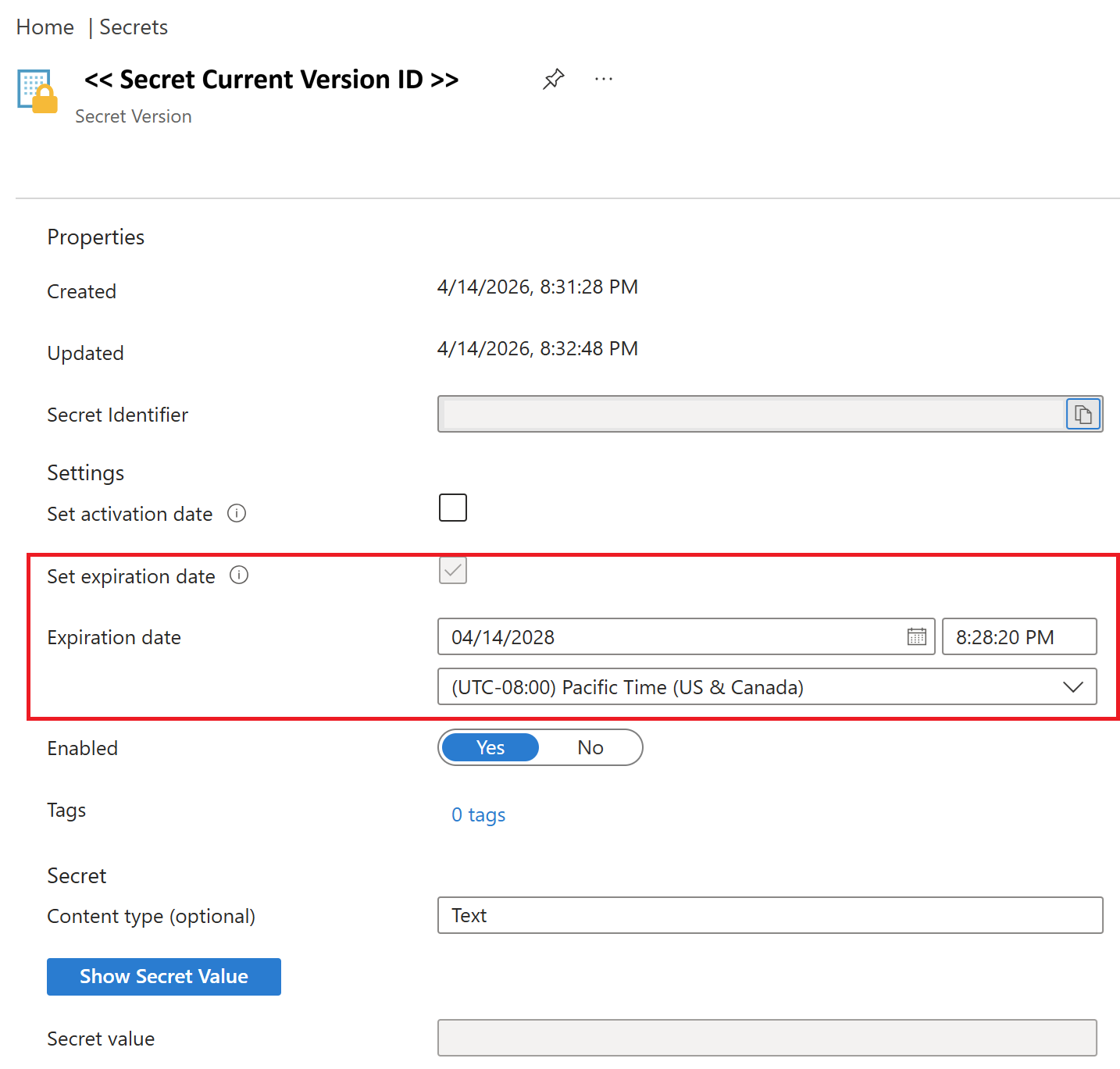
To set an expiry date on an existing secret version in the portal:
- Open your Key Vault and select Secrets under Objects.
- Select the secret you want to update.
- Select the Current Version ID.
- Set the Expiration date and select Save.
Alternatively, use the Azure CLI to update the attribute in place without creating a new version:
az keyvault secret set-attributes \
  --vault-name <vault-name> \
  --name <secret-name> \
  --expires 2026-10-14T00:00:00Z
For Contoso Health's connection strings, the immediate remediation is to set Expires on each current version—creating a governance boundary, enabling rotation automation through Event Grid, and removing indefinite validity.
Configure Key Vault references for applications
The most operationally elegant secret rotation pattern is one where the application never needs to be redeployed. Key Vault references in Azure App Service and Azure Functions makes seamless application key usage possible.
Instead of storing a connection string directly in an app setting, you store a reference:
@Microsoft.KeyVault(SecretUri=https://<vault-name>.vault.azure.net/secrets/<secret-name>)
Versionless URI - references the secret by name only, without a pinned version. When the application starts, it resolves this reference to the latest enabled version of the secret. When you rotate the secret and add a new version, the application picks up the new value automatically within 24 hours. Any app configuration change that triggers a restart causes an immediate refetch. No redeployment is needed. The managed identity of the App Service must have the Key Vault Secrets User role to read the secret.
Apply single-credential rotation
The simplest rotation pattern for a secret is single-credential rotation: one secret, updated to a new value in a single atomic operation.
- Generate a new credential (password, key, token).
- Update the target system to accept the new credential.
- Update the secret in Key Vault with the new value (creating a new version).
- The application reads the new value at the next request.
The challenge with single-credential rotation is the brief transition window between steps 2 and 3 (or 3 and 4). If the application reads the old version before the new value is live in the target system, the authentication fails. For noncritical workloads with retry logic and short retry windows, this window is acceptable. For high-availability or latency-sensitive production services, this window is a risk you can't accept.
Implement dual-credential rotation
Dual-credential rotation eliminates the transition window by maintaining two valid credentials simultaneously in the target system. The pattern accommodates the full rotation cycle without a moment when both the application and the target system agree on a valid credential.
Here's the pattern in detail, using a database as the example:
Set up: The database has two sign-in credentials -
db-user-aanddb-user-b. Both are valid. The vault's active secret contains the password fordb-user-a. The application uses the secret (versionless URI) to authenticate.Rotate credential B first: Generate a new password for
db-user-b. Update the database sign-in fordb-user-bwith the new password. The application is still usingdb-user-a- nothing disrupts it.Store credential B as the new secret version: Add the new
db-user-bpassword to Key Vault as a new version of the secret. The versionless reference in the application now resolves todb-user-b.Verify the application uses credential B: Confirm the application is authenticating with
db-user-b. You can validate this through query logs, connection tracing, or diagnostic logs.Rotate credential A: Now that the application runs on
db-user-b, generate a new password fordb-user-a. Update the database sign-in. The application isn't usingdb-user-a, so this change causes zero disruption.Store credential A as the next secret version: Add the new
db-user-apassword as the next version. The cycle is complete.
Credentials alternate on each rotation cycle. At no point, does a rotation event leave the application without a valid credential in the target system.
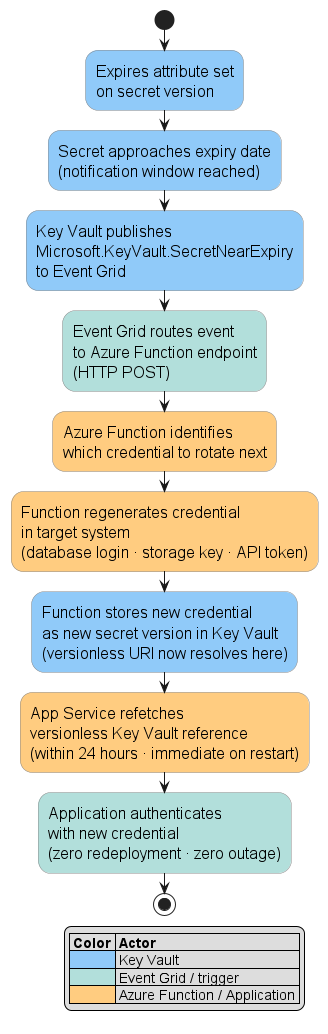
Implementing dual-credential rotation with Azure Functions: This pattern is typically automated using an Azure Function that triggers on the Key Vault SecretNearExpiry Event Grid event. When the secret approaches its expiry date:
- The
Microsoft.KeyVault.SecretNearExpiryEvent Grid event calls the function app endpoint via HTTP POST. - The function identifies which credential isn't* currently stored in the latest vault version (the alternating credential).
- The function regenerates that credential in the target system.
- The function stores the new credential as a new version in Key Vault.
The function app's managed identity needs the Key Vault Secrets Officer role on the vault and the appropriate permission on the target resource (for example, the Storage Account Key Operator Service Role for storage account keys, or database admin credentials for SQL sign-in rotation).
Important
The dual-credential pattern requires that the target system supports two simultaneous valid credentials. Most databases support dual-credential through separate user accounts. Azure Storage supports it natively through primary and secondary access keys. Evaluate your target system's multi-credential support before choosing the pattern.