Design an environment strategy and topology
Before you create environments, you need a strategy that maps your organization's structure, compliance requirements, and maker populations to a logical topology. A well-designed environment strategy prevents sprawl, reduces risk, and makes governance scalable.
Understand environment types
Power Platform provides several environment types, each serving a different purpose:
- Default: Created automatically with every tenant. All licensed users have the Environment Maker role here. Use it only for Microsoft 365 productivity customizations like simple flows and canvas apps that extend SharePoint or Teams.
- Production: Hosts business-critical apps and data. Backed by Dataverse with full service-level agreement (SLA) coverage. Requires deliberate provisioning by an admin.
- Sandbox: A nonproduction copy of a production environment. Use for testing, user acceptance, and training without affecting live data.
- Developer: A personal workspace for a single maker. Limited to development and testing - assets can't be run by other users without proper licensing.
- Trial: Expires after 30 days (with a one-time 30-day extension). Useful for evaluating new features without committing resources.
Tip
Restrict who can create production and sandbox environments through tenant settings in the Power Platform admin center. Allow admins only, then implement a request process for teams that need dedicated environments.
Apply a zoned governance model
A zoned governance model classifies environments by risk level and maps appropriate controls to each zone. This framework helps you decide which governance features to apply and where:
| Zone | Risk level | Who builds | Governance approach | Example |
|---|---|---|---|---|
| Green | Low | Citizen developers | Full DIY with light guardrails | Personal developer environments for store managers building inventory apps |
| Yellow | Medium | Coached makers | Partnered DIY with oversight | Shared sandbox where the marketing team builds campaign automation with admin review |
| Red | High | Professional developers | IT-led with strict controls | Production environment. Zava might host their Zava Pay payment processing, subject to PCI-DSS here. |
Each zone prescribes different settings for data policies, sharing limits, solution checker enforcement, and approval workflows. As your organization matures, environments can move between zones. A sandbox that starts in the Green zone might graduate to Yellow when it becomes a shared team project. It can ultimately move to Red when the app goes to production with sensitive data.
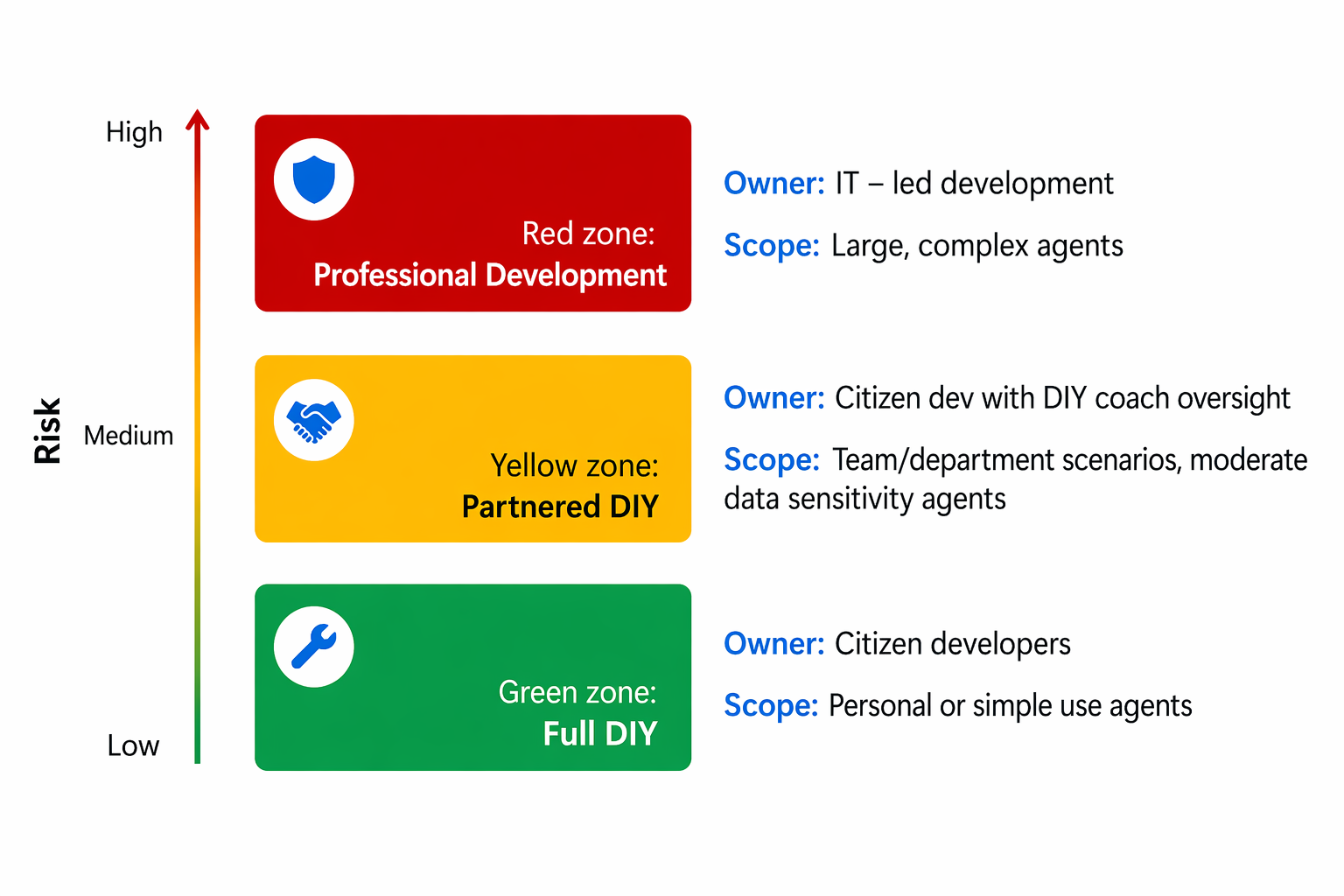
The zoned model isn't prescriptive about the exact number of zones. Some organizations add a fourth zone for preproduction staging, while others collapse Green and Yellow into a single tier. The key principle is that risk classification drives governance decisions rather than ad-hoc, per-environment configuration.
Design your environment topology
A topology defines how environments relate to each other and to your organizational structure. Consider these patterns:
Pattern 1: Environment-per-team
Each business unit or team gets dedicated development, test, and production environments. This pattern provides clear isolation but increases admin overhead.
Pattern 2: Shared development with dedicated production
Makers share development and sandbox environments organized by department or project, but you isolate production environments per application. This pattern balances cost with security isolation for critical workloads.
Pattern 3: Zoned groups with routing
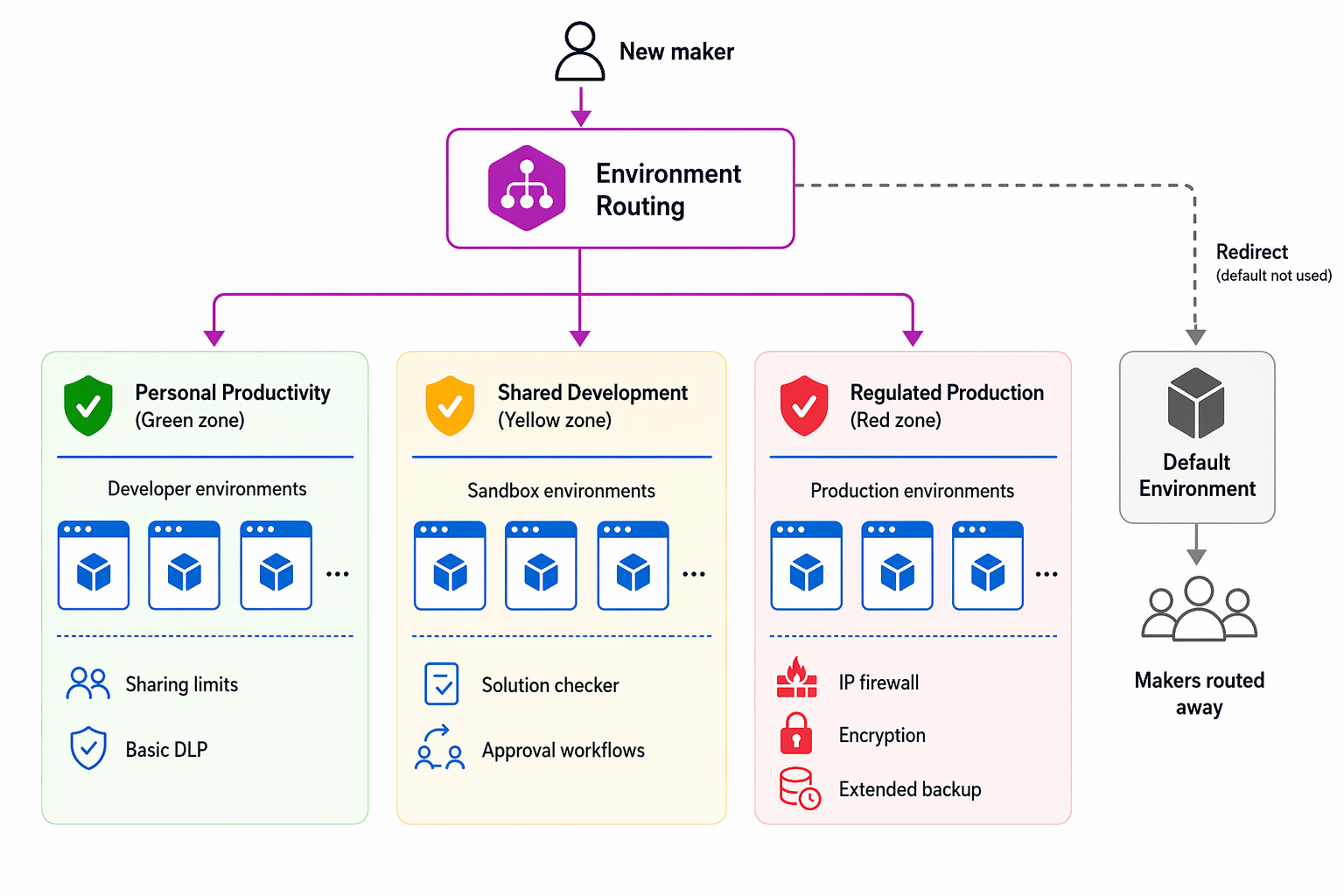
Use environment groups to define governance zones and environment routing to automatically place new maker environments in the correct group. This approach combines automation with consistent governance, making it the recommended approach for enterprise-scale adoption.
For Zava, this approach means:
- A Personal Productivity group (Green zone) where environment routing places all new developer environments, governed by sharing limits and basic data loss prevention (DLP).
- A Shared Development group (Yellow zone) for team-based sandbox environments with solution checker enforcement and approval-based promotion.
- A Regulated Production group (Red zone) for Zava Pay environments with IP firewall, customer-managed key encryption, lockbox, and extended backup.
Plan for the default environment
The default environment exists in every tenant and can't be deleted. Rather than fighting this constraint, plan around it:
- Apply restrictive data policies to allow only Microsoft 365 connectors.
- Enable environment routing to redirect makers to personal developer environments.
- Set sharing limits to prevent broad distribution of apps built in the default environment.
- Review assets in the default environment regularly, and migrate valuable ones to appropriate production environments with pipelines.
Important
Don't disable the default environment or try to replace it. Instead, use it as a contained space for simple Microsoft 365 integrations and redirect all other development through routing.