Configure secure authentication for AI workloads
The first setup decision is how the workload authenticates. The answer depends on where the workload runs, because the hosting environment determines which credential types are available.
Select the credential type based on where the workload runs
Use the workload's hosting model to determine how it should authenticate.
| Workload scenario | Preferred credential type | Why it fits |
|---|---|---|
| Azure-hosted AI workload on a resource that supports managed identity | Managed identity | Azure manages the credential lifecycle. No secrets to store or rotate. |
| Workload outside Azure, with a hosting environment that issues identity tokens | Federated identity credential | The application trusts an external token instead of storing a secret. |
| Hosting environment can't issue tokens, but the workload needs production credentials | Certificate credential | Certificates require possession of the private key, making them stronger than client secrets. |
| Local development or temporary testing only | Client secret | Simplest to configure for short-lived scenarios. Not recommended for production. |
The hosting environment determines the options. An inference API on App Service, a processing pipeline on Azure Functions, or a workload on Container Apps can use a managed identity directly. A model serving workload on a Kubernetes cluster outside Azure can use workload identity federation if the cluster has an OIDC issuer. A workload that can't use either option falls back to certificate credentials for production.
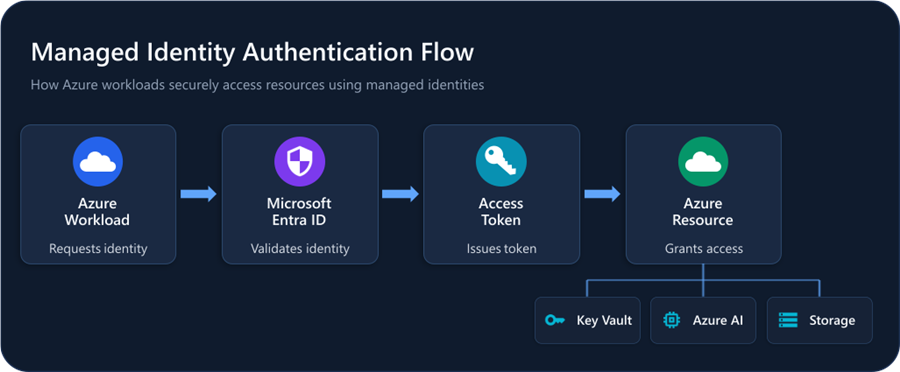
Why the credential type matters more than getting authentication working
Each credential type carries a different operational cost:
- Managed identity: No rotation, no storage, no cleanup.
- Federated credential: Maintain the trust relationship with the external identity provider.
- Certificate: Secure the private key and rotate before expiration.
- Client secret: Rotation, secure storage, and cleanup, plus the risk of exposure in code, logs, or configuration files.
The common shortcut is to use whichever credential gets the workload authenticating fastest. That's usually a client secret. But if the hosting environment supports managed identity, every day the workload runs with a secret is a day you're maintaining a credential that doesn't need to exist. Start from what the hosting environment makes possible, then pick the option with the lowest operational burden for the life of the workload.
System-assigned vs. user-assigned managed identities
If managed identity is the right credential type, the next decision is whether to use system-assigned or user-assigned. System-assigned identities are tied to the lifecycle of the Azure resource, so when the resource is deleted, the identity is removed. User-assigned identities have an independent lifecycle and can be shared across related workloads.
For most single-workload scenarios, system-assigned is simpler. User-assigned identities make sense when multiple related workloads need the same identity, or when the identity needs to survive resource redeployment. Make the choice deliberately and document it.
Key considerations for federation and certificates
When configuring workload identity federation, the issuer, subject, and audience claims must match the external token exactly. The matching is case-sensitive. If any value is wrong, token exchange fails silently from the workload's perspective.
For certificate credentials, store the private key in Azure Key Vault or a hardware security module. Plan rotation before the certificate expires, and test the rotation process before you need it.
Confirm the credential model before configuring permissions
Before treating authentication as complete, confirm:
- Token acquisition succeeds from the workload's actual hosting environment, not just from a developer workstation.
- The credential type matches the hosting scenario. If the workload runs on a resource that supports managed identity, it should be using managed identity, not a client secret.
- No unnecessary secret remains in the design.
- You can identify which object holds the credential (the managed identity, the app registration, or both).
A successful sign-in from the actual hosting environment confirms the credential model works as intended. If authentication fails at this point, permission configuration won't fix it, so resolve credential issues first. Once the identity can authenticate, the next decision is what it should be allowed to access.