Select models using benchmarks
Tip
See the Text and images tab for more details!
Before deploying a model, you want to understand how it performs across different dimensions. Model benchmarks provide objective, measurable data to help you compare models and make informed selection decisions. The Microsoft Foundry portal offers comprehensive benchmarking tools organized into quality, safety, cost, and performance metrics.
Access model benchmarks
You can explore benchmarks in two ways within the Microsoft Foundry portal:
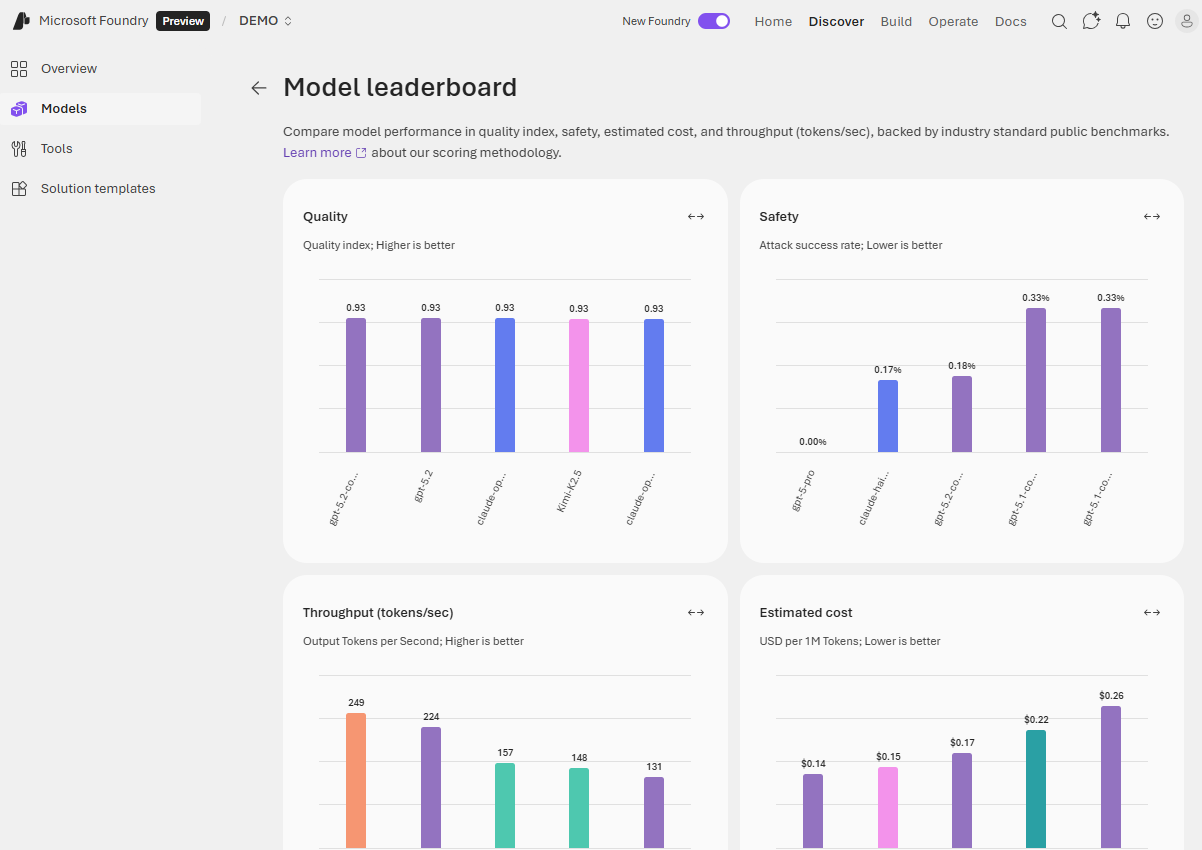
In the model catalog, view the Model leaderboard to see comparative rankings across all available models. This view helps you identify top-performing models for specific metrics or scenarios. The leaderboard displays top models ranked by quality, safety, estimated cost, and throughput.
For detailed benchmarks on a specific model, open its model card and select the Benchmarks tab. This view shows how the individual model performs across various metrics and datasets, with comparison charts placing it relative to similar models.
Quality benchmarks
Quality benchmarks assess how well a model generates accurate, coherent, and contextually appropriate responses. These metrics use public datasets and standardized evaluation methods to ensure consistency.
The Quality index provides a high-level overview by averaging accuracy scores across multiple benchmark datasets that measure reasoning, knowledge, question answering, mathematical capabilities, and coding skills. Higher quality index values indicate stronger overall performance across general-purpose language tasks.
Quality benchmarks use datasets such as:
- Arena-Hard - adversarial question answering
- BIG-Bench Hard - reasoning capabilities
- GPQA - graduate-level multi-discipline questions
- HumanEval+ and MBPP+ - code generation tasks
- MATH - mathematical reasoning
- MMLU-Pro - general knowledge assessment
- IFEval - instruction following
Benchmark scores are normalized indexes ranging from zero to one, where higher values indicate better performance.
Safety benchmarks
Safety metrics ensure models don't generate harmful, biased, or inappropriate content. These benchmarks are crucial for applications exposed to end users, especially in regulated industries or customer-facing scenarios.
Microsoft Foundry evaluates models across multiple safety dimensions:
Harmful behavior detection uses the HarmBench benchmark to measure how well models resist generating unsafe content. The evaluation calculates Attack Success Rate (ASR), where lower values indicate safer, more robust models. HarmBench tests three functional areas:
- Standard harmful behaviors - cybercrime, illegal activities, general harm
- Contextually harmful behaviors - misinformation, harassment, bullying
- Copyright violations - reproducing copyrighted material
Toxic content detection uses the ToxiGen dataset to measure how well models identify adversarial and implicit hate speech. Higher F1 scores indicate better detection performance across references to minority groups.
Sensitive domain knowledge uses the WMDP (Weapons of Mass Destruction Proxy) benchmark to measure model knowledge in biosecurity, cybersecurity, and chemical security. Higher WMDP scores indicate more knowledge of potentially dangerous capabilities.
Safety scores help you understand model robustness, especially important for customer-facing applications where harmful output poses significant concerns.
Cost benchmarks
Understanding the financial impact of model usage helps you balance quality requirements with budget constraints. Cost benchmarks in Microsoft Foundry display pricing for serverless API deployments and Azure OpenAI models.
Cost per input tokens shows the price for processing 1 million input tokens (the text you send to the model).
Cost per output tokens indicates the price for generating 1 million output tokens (the text the model produces).
Estimated cost combines input and output costs using a typical 3:1 ratio (three input tokens for every output token), giving you a single number for comparison. Lower values indicate more cost-effective models.
Cost benchmarks help you identify models that deliver the quality you need at a price point that fits your application's usage patterns and budget.
Performance benchmarks
Performance metrics measure how quickly and efficiently models respond to requests. These benchmarks matter for real-time applications where user experience depends on responsiveness.
Latency measurements include:
- Latency mean - average time in seconds to process a request
- Latency P50 (median) - 50% of requests complete faster than this time
- Latency P90 - 90% of requests complete faster than this time
- Latency P95 - 95% of requests complete faster than this time
- Latency P99 - 99% of requests complete faster than this time
- Time to first token (TTFT) - time until the first token arrives when using streaming
Throughput measurements include:
- Generated tokens per second (GTPS) - output tokens generated per second
- Total tokens per second (TTPS) - combined input and output tokens processed per second
- Time between tokens - interval between receiving consecutive tokens
The leaderboard summarizes performance using mean time to first token (lower is better) and mean generated tokens per second (higher is better). High-throughput, low-latency models provide better user experiences in interactive applications. For batch processing jobs where speed matters less than cost, you can prioritize other factors.
Use leaderboards and comparison features
The model leaderboard lets you view top models for specific metrics. You can sort by quality, safety, estimated cost, and throughput to identify models that best match your requirements.
Scenario leaderboards help you find models optimized for specific use cases like reasoning, coding, math, question answering, or groundedness. If your application maps to a particular scenario, start with the relevant scenario leaderboard rather than relying solely on overall quality index.
Trade-off charts display two metrics simultaneously, such as quality versus cost or quality versus throughput. These visualizations help you find the optimal balance for your requirements. Use the dropdown to compare quality against cost, throughput, or safety. Models closer to the top-right corner of the chart perform well on both metrics. A model that's slightly less accurate but significantly faster or cheaper might better serve your needs.
Side-by-side comparison lets you select two or three models from the leaderboard and compare them across multiple dimensions:
- Performance benchmarks (quality, safety, throughput)
- Model details (context window, training data, supported languages)
- Supported endpoints (deployment options)
- Feature support (function calling, structured output, vision)
Select models by checking boxes next to their names, then choose Compare to open the detailed comparison view.