Manage groups
Several departments require similar permissions. Managing those permissions individually for every user could become difficult to maintain over time.
Groups provide a scalable way to assign permissions and manage access across many users.
Manage groups
mPower uses groups to assign permissions. Rather than assigning permissions directly to individual users, administrators create groups and assign permissions to those groups. Users then inherit permissions through membership.
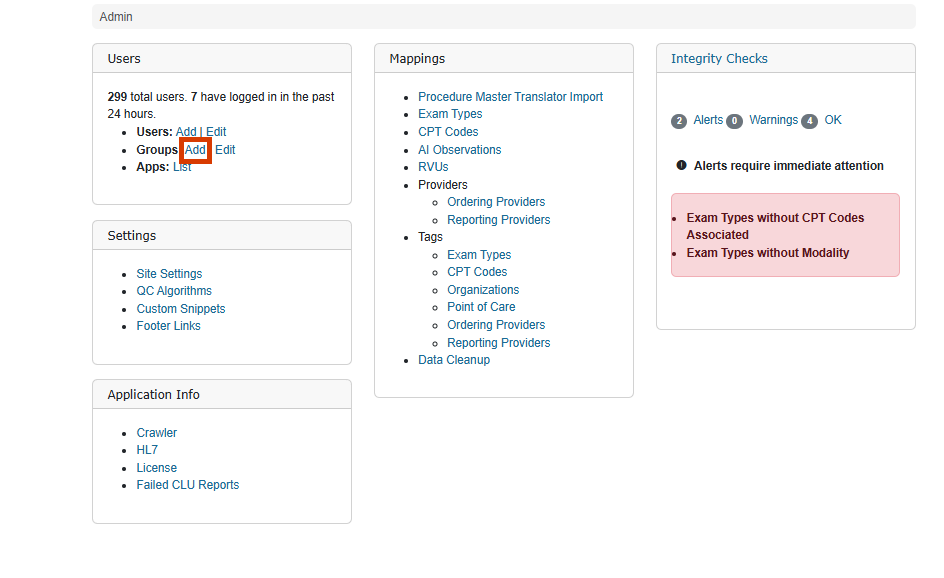
Create groups
Administrators create groups by providing a group name and selecting the permissions that members should receive.
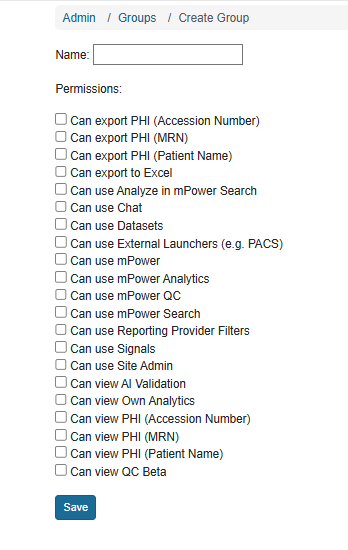
Manage permissions
Permissions control access to features such as Analytics, Quality Control, Search, exports, and administrative capabilities. Assigning permissions through groups helps maintain consistent access management.
Maintain group membership
As responsibilities change, administrators update group memberships to ensure users continue to receive the correct permissions.