Manage your profile and saved content
As an administrator, you may frequently access the same reports, dashboards, and resources. Personalizing your experience and saving commonly used content can help improve efficiency and simplify recurring tasks.
Manage your profile
mPower provides profile settings that help personalize the user experience.
From the user menu, administrators can review profile information, update preferences, and access saved content.
To review and update your profile:
Select your profile icon or avatar.
Open Profile or Settings.
Review the available profile information.
Update the settings that are relevant to you.
Save your changes.
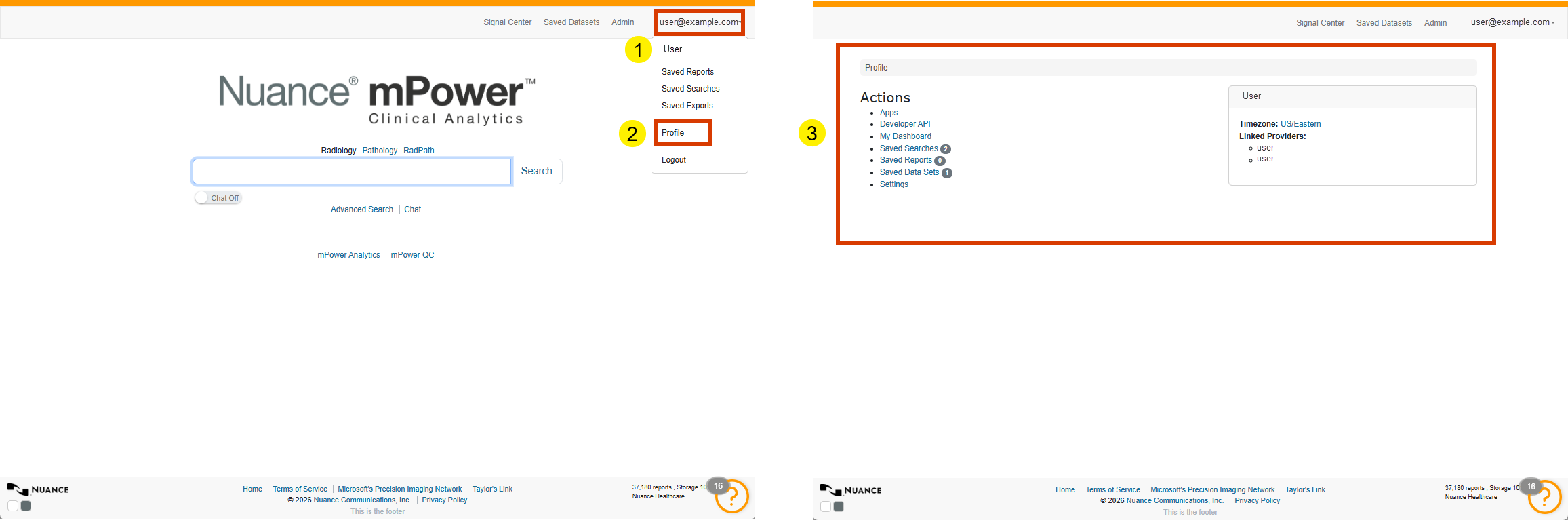
Keeping profile information current helps ensure a consistent experience across the application.
Use dashboards
Dashboards provide visual summaries that help users monitor trends and performance information.
Depending on permissions, users may have access to:
My Dashboard, which displays personalized metrics for your work.
Analytics dashboards that display volume, turnaround time, quality events, and other key measures.
Understanding available dashboards helps administrators guide users to information relevant to their responsibilities.
Save and reuse content
Many users perform the same searches or review the same reports regularly.
mPower supports this workflow by enabling users to:
- Save searches.
- Save reports.
- Organize content into folders.
- Return to saved items through their profile menu.
Using saved content can reduce repetitive work and support ongoing analysis activities.