Use Microsoft Security Copilot to investigate threats
Microsoft Security Copilot helps security teams investigate threats faster by summarizing incidents, answering follow-up questions, analyzing suspicious scripts, generating investigation queries, and supporting repeatable investigation workflows. It doesn’t replace analyst judgment. Instead, it helps reduce the time spent collecting evidence, correlating alerts, and organizing investigation details.
Start with an incident summary
When you open an incident in the Microsoft Defender portal, Security Copilot can automatically generate an incident summary. This summary gives analysts a faster starting point for investigation by organizing the most important incident details in one place. The summary can include an attack overview, timeline, affected assets, attack details, and recommended actions.
A useful incident summary helps answer:
- What happened?
- When did the attack start?
- Which devices, users, or applications are involved?
- What techniques, malicious artifacts, or suspicious behaviors were identified?
- What actions should be considered to contain or remediate the incident?
After reviewing the summary, analysts can ask follow-up questions in natural language. This capability helps narrow the investigation without manually switching between every alert, entity, and device page.
Example question areas include understanding the attack, assessing scope, investigating a user, checking device status, correlating events, researching threat intelligence, and planning remediation. The source examples include questions such as asking what MITRE ATT&CK techniques were used, whether other devices were affected, whether the device is compliant with Intune, and whether similar attacks appeared in the past 30 days.
Prompts work best when they are specific and tied to the incident context. For example, ask about a specific incident, affected device, user, indicator, or time range rather than asking a broad question such as “What happened recently?”
Use guided response recommendations
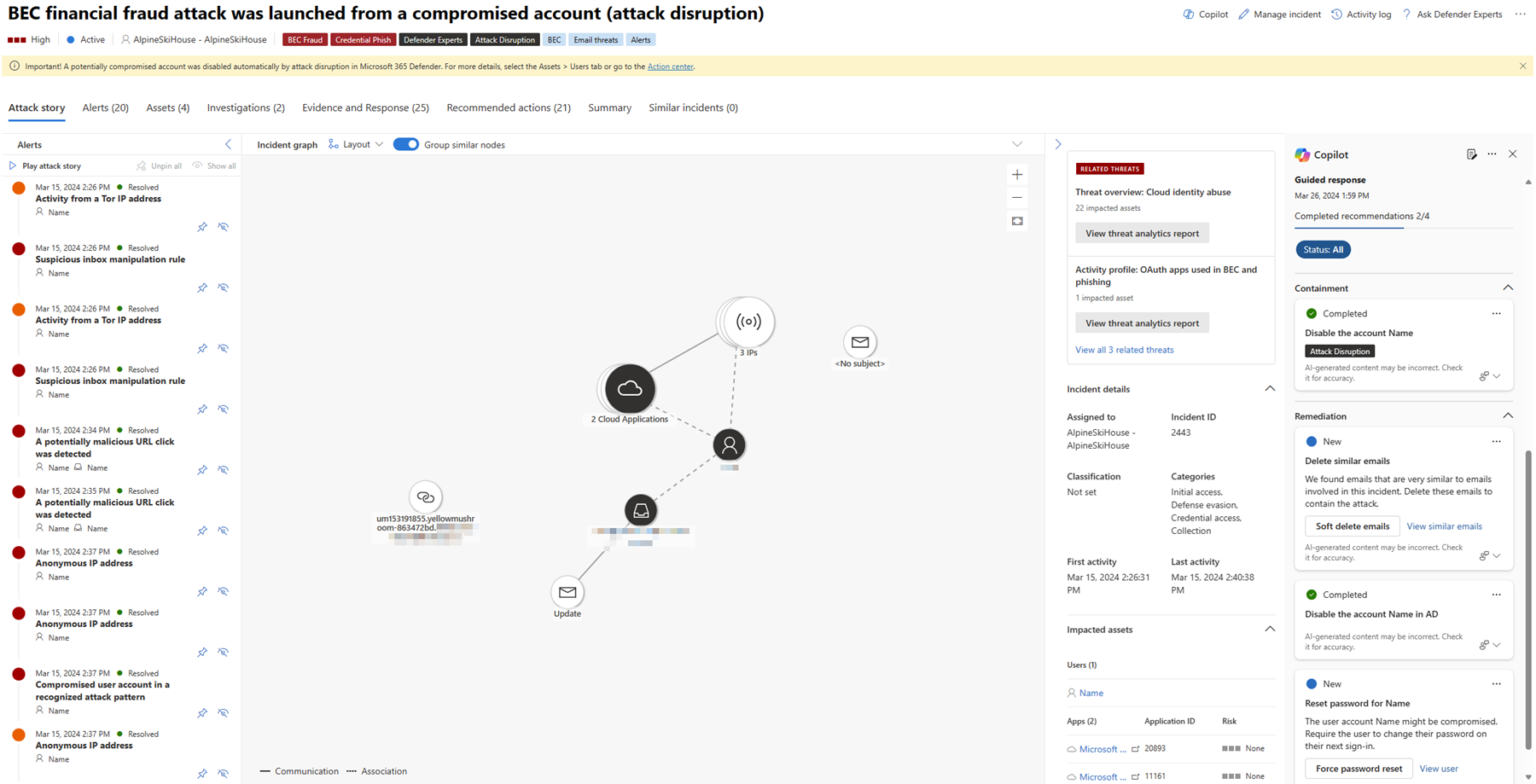
Security Copilot can provide guided response recommendations based on the attack type. These recommendations help analysts plan containment and remediation steps for common scenarios such as malware infection, compromised credentials, ransomware, or lateral movement.
For example, recommended actions might include isolating affected devices, running antivirus scans, removing detected threats, resetting compromised credentials, revoking sessions, blocking malicious files or IP addresses, reviewing persistence mechanisms, or checking for related activity across the environment.
Analysts should treat these recommendations as response guidance. High-impact actions should still be validated in Microsoft Defender and reviewed according to the organization’s incident response process.
Analyze suspicious scripts and activity
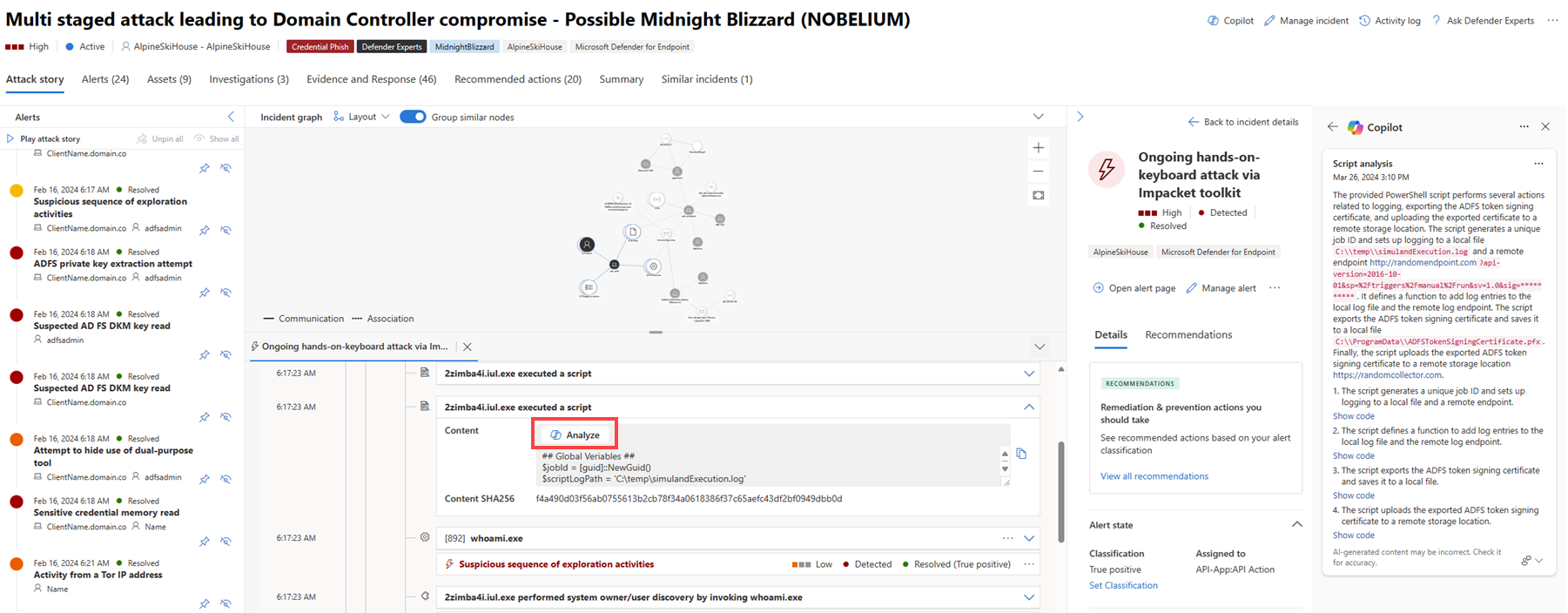
If an incident involves suspicious scripts, Security Copilot can help decode and explain them. For example, analysts can review the alert involving script execution and use script analysis to understand the script’s purpose, suspicious behaviors, indicators, verdict, and recommended actions.
This capability is useful when an investigation includes obfuscated PowerShell, encoded commands, suspicious script downloads, or unusual process behavior. Copilot can help explain what the script appears to do and identify indicators such as hashes, domains, or IP addresses.
Script analysis should still be validated against Defender evidence, such as the device timeline, process tree, related alerts, and observed network activity.
Generate investigation queries
Security Copilot can help generate investigation queries when analysts know what they want to search for but need help turning the question into a query.
For example, an analyst might ask Copilot to generate a query to find:
- Devices that ran a suspicious file.
- Devices that contacted a suspicious IP address.
- Similar command-line activity across endpoints.
- Sign-ins from affected users during a specific time range.
- Related events connected to the same file hash, domain, or process.
This capability helps analysts search for related activity across the environment and determine whether the incident is isolated or part of a broader attack. Generated queries should be reviewed before the results are used for response decisions.
Use promptbooks for repeatable investigations
Promptbooks are reusable workflows made of multiple prompts. They help standardize common security tasks such as incident investigation, suspicious script analysis, vulnerability impact assessment, user analysis, or threat actor profiling.
For example, an incident investigation promptbook can help summarize an incident, analyze affected devices and users, identify techniques and indicators of compromise, research threat intelligence, assess business risk, generate remediation recommendations, and create an executive summary.
Promptbooks are useful when an investigation follows a repeated pattern. They improve consistency, especially when different analysts need to follow the same process.
Prepare reports and handoff notes
After investigating with Copilot, analysts can generate reports for different audiences. A technical report might include timelines, affected assets, MITRE ATT&CK techniques, indicators of compromise, evidence artifacts, forensic analysis, and remediation steps. An executive summary might focus on business impact, current status, actions taken, risk assessment, and prevention measures. A compliance report might document detection, response actions, evidence preservation, and post-incident review.
A useful handoff should include:
- What happened.
- Which users and devices were affected.
- What evidence supports the conclusion.
- Which actions were taken.
- Which actions are still required.
- Whether the issue should be escalated.
Clear reporting helps response work continue without repeating the same investigation steps.
Validate findings before response
Security Copilot can help accelerate investigation, but analysts should validate important findings before taking high-impact response actions. Examples include isolating production servers, resetting privileged accounts, blocking files across the organization, approving automated remediation, changing security policies, or escalating an incident to another team.
Use Copilot output as investigation support, not as the only source of truth. Review Defender evidence, confirm affected assets, and follow your organization’s incident response process.