Understand how indexes work
Before you create indexes, it helps to understand how they work internally. This understanding lets you predict which indexes a query uses, estimate the storage and write cost of each index, and diagnose performance problems with confidence.
Understand the B-tree data structure
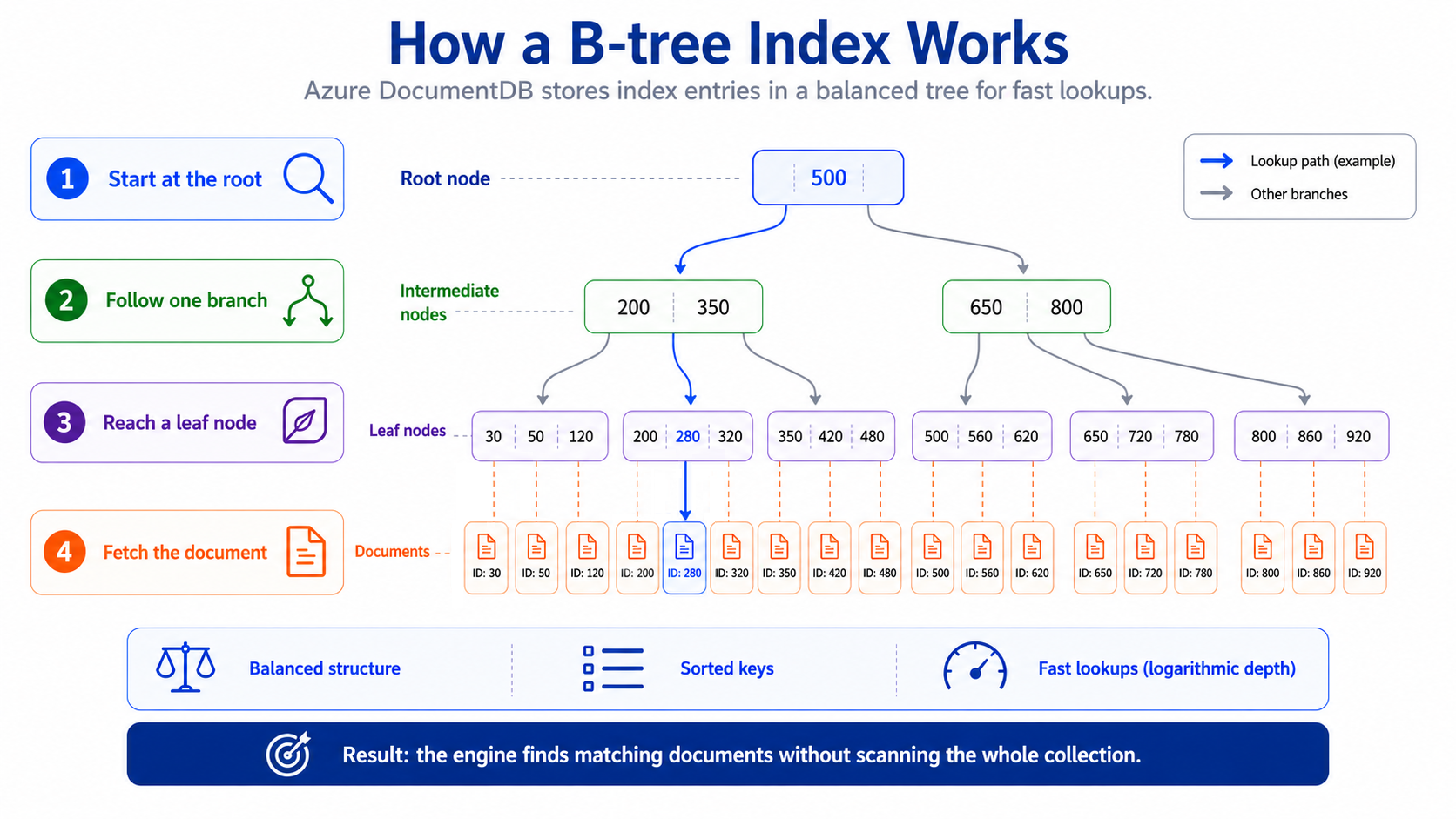
Azure DocumentDB uses a B-tree data structure for indexes. A B-tree organizes index entries in a sorted, hierarchical structure where each node contains multiple keys and pointers. The root node points to intermediate nodes, which point to leaf nodes that contain the actual indexed values paired with pointers back to the documents.
When a query uses an index, the database engine traverses the tree from root to leaf, comparing the search value at each level. Because the tree is balanced, the number of comparisons is proportional to the logarithm of the total entries, meaning that even in a collection with millions of documents, an index lookup touches only a handful of nodes.
Compare collection scans and index scans
Without an index on the queried field, the database performs a collection scan (COLLSCAN). A collection scan reads every document in the collection and evaluates the query filter against each one. For a collection with 1,000,000 documents, a query that matches 500 documents still examines all 1,000,000.
With an appropriate index, the database performs an index scan (IXSCAN). The engine traverses the B-tree to find matching entries and then follows the document pointers to retrieve only the matching documents. The same query that returned 500 documents now examines only the 500 matching index entries plus the 500 documents they point to.
// Without index: COLLSCAN examines all documents
db.products.find({ "category.name": "Mountain Bikes" });
// Examined: 1,000,000 documents → Returned: 500

// After creating an index: IXSCAN examines only matches
db.products.createIndex({ "category.name": 1 });
db.products.find({ "category.name": "Mountain Bikes" });
// Examined: 500 index entries + 500 documents → Returned: 500
The performance difference is dramatic. A collection scan on a large dataset might take seconds, while an index scan for the same query completes in milliseconds.
Know the default index behavior
Azure DocumentDB indexes only the _id field by default. This behavior differs from some other MongoDB-compatible services that index all fields automatically. The _id index:
- Is created automatically when a collection is created.
- Can't be dropped.
- Ensures uniqueness of document identifiers.
- Supports efficient lookups by document ID.
All other indexes must be created explicitly based on your query patterns. This approach gives you full control over which fields to index, but it also means that queries on non-_id fields perform collection scans until you create the appropriate indexes.
Important
Azure DocumentDB allows a maximum of 64 indexes per collection. Depending on the tier, you can request an extension up to 300 indexes. Plan your indexing strategy to stay within these limits.
Evaluate index selectivity and cardinality
Not all indexes are equally effective. Cardinality refers to the number of unique values in a field. Selectivity measures how well an index narrows down the results.
A field with high cardinality (many unique values) like email or orderId makes a highly selective index. A query on that field returns few documents relative to the total, so the index eliminates most of the collection from consideration.
A field with low cardinality (few unique values) like status with values active, inactive, and pending makes a poorly selective index. If 60% of documents have status: "active", an index scan on that value still reads more than half the collection. In these cases, a compound index that combines the low-cardinality field with a more selective field performs better. For example, an index on { status: 1, createdAt: -1 } allows queries that filter by status and sort by createdAt to efficiently find recent documents in each status category.
Assess index costs
Every index carries costs that you need to weigh against the read performance benefits:
| Cost | Description |
|---|---|
| Storage | Each index is a separate data structure stored on disk. More indexes mean more storage consumption. |
| Write overhead | Every insert, update, or delete must update all affected indexes. More indexes mean slower write operations. |
| Memory | Indexes are loaded into RAM for fast access. If the total index size exceeds available memory, the database swaps index pages to and from disk, which degrades performance. |
The goal is to create enough indexes to cover your critical query patterns without over-indexing. A collection with many rarely used indexes pays high write and storage costs for minimal read benefit. Later in this module, you learn how to identify and remove unused indexes.
Understanding these internals, from B-tree traversal to collection scan vs. index scan to the cost trade-offs, gives you the foundation to make deliberate indexing choices. In the next unit, you create single-field and compound indexes and learn the ESR (Equality-Sort-Range) rule for ordering compound index fields.