Implement API limit retry policies
The previous unit closed on a warning: a retry policy applies as much to a service.Execute() call as it does to a Web API request. This unit builds that policy. You move from performing individual operations to designing a retry strategy that keeps an integration resilient when Dataverse pushes back. That way, you recognize the limit type, read the signal the platform sends, and respond correctly instead of guessing.
Why Dataverse pushes back on demanding callers
Dataverse applies service protection limits to keep the shared platform responsive for every tenant, not to interfere with how any one person works. A handful of interactive clicks through a form almost never comes close to these thresholds. Bulk and integration workloads are a different story, and Contoso's solution has two of them.
The external inventory service occasionally posts a burst of contoso_device availability updates right after a warehouse inventory sync, sending far more requests in a short window than normal. The coordinator's compiled approval service runs a bulk pass approving many pending contoso_request rows at once, which racks up both request count and concurrent calls. Neither integration is misbehaving. Both are doing exactly the kind of demanding, automated work these limits exist to detect.
Match the limit you hit to the signal it sends
Dataverse tracks three separate facets of demand. The request-count and execution-time limits accumulate over a rolling 300-second window, while the concurrent-request limit applies the moment too many calls overlap. Any one of these limits can trigger a throttling error on its own.
| Limit type | What it counts | Default threshold | Contoso risk |
|---|---|---|---|
| Number of requests | Total requests from a user in the preceding 300 seconds | 6,000 requests per 300-second window | The inventory service's burst of device updates right after a warehouse sync |
| Execution time | Combined execution time of all requests from a user in the preceding 300 seconds | 1,200,000 ms (20 minutes) per 300-second window | A batched or complex bulk operation, such as grouping the approval pass into large batches |
| Concurrent requests | Requests from the same user processed at the same instant | 52 or more concurrent requests | The coordinator service firing many parallel Execute calls during its bulk approval pass |
The inventory service's burst is the clearest case of the first limit type: enough updates land in a short enough window that the cumulative count for that user crosses 6,000 before the window resets. The coordinator service's bulk pass more often trips the third limit type instead.
Looping over hundreds of pending requests with unchecked parallelism can push simultaneous Execute calls past the concurrency ceiling almost immediately. Unlike the request-count and execution-time limits, which only trigger after the rolling window fills, the concurrent-request limit returns an error the moment too many calls overlap.
Read the error the platform returns
Dataverse tells you which limit you hit, but it tells you through a different shape depending on the API surface:
- Web API: a
429 Too Many Requestsresponse, with aRetry-Afterheader stating how many seconds to wait. - Organization service (SDK for .NET): an
OrganizationServiceFault, with one of three specific error codes identifying the limit type, and aRetry-Aftervalue available as aTimeSpanin the fault'sErrorDetailscollection.
Both signals carry the same essential information: you exceeded a limit, and a wait duration tells you when it's safe to try again.
Learn more about the full set of service protection API limit errors.
Retry correctly: honor Retry-After instead of guessing
The Retry-After duration isn't an arbitrary cooldown. It reflects how demanding the recent requests from that user were, so a longer duration signals a heavier load that needs more time to clear. Waiting the full duration, rather than a guessed shorter interval, keeps the retry from immediately tripping the same limit again and extending the wait further.
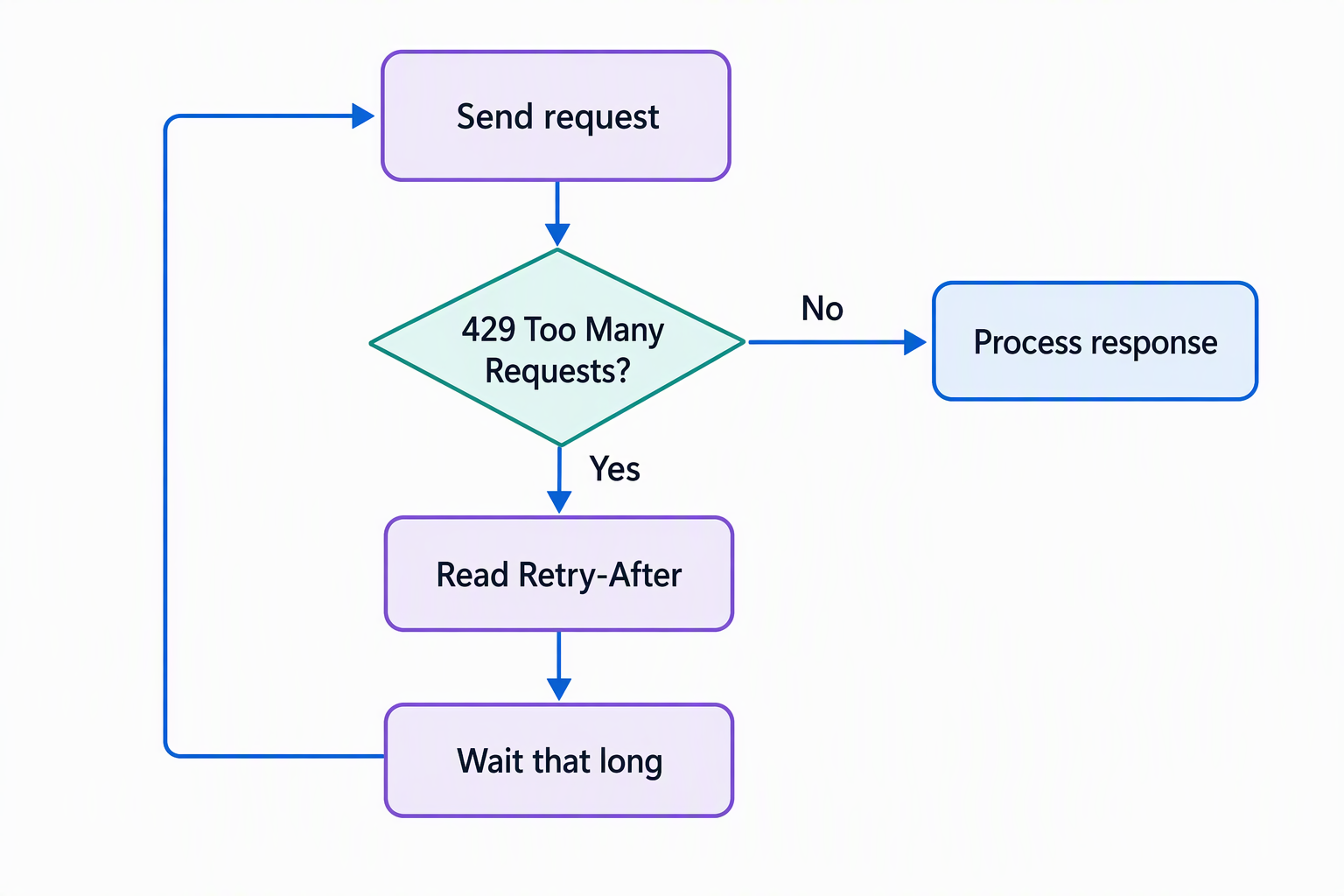
For a raw Web API call, you implement this check yourself. The pattern is small: catch the 429, read Retry-After, wait, then retry.
HttpResponseMessage response = await httpClient.SendAsync(request);

if ((int)response.StatusCode == 429)
{
    TimeSpan wait = response.Headers.RetryAfter?.Delta ?? TimeSpan.FromSeconds(5);
    await Task.Delay(wait);
    response = await httpClient.SendAsync(request);
}
Polly is a common .NET library for implementing retry policies that honor Retry-After without hand-rolling the wait-and-retry logic yourself. The x-ms-ratelimit-* response headers also report your remaining capacity against each limit, which helps when you're debugging throttling before it escalates into a 429.
The Organization service takes a different approach for you. When the coordinator service connects through ServiceClient (or the older CrmServiceClient), recent versions of the SDK for .NET automatically pause and resend the request after the Retry-After duration elapses. You still need to understand what's happening and why a call might pause. But you don't hand-write the catch-wait-retry logic that a raw Web API integration like the inventory service requires.
Choose a throughput strategy instead of guessing a safe rate
Retrying correctly keeps a single throttled call from failing outright, but an integration that's constantly hitting limits is still slower than one designed to avoid them. A few strategies help both Contoso integrations stay under the ceiling instead of bouncing off it repeatedly:
- Ramp the request rate up gradually rather than guessing a number that feels safe. Start conservatively, increase until you see the first throttling response, and let the
Retry-Aftervalue guide how much headroom remains. - Use concurrency deliberately. Parallel calls improve throughput, but only when the degree of parallelism stays capped below the concurrent-request limit, which is exactly where the coordinator service's unchecked bulk pass runs into trouble.
- Batch related operations thoughtfully, not automatically. The
$batchoperation you explored for the Web API, and a similar batching approach through the Organization service, both reduce request count. But every operation in the batch still consumes execution time against the same 300-second window, so a large batch trades one limit for pressure on another rather than eliminating the risk.
Build a mental model for which lever to pull
When a throttling response names a specific limit type, it also tells you which lever to pull:
- Hitting number of requests: slow the rate down, or combine related calls into a batch.
- Hitting execution time: shrink the batch size, or reduce how many demanding operations run concurrently.
- Hitting concurrent requests: cap parallelism below the threshold.
Guiding question: Between the inventory service's burst updates and the coordinator's bulk approval pass, which limit type is each one most likely to trip first? What single change to that integration would reduce the risk?
Where this resilience behavior goes next
Designing and implementing a retry policy by hand, as you did here for a raw Web API call, makes the mechanics explicit: catch the signal, read the duration, wait, retry. The Dataverse SDKs for .NET and Python you explore next simplify data access in different ways, but they still require you to recognize Dataverse throttling behavior and respond appropriately.