Access to Azure Kubernetes Service
To allow access to your applications or between application components, Kubernetes provides an abstraction layer to virtual networking. Kubernetes nodes connect to a virtual network, providing inbound and outbound connectivity for pods. The kube-proxy component runs on each node to provide these network features.
In Kubernetes:
- Services logically group pods to allow for direct access on a specific port via an IP address or DNS name.
- ServiceTypes allow you to specify what kind of Service you want.
- You can distribute traffic using a load balancer.
- More complex routing of application traffic can also be achieved with ingress controllers.
The Azure platform also simplifies virtual networking for AKS clusters. When you create a Kubernetes load balancer, you also create and configure the underlying Azure load balancer resource. As you open network ports to pods, the corresponding Azure network security group rules are configured. For HTTP application routing, Azure can also configure external DNS as new Ingress routes are configured.
Services
To simplify the network configuration for application workloads, Kubernetes uses Services to logically group a set of pods together and provide network connectivity. You can specify a Kubernetes ServiceType to specify what kind of Service you want.
The following ServiceTypes are available:
ClusterIP
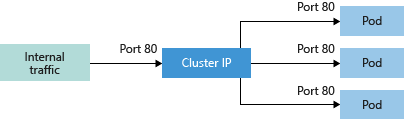
ClusterIP creates an internal IP address for use within the AKS cluster. This Service is good for internal-only applications that support other workloads within the cluster.
NodePort
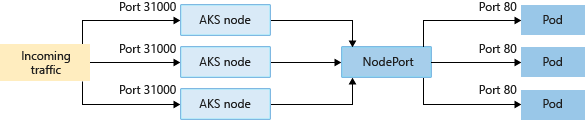
NodePort creates a port mapping on the underlying node that allows the application to be accessed directly with the node IP address and port.
LoadBalancer
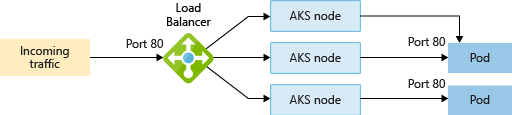
LoadBalancer creates an Azure load balancer resource, configures an external IP address, and connects the requested pods to the load balancer backend pool. To allow customers' traffic to reach the application, load balancing rules are created on the desired ports.
For extra control and routing of the inbound traffic, you may instead use an Ingress controller.
ExternalName
Creates a specific DNS entry for easier application access.
Either the load balancers and services IP address can be dynamically assigned, or you can specify an existing static IP address. You can assign both internal and external static IP addresses. Existing static IP addresses are often tied to a DNS entry.
You can create both internal and external load balancers. Internal load balancers are only assigned a private IP address, so they can't be accessed from the Internet.
Azure virtual networks
In AKS, you can deploy a cluster that uses one of the following network models:
Kubenet networking
The network resources are typically created and configured as the AKS cluster is deployed.
Azure Container Networking Interface (CNI) networking
The AKS cluster is connected to existing virtual network resources and configurations.
Kubenet (basic) networking
The kubenet networking option is the default configuration for AKS cluster creation. With kubenet:
- Nodes receive an IP address from the Azure virtual network subnet.
- Pods receive an IP address from a logically different address space than the nodes' Azure virtual network subnet.
- Network address translation (NAT) is then configured so that the pods can reach resources on the Azure virtual network.
- The source IP address of the traffic is translated to the node's primary IP address.
Nodes use the kubenet Kubernetes plugin. You can let the Azure platform create and configure the virtual networks for you, or choose to deploy your AKS cluster into an existing virtual network subnet.
Only the nodes receive a routable IP address. The pods use NAT to communicate with other resources outside the AKS cluster. This approach reduces the number of IP addresses you need to reserve in your network space for pods to use.
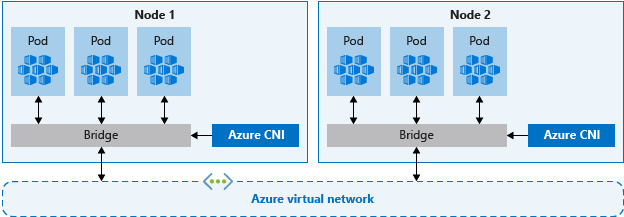
Azure CNI (advanced) networking
With Azure CNI, every pod gets an IP address from the subnet and can be accessed directly. These IP addresses must be planned in advance and unique across your network space. Each node has a configuration parameter for the maximum number of pods it supports. The equivalent number of IP addresses per node are then reserved up front. This approach can lead to IP address exhaustion or the need to rebuild clusters in a larger subnet as your application demands grow, so it's important to plan properly.
Unlike kubenet, traffic to endpoints in the same virtual network isn't NAT related to the node's primary IP. The source address for traffic inside the virtual network is the pod IP. Traffic that's external to the virtual network still NATs to the node's primary IP.
Ingress controllers
When you create a LoadBalancer-type Service, you also create an underlying Azure load balancer resource. The load balancer is configured to distribute traffic to the pods in your Service on a given port.
The LoadBalancer only works at layer 4. At layer 4, the Service is unaware of the actual applications, and can't make any more routing considerations.
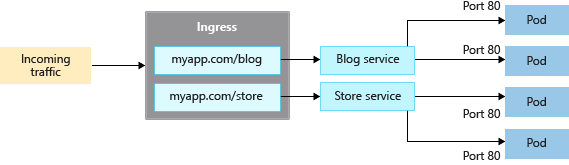
Ingress controllers work at layer 7 and can use more intelligent rules to distribute application traffic. Ingress controllers typically route HTTP traffic to different applications based on the inbound URL.