Follow-up recommendations
Follow-up Recommendations identifies follow-up exam recommendations in a report and extracts them into structured data fields. PowerScribe One uses Clinical Language Understanding (CLU) technology to recognize recommendation language in the report text and standardize it for downstream use.
You can create Follow-up Recommendations manually or as part of the reporting workflow at signoff, depending on configuration.
Note
Only Epic Radiant 2015 or later can accept Follow-up Recommendations and deliver them directly to the EMR/EHR through the HL7 interface. If your organization isn't integrated with Epic, Follow-up Recommendations can still function independently within PowerScribe One. In this scenario, tracking is available to the PowerScribe One administrator under Logs > Reports.
Where Follow-up Recommendations appear in your workflow
As you dictate and document findings, CLU detects recommendation language. When the system detects a follow-up recommendation, it can surface an alert in the Navigator or in Smart Assist considerations. You can open the Follow-up dialog immediately to review the recommendation, or you can wait and address Follow-up Recommendations after you select Sign.
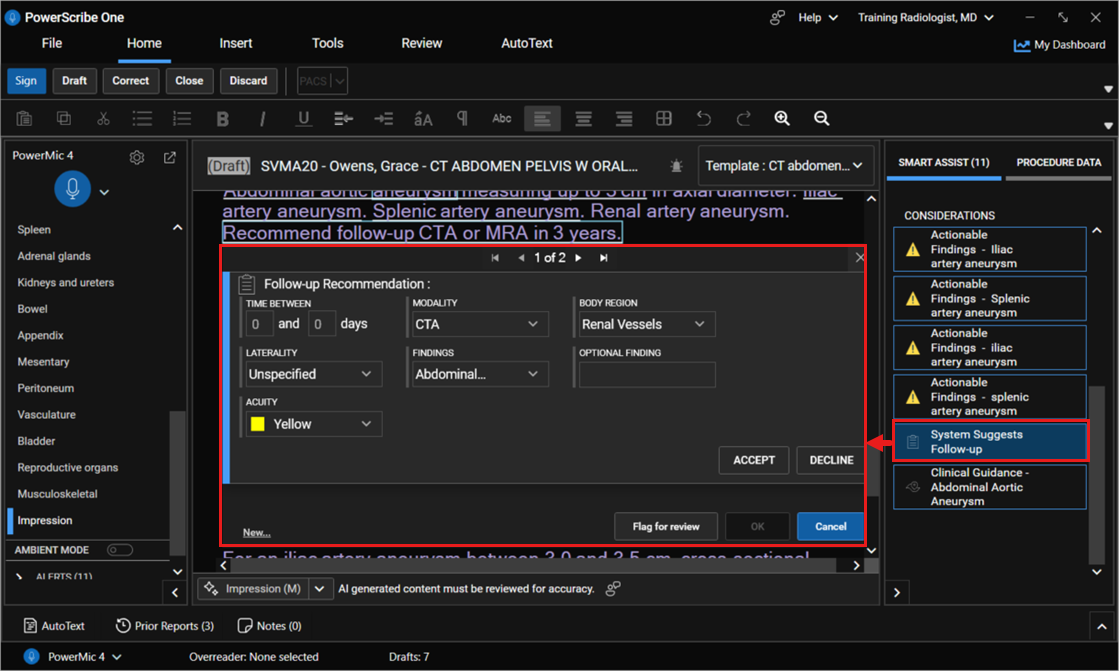
Structured fields
When you open the Follow-up dialog, you review and (if needed) update the structured fields:
- Time Between: range of days for the follow-up exam.
- Modality: imaging modality from a dropdown list.
- Body Region: anatomy from a dropdown list.
- Laterality: Left, Right, Bilateral, Unilateral, or Unspecified.
- Findings: populated by CLU; you can select, deselect, or add findings.
- Optional Findings: used when CLU returns no findings or when you need to add or adjust findings.
Finalize Follow-up Recommendations
When you sign the report, you're prompted to Flag for Review, Accept, or Decline each Follow-up Recommendation.
Review each recommendation and edit data elements as appropriate.
Select Flag for Review, Accept, or Decline for each recommendation.
Note
Selecting Cancel closes the Follow-up Recommendations dialog and returns you to the report without saving changes.
When finished, select OK.
Applied scenario
You're finalizing a report where your impression includes a recommendation for more imaging within a defined timeframe. While dictating, you see a Follow-up Recommendation alert in Smart Assist considerations. You open the Follow-up dialog, confirm that the Time Between, Modality, and Body Region match your intended recommendation, and adjust Laterality to the correct side. CLU didn't return a clear finding, so you enter a short clarification in Optional Findings. At signoff, you select Accept and then OK to save the recommendation before completing the report.