Associate an order
Order association in PowerScribe One links one or more imaging orders (accession numbers) to a single report. This ensures that all relevant studies are documented and interpreted within the correct clinical context.
An order represents a requested imaging study. Each order has a unique accession number, which is used to track and identify the study.
In some workflows, multiple related studies must be documented in a single report. PowerScribe One supports associating multiple accession numbers with one report when the system and electronic medical record (EMR) integration are configured for that workflow.
Workflow dependencies
- System dependency: Multiple-order association is available only if the EMR or EHR supports multiple accession numbers per report.
- Configuration dependency: Your administrator must enable this capability in system configuration before it appears in your workflow.
- Workflow visibility: Associated orders appear in the Procedure Data tab and at the top of the report header so you can verify associated studies.
Associate orders within an open report
- Open an exam or report in the Report Editor.
- Locate the Procedure Data tab in the right pane.
- Select Open Orders to view available orders for the patient.
- Identify the correct accession number or accession numbers.
- Select the Add (+) icon next to each order to associate it with the report.
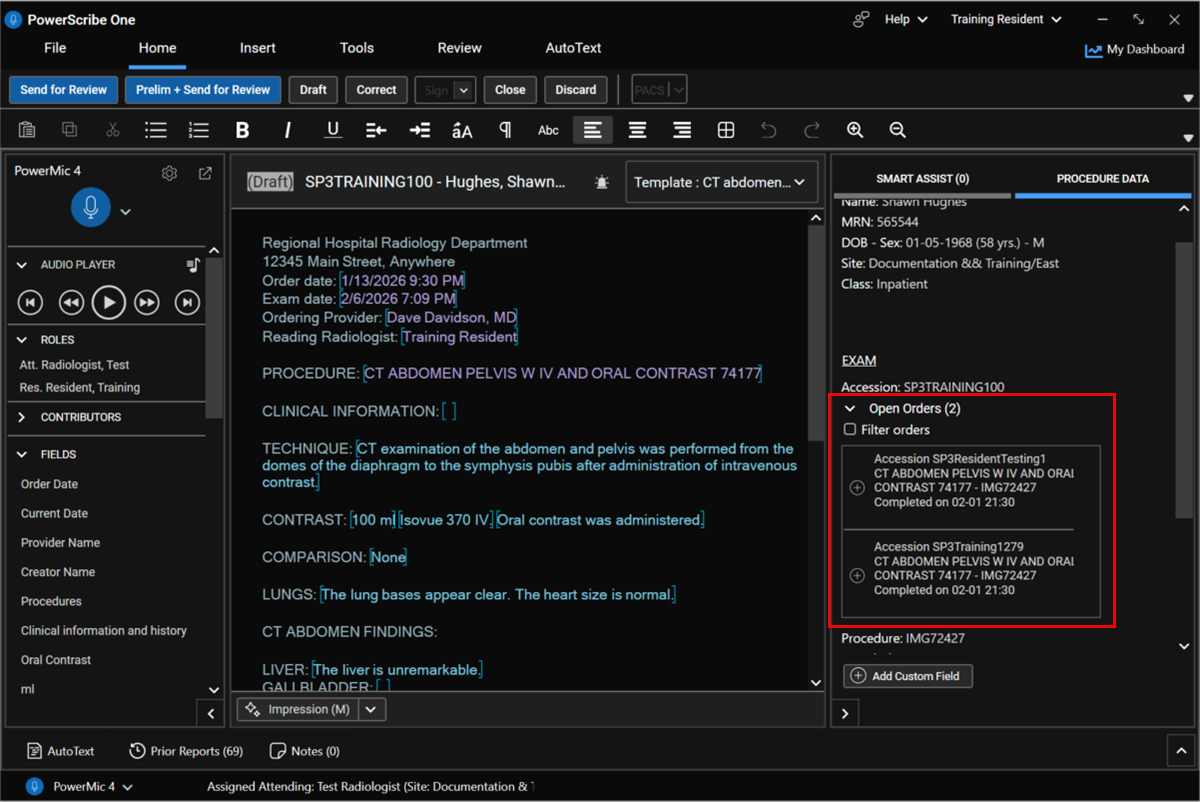
After you associate orders:
- Confirm that all accession numbers appear in the report header.
- Review exam descriptions to ensure that the correct studies are included.
- Replace or insert AutoText as appropriate.
- Continue dictation and editing as needed.
- Complete and finalize the report by following your standard workflow.
Applied scenario
You review a CT Abdomen and Pelvis exam and notice that the patient also has a CT Chest study performed at the same time. In the Procedure Data tab, you locate the CT Chest order under Open Orders and select Add (+) to associate it. Both accession numbers now appear in the report header. You review findings from both studies and complete a single comprehensive report that reflects the full clinical picture.