Attribute DLP alerts across AI apps and agents
Copilot prompts are one surface DLP watches, but an agent messaging a person outside any prompt is a different activity entirely. Return to the case that opened this module: Relecloud built a DLP safeguard specifically to stop credit card numbers from passing through Microsoft 365 Copilot, and then an AI agent messages a human reviewer with a customer's actual credit card number. The safeguard stays silent. A different alert fires instead. Attributing that alert to the right policy—and explaining why the "right" policy didn't fire—is the skill this unit builds.
Predict before you look at the alert
Before the reveal, work through the logic yourself.
Guiding question: Relecloud has a DLP policy scoped to endpoint file uploads for the Finance group, detecting credit card numbers. An AI agent in a different group messages a human reviewer with a credit card number. Does that policy fire? Why or why not?
Most administrators pause on this, because the sensitive information type matches exactly. The policy watches for credit card numbers, and a credit card number is exactly what moved. It's tempting to assume that's enough. It isn't, and the reason why is the core idea this unit builds on.
Read a DLP alert as three parts, not one
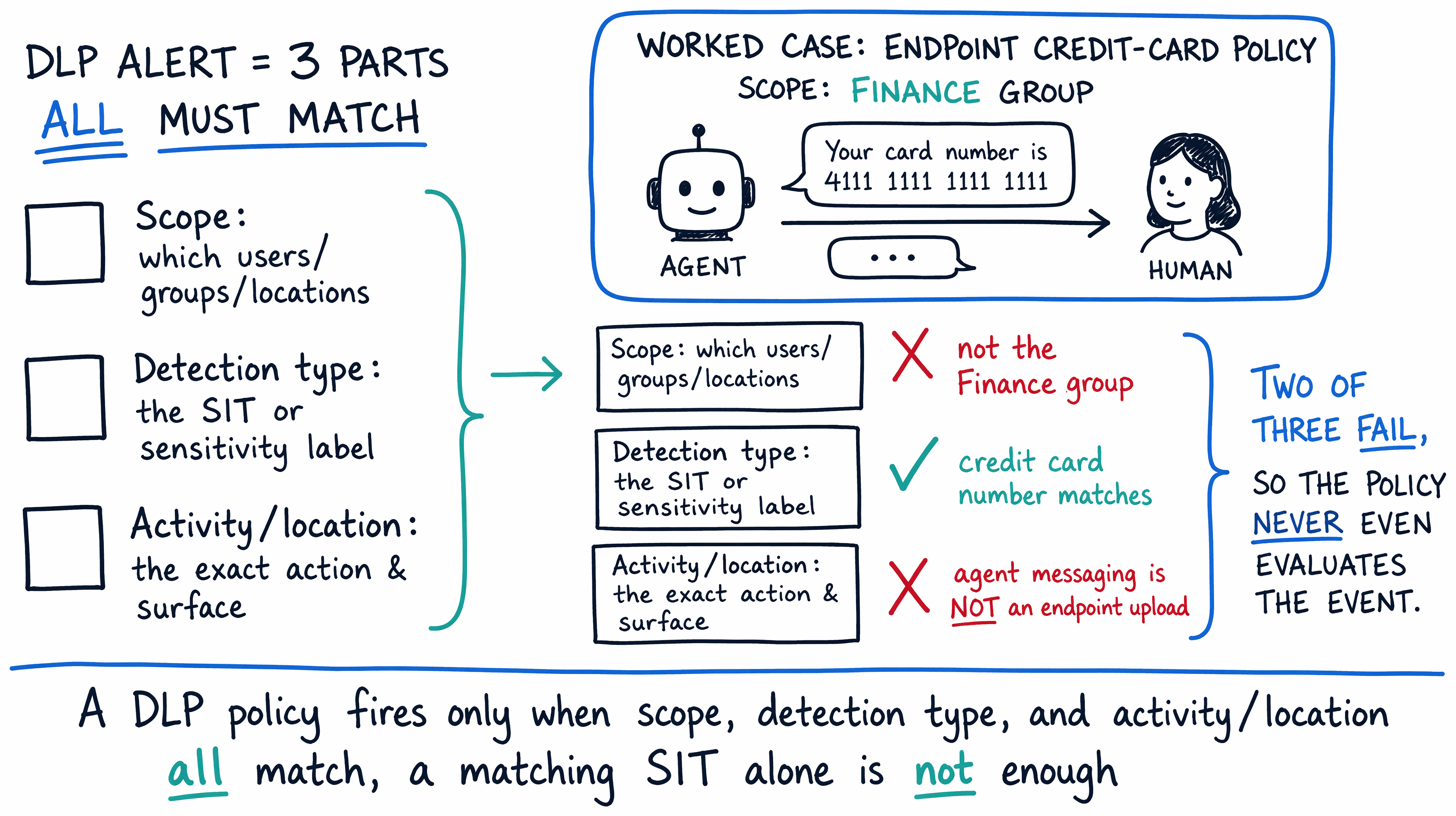
A DLP alert can look like it's only about the data it caught, since the sensitive information type is usually the most visible detail. But every alert actually tells you three things at once, and all three have to line up before you can say which policy is responsible.
- Scope—which users, groups, or locations the policy applies to.
- Detection type—the specific sensitive information type or sensitivity label the policy watches for.
- Activity/location—the exact action and surface where DLP is watching, such as an endpoint file upload, a Copilot prompt, or an agent's message to a human reviewer.
A policy only fires when an activity actually matches its configured location, condition, and assigned scope together. Not two out of three—all three, at the same time. Relecloud's endpoint policy is scoped to the Finance group, watches for credit card numbers, and monitors endpoint file-upload activity. An agent messaging a human reviewer isn't an endpoint file upload, and the reviewer likely isn't in the Finance group either. Two of the three conditions already fail, so the policy never even evaluates the message—it isn't silently choosing to ignore it, it's simply not watching that activity at all.
This matters because agent-to-human and human-to-agent messaging is its own distinct activity/location in DLP, not a variant of an endpoint upload or a browser paste. Endpoint DLP watches things like uploading a file to a restricted cloud service, copying to a clipboard, or pasting into a browser—all endpoint-specific operations tied to a device. An agent sending a message to a person is a completely different action, on a completely different surface, and it needs its own policy scoped to that activity to be caught at all.
Resolve the puzzle
With the three-part model in hand, the Introduction's puzzle has a precise answer. Relecloud's credit-card policy is scoped to endpoint file uploads for a specific group of users. It never evaluates agent-to-human messaging, because that's a different activity/location than the one the policy is configured to watch—regardless of how well the detection condition matches the data involved. The policy didn't fail; it was never in a position to see the event.
The alert that actually fired came from a separate policy, one scoped to agent messaging with its own detection rule for credit card numbers. That's the policy an admin needs to locate and open when investigating this incident, not the endpoint policy the case initially seemed to point to. Attributing the alert correctly means checking the activity/location field first, then confirming scope and detection type match too—not stopping as soon as the sensitive information type looks right.
Recognize AI apps and agents as first-class DLP surfaces
This case matters beyond the single puzzle it resolves, because it points to a shift in what DLP has to cover. DLP protections for the Microsoft 365 Copilot and Copilot Chat location explicitly extend to prebuilt agents running in Copilot and Copilot Chat, not just to prompts a person types directly. And agents built in Copilot Studio are subject to enforced data policy checks of their own—since March 2025, a published agent can no longer be exempted from data policy enforcement, and a violation surfaces to the agent's users as a DataLossPreventionViolation error.
Together, these confirm that agents are a real, enforced DLP surface today, running alongside—not underneath—traditional locations like Exchange, SharePoint, and endpoints. That changes what you specify as a requirement, not just how you read an alert afterward. A complete DLP strategy for Relecloud needs explicit coverage for agent-to-human and human-to-agent messaging as its own location, the same way it needs explicit coverage for Exchange mail flow or endpoint uploads. Assuming a credit-card policy built for one surface automatically protects every surface where a credit card number could appear is exactly the gap that let this incident through.
Learn more about DLP protections for Microsoft 365 Copilot and Copilot Chat and troubleshooting data policy enforcement for Copilot Studio agents.
Move from attribution to action
Knowing which policy fired, and why, is only half the job. Once you've attributed an alert to the agent-messaging policy instead of the endpoint policy, you still have to do something about it: acknowledge the alert, review the evidence, and decide whether to escalate or remediate. Where do you actually go to investigate and act on the alert you just attributed? The next unit takes you into Microsoft Defender XDR to answer that.