Specify data lifecycle management requirements
The next unit turns to data lifecycle management requirements to work that out, and Woodgrove Bank's case records are exactly the kind of content that raises the question. Most of Relecloud's SharePoint content only needs to stick around for three years, but Woodgrove's regulated case files have to survive for seven—and specifying that requirement means making three separate decisions, not one.
Separate the container decision from the item decision
A retention policy applies at the container level. You point it at a location—all of SharePoint, all mailboxes, a specific site—and every item inside that container inherits the same retention behavior automatically. For Relecloud's general content, a three-year retention policy scoped to the SharePoint sites where that content lives covers the requirement without anyone having to act on individual files.
Woodgrove's case records don't fit that pattern. They're regulated exceptions living inside sites that otherwise only need three years, so a container-wide policy can't give them the longer retention they require without over-retaining everything else in the same site. That's where a retention label comes in: a label applies to an individual item, not a container, so you can mark a specific case record for seven-year retention while the site around it keeps its three-year policy. The label becomes the exception mechanism—the tool you reach for whenever a subset of content needs different treatment than everything else in its location.
Specifying the label itself only solves part of the requirement, though. A label has to reach the content somehow, and that's a distinct decision: a retention label policy controls how. A publish label policy makes the label available so a records manager or site owner can apply it manually to a case record they recognize as regulated. An auto-apply label policy instead applies the label automatically, triggered by conditions such as a sensitive information type, a keyword, or a trainable classifier trained to recognize case-record content. Woodgrove's records team might prefer auto-apply so no case file depends on someone remembering to tag it—but that choice, publish or auto-apply, is part of the requirement you specify, not an afterthought.
| Decision | Instrument | What it does |
|---|---|---|
| Container default | Retention policy | Applies to a location (all of SharePoint, a site, mailboxes); every item inherits it |
| Item exception | Retention label | Marks an individual item for different treatment than its container |
| How the label reaches content | Retention label policy | Publish (manual apply) or auto-apply (triggered by a SIT, keyword, or trainable classifier) |
Predict the outcome before you see the rule
With the policy in place at the site level and a label available for case records, Relecloud now has both a three-year policy and a seven-year label pointed at the same content. Before the next section resolves it, take a guess.
Guiding question: A container-level retention policy sets three years. A retention label applied to one case record sets seven years. Which one wins? Now change the scenario: the label instead sets a shorter retention period than the policy, paired with a delete action. Does your answer change—and if so, why?
Work through the four principles in order
Retention conflicts resolve through four principles, checked in sequence. Each one only comes into play if the principle before it didn't already settle the question.
| # | Principle | What it decides |
|---|---|---|
| 1 | Retention beats deletion. | If any applicable policy or label says to keep an item, the item can't be permanently deleted until every retention period protecting it has ended. |
| 2 | The longest retention period wins. | When multiple policies or labels apply with different retention periods, the item is retained until the longest of those periods finishes. |
| 3 | Explicit label beats implicit policy — for deletion. | When both a label and a policy specify delete actions, the label's delete action takes precedence, regardless of which period is longer or shorter. |
| 4 | Shortest deletion period wins — among policies only. | When two or more retention policies conflict and no label is involved, the shortest of the competing policy periods decides when the item is deleted. |
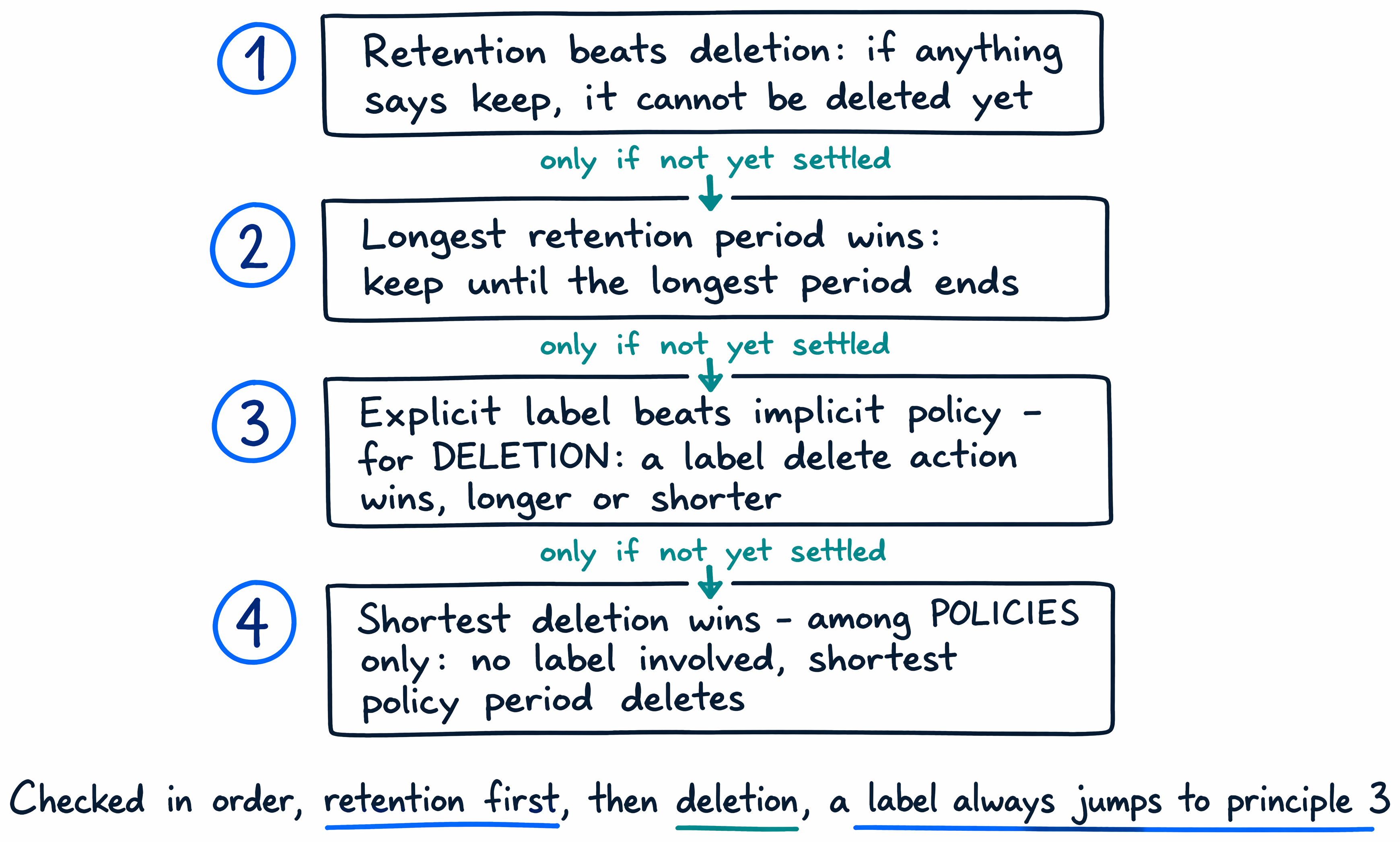
Principle 2 answers the first version of the guiding question: Woodgrove's seven-year label overrides Relecloud's three-year site policy for that one case record. The policy's three years never get a chance to delete the file early, because the label's longer period is counted first.
But retention and deletion are separate questions. Once retention is settled, the deletion timing might still be unresolved—which is where principle 3 takes over, and where the second version of the guiding question lands.
Here's an example that makes the layering concrete: an item sits under an org-wide policy that deletes after 10 years, a scoped policy that retains 5 years and then deletes, and a label that retains 3 years and then deletes. Principle 2 resolves retention first: the item is retained for 5 years, the longest of the three periods. Then principle 3 resolves deletion: even though 3 years is shorter than both policy periods, the label's delete action wins because it's explicit. The item is permanently deleted at the 3-year mark, layered on top of the 5-year retention floor principle 2 already established.
Apply that same logic to Woodgrove's shorter-label scenario from the guiding question: if the label set a period shorter than the site policy and paired it with a delete action, the label's delete action would still take precedence over the policy's, once the longer retention period from principle 2 had run its course. The label's explicit status settles deletion timing every time a label is present, no matter which direction its period runs relative to the policy.
Principle 4 exists for the narrower case where two or more retention policies conflict with each other and there's no label in the picture. The docs illustrate it with a OneDrive document subject to two retention policies, one deleting after 10 years and one after 7: the document is deleted at 7 years, the shorter of the two policy periods. Principle 3 never applies here because no label is involved—only policies compete, so the shortest period among them decides. A label anywhere in the mix would jump straight back to principle 3.
Lock the requirement so it can't be undone
Specifying retention correctly is only half the requirement for a regulated record like Woodgrove's case files—the other half is making sure nobody can quietly weaken it later. Preservation Lock locks a retention policy or a retention label policy so that no one, including an administrator with full permissions, can turn it off, delete it, or make it less restrictive. Once locked, a policy can only be extended or have more locations or labels added to it; every path toward shortening or removing it is closed off.
You configure Preservation Lock in PowerShell only—it isn't available anywhere in the Purview or Microsoft 365 admin UI—using Set-RetentionCompliancePolicy -RestrictiveRetention $true against the policy you want to protect. For Woodgrove's seven-year case-record requirement, locking the label policy behind it turns "seven years" from a setting an administrator could adjust into a commitment the tenant can't walk back, which is exactly the kind of guarantee regulations like SEC Rule 17a-4 expect a compliant retention program to provide.
Move from governing data to watching how it's used
Specifying this requirement well means answering three questions, not one: what container-level policy applies by default, what label marks the exceptions, and how that label reaches the content that needs it—publish or auto-apply. Get those three right, and the four principles tell you exactly what happens whenever settings overlap, down to which delete action wins.
DLP and retention now cover the two ends of the same problem: DLP stops sensitive data from moving somewhere it shouldn't, and retention decides how long that data—and everything like it—stays in the tenant at all. But neither one answers a question that matters just as much once Microsoft 365 Copilot and its agents are active across that data every day: what are they actually doing with it? The next unit turns to monitoring that ongoing AI activity with DSPM for AI.