Introduction
In this module, you’ll explore the essential process of posting service orders or repair activity usage in Microsoft Dynamics 365 Business Central. Posting service orders is a crucial step that you can complete after service orders have been completed or during ongoing repairs when the service order isn't yet fully completed.
Typically, administrative personnel complete the posting activity. When the posting process is implemented, the system will create important historical documents and ledger entries, providing a comprehensive record of the service activities and their financial impact.
Throughout this module, you’ll delve into the various aspects of processing service orders, including the necessary steps, considerations, and the significance of accurate posting.
Before you can proceed with learning about posting service usage, you’ll need to review the necessary setup that’s required for service posting. The initial step is to verify if number ranges have been set up for Posted Service Shipments, Service Invoices, and Posted Service Documents. You can access this setup through the Service Management Setup page. Similarly, make sure that the number ranges for Credit Memo documents, posted and unposted, are set up. Additionally, you need to review the configuration of the Shipment On Invoice and Link Service to Service Item fields in the Service Management setup. These fields are located on the General setup page.
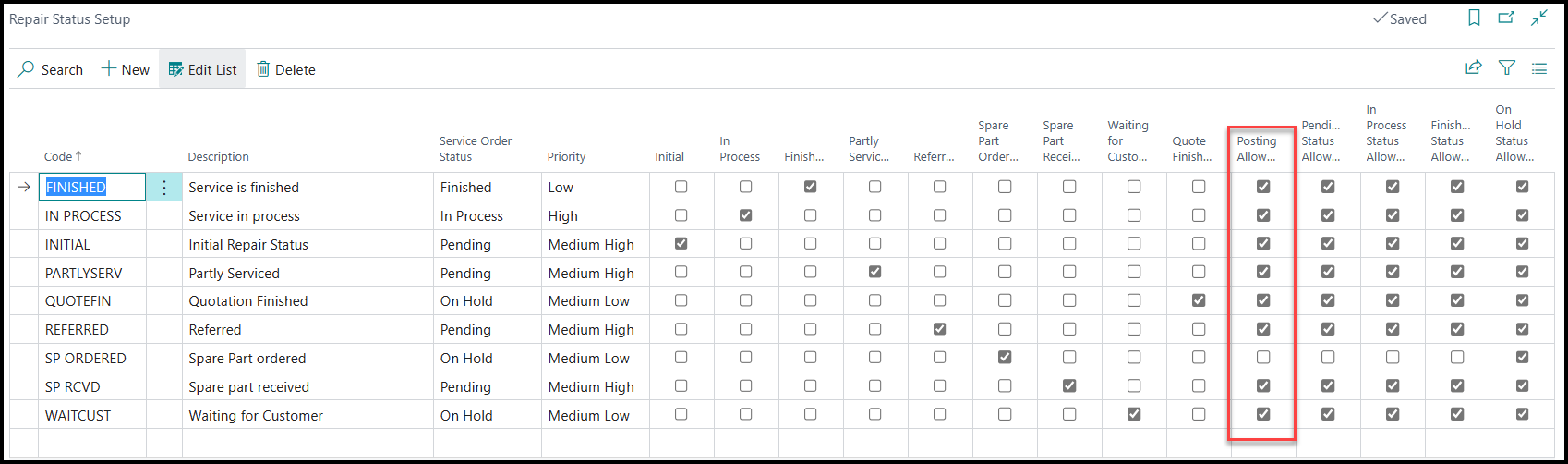
Furthermore, make sure that you review the Repair Status Setup page, which includes the Posting Allowed field. This significant field determines whether you can post a service order with a specific repair status or not. It's essential to verify and set up the Posting Allowed settings based on the desired posting behavior for different repair statuses.
You’ll begin your journey by learning about the vital process of posting service orders and the subsequent creation of historical documents and ledger entries in Business Central.