Implement scheduled and event-driven triggers in Azure Functions
Keeping a caller from blocking on a slow operation solves only part of the equipment-provisioning picture. Contoso also needs functions that start running without any caller at all, because a clock reaches a certain time, or because something changes in Dataverse. This unit looks at what triggers a function to run in the first place.
Run reconciliation on a schedule
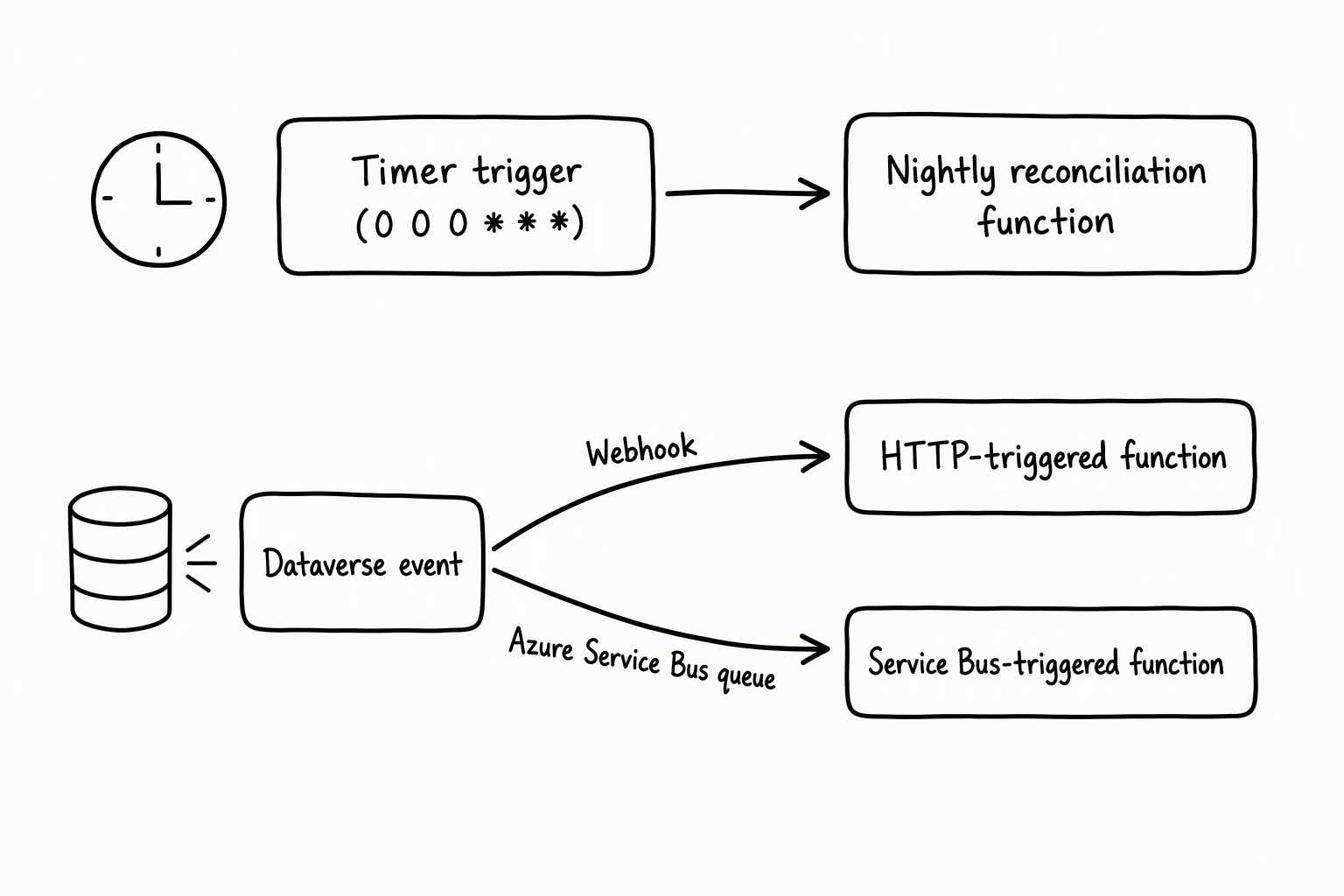
Contoso's allowance data drifts over time: requests get approved, devices get returned, and allowance balances need a nightly pass to catch inconsistencies before employees submit new requests against stale numbers. A timer trigger handles this kind of work well, because nothing calls the function directly: the function wakes up on its own.
A timer trigger relies on a schedule property to define when it runs. In most cases, that property holds a NCRONTAB expression: six fields in the form {second} {minute} {hour} {day} {month} {day-of-week}, one more than a standard cron expression because of the leading seconds field. The nightly reconciliation job uses the pattern 0 0 0 * * *, which fires every day at midnight.
On a function app that runs on an App Service plan, you can use a TimeSpan value instead. Either way, the schedule lives in configuration, not in code that a caller has to invoke.
Two details matter more than they first appear. The first is runOnStartup. It's tempting to set it to true while you test a function locally, but you rarely want that setting in production. A function app restarts for all kinds of reasons: a deployment, a scale operation, a host recycle.
Each restart fires the function again. For a nightly reconciliation job, an unplanned extra run means allowances get recalculated twice in one night, which is exactly the kind of inconsistency the job exists to prevent.
The second detail is schedule monitoring. The timer trigger persists information about each scheduled occurrence. Suppose the function app happens to be down at the exact moment a run was due. The next host instance that starts up recognizes the missed occurrence and runs it, instead of silently skipping a night of reconciliation or firing it twice.
For allowance data that feeds directly into whether an employee can submit a new request, a skipped or duplicated run isn't a cosmetic bug. It's a data-integrity problem that eventually surfaces as an employee complaint.
Learn more about configuring a timer trigger schedule.
React to Dataverse events instead of polling
Reconciliation is Contoso looking inward on a schedule. The other half of the picture is Contoso reacting outward: the moment someone creates a new request record, or a request's status changes from submitted to approved. Polling Dataverse on a timer to check "did anything change?" works, but it wastes calls and adds latency.
Dataverse already has a better answer: an event framework that plug-ins, workflows, Azure integrations, and webhooks all build on, registered through the Plug-in Registration tool. Two of those integration paths lead straight to an Azure Function.
Path 1: A webhook calls the function's HTTP trigger directly
The most direct route is a Dataverse webhook that posts to your function's HTTP trigger endpoint the moment the registered table event fires. Registering the webhook requires a name, an endpoint URL, and one of three authentication options.
One of those options, WebhookKey, deserves a second look: it passes its value as a query string using code as the key. That's the same query-string convention an Azure Functions HTTP trigger already expects for its function key.
In other words, the webhook's authentication model and the function's default authentication model line up without any extra translation layer. Dataverse calls the function, the function validates the key, and the request processes immediately.
Path 2: Dataverse posts to Azure Service Bus, and a Service Bus trigger picks it up
The second route adds a layer of decoupling. Instead of calling your function directly, Dataverse posts the execution context of the operation to a queue or topic. It does this through a service endpoint registered in Dataverse together with an Azure-aware plug-in step, again configured with the Plug-in Registration tool. Your function doesn't use an HTTP trigger here; it uses a Service Bus trigger, and it picks up the message whenever it's ready, independent of Dataverse's own transaction.
Choose the path that matches the reaction you need
Both paths start from the same Dataverse event framework, so the real decision is about coupling, reliability, and volume:
| Consideration | Direct webhook (HTTP trigger) | Service Bus (Service Bus trigger) |
|---|---|---|
| Coupling to Dataverse's transaction | Configurable: synchronous steps wait on the call, while asynchronous steps don't | Loose: asynchronous queue or topic buffers the message |
| Delivery guarantees | None built in; a failed call is just a failed call | Retry and dead-lettering come from the queue |
| Best fit for event volume | Modest, steady volume | Higher or spikier volume |
| Reaction speed | Fastest: no intermediate hop | Slightly slower: message passes through the queue |
| Operational complexity | Lower: one registration, one endpoint | Higher: service endpoint, plug-in step, and queue to manage |
For a request-status-change notification that needs to reach a downstream system quickly and doesn't happen often, the direct webhook is enough: you get a fast, simple round trip. Consider something like new-request creation during a high-volume period, where you want the function to survive being temporarily unavailable. If you'd rather rely on the queue's retry and dead-letter handling than build that resilience yourself, the Service Bus path earns its extra moving parts.
Learn more about registering a Dataverse webhook and about integrating Dataverse with Azure Service Bus.
Guiding question: Think about the request-status-change event in Contoso's solution. Given how often requests change status and how tightly the downstream system needs to stay in sync, would you reach for the direct webhook or the Service Bus path? What would change your answer?
Connect an event-driven trigger to longer-running work
An event-driven trigger doesn't have to do all the work itself. Suppose a webhook-triggered function discovers that the request it received needs to fan out across several fulfillment sources. The function can start a Durable Functions orchestration and return immediately, instead of trying to finish all that fan-out work inside the trigger's own execution. The trigger's job is to decide that work needs to happen and get it started.
Avoid two common pitfalls
A direct webhook call isn't a guaranteed-delivery mechanism. Because it's an HTTP call with no queue behind it, a transient failure on either side means the event is gone unless you add your own retry logic. Don't assume Dataverse quietly retries a failed webhook call the way a queue retries a failed message delivery.
Scheduling reconciliation too tightly causes the second pitfall. If you leave runOnStartup enabled, or if you schedule reconciliation to run close to a deployment window, you risk the duplicate-run scenario described earlier. Treat the timer schedule and your deployment practices as something you reason about together, not separately.