Authenticate to Microsoft Power Platform by using managed identities
Contoso's functions no longer wait on a caller, and they start themselves on a schedule or the moment a Dataverse event fires. Every one of those functions still has a job to finish once it wakes up: reading allowance and eligibility data, or writing back an approval or fulfillment status the instant a device turns up available.
This unit looks at how a function proves who it is to Dataverse when it makes that call, without a developer ever storing a secret to do it.
See what a stored client secret costs you
The traditional way a custom application authenticates to Dataverse is server-to-server (S2S) authentication: you register an application in Microsoft Entra ID, generate a client secret (or certificate) for it, and your function code reads that secret from configuration whenever it needs a token. It works, but the secret itself becomes something you now have to manage for as long as the function exists.
That management burden shows up in predictable ways:
- It has to live somewhere, which usually means an app setting or a key vault reference that someone configured by hand.
- It expires, which means a rotation task that someone has to remember, test, and deploy before the old value stops working.
- It can leak. Examples include a secret pasted into a log statement during debugging, committed to source control in a moment of carelessness, or left behind in an old, uncleaned deployment slot.
None of this is unique to Contoso. It's the ordinary cost of any credential a human has to create, store, and eventually replace.
Let a managed identity carry the function app's credentials
A managed identity removes that cost by letting the function app itself hold the credential. Azure creates and manages a Microsoft Entra identity for the function app, and the Azure Functions runtime uses that identity to request tokens directly from Entra ID at run time. No secret ever appears in app settings, no certificate needs renewal, and there's nothing for a developer to protect in code, because there's nothing a developer ever typed in.
You choose between two kinds of managed identity, and the choice comes down to how tightly you want the identity's lifecycle tied to a single function app.
| Consideration | System-assigned identity | User-assigned identity |
|---|---|---|
| Lifecycle | Created with the function app, deleted with it | Exists as its own standalone resource |
| Sharing | Belongs to exactly one function app | Can be assigned to multiple function apps |
| Good fit | A function whose Dataverse access is unique to that one app | Several function apps that genuinely share the same access needs |
Microsoft's current guidance favors user-assigned identities in most scenarios because their lifecycle and role assignments are independent of the function app. Either option reuses the same underlying authentication model Dataverse already expects from an application. The difference is only in what identifies the caller and how that identity gets provisioned, not in how Dataverse processes the call once it arrives.
Request a token from the managed identity in code
Inside the function, use the Azure.Identity library to turn that managed identity into a token the Dataverse client can use. Create a DefaultAzureCredential for local development, or a ManagedIdentityCredential scoped to the user-assigned identity's client ID when the function runs in Azure, then request a token for the Dataverse scope: the environment URL followed by /.default.
Pass that credential to ServiceClient from Microsoft.PowerPlatform.Dataverse.Client through its token-provider constructor, which calls your function on demand whenever it needs a fresh token.
var credential = new DefaultAzureCredential();
var environmentUrl = new Uri("https://org.crm.dynamics.com");

var serviceClient = new ServiceClient(
    instanceUrl: environmentUrl,
    tokenProviderFunction: async instanceUri =>
    {
        var resource = new Uri(instanceUri)
            .GetComponents(UriComponents.SchemeAndServer, UriFormat.UriEscaped);
        var token = await credential.GetTokenAsync(
            new TokenRequestContext(new[] { $"{resource}/.default" }));
        return token.Token;
    },
    useUniqueInstance: true);
Tell Dataverse who that identity is
Turning on a managed identity for the function app solves half the problem. Dataverse still has no idea the identity exists until you tell it. You create a Dataverse application user, the same mechanism traditional S2S authentication relies on. The difference is in how you find it.
Instead of searching for a registered application by its Application ID, you search for and add the managed identity by its application (client) ID in the Power Platform admin center. From Dataverse's point of view, the application user is what makes an incoming call recognizable as a known caller. That holds regardless of whether a registered app or a managed identity sits behind it.
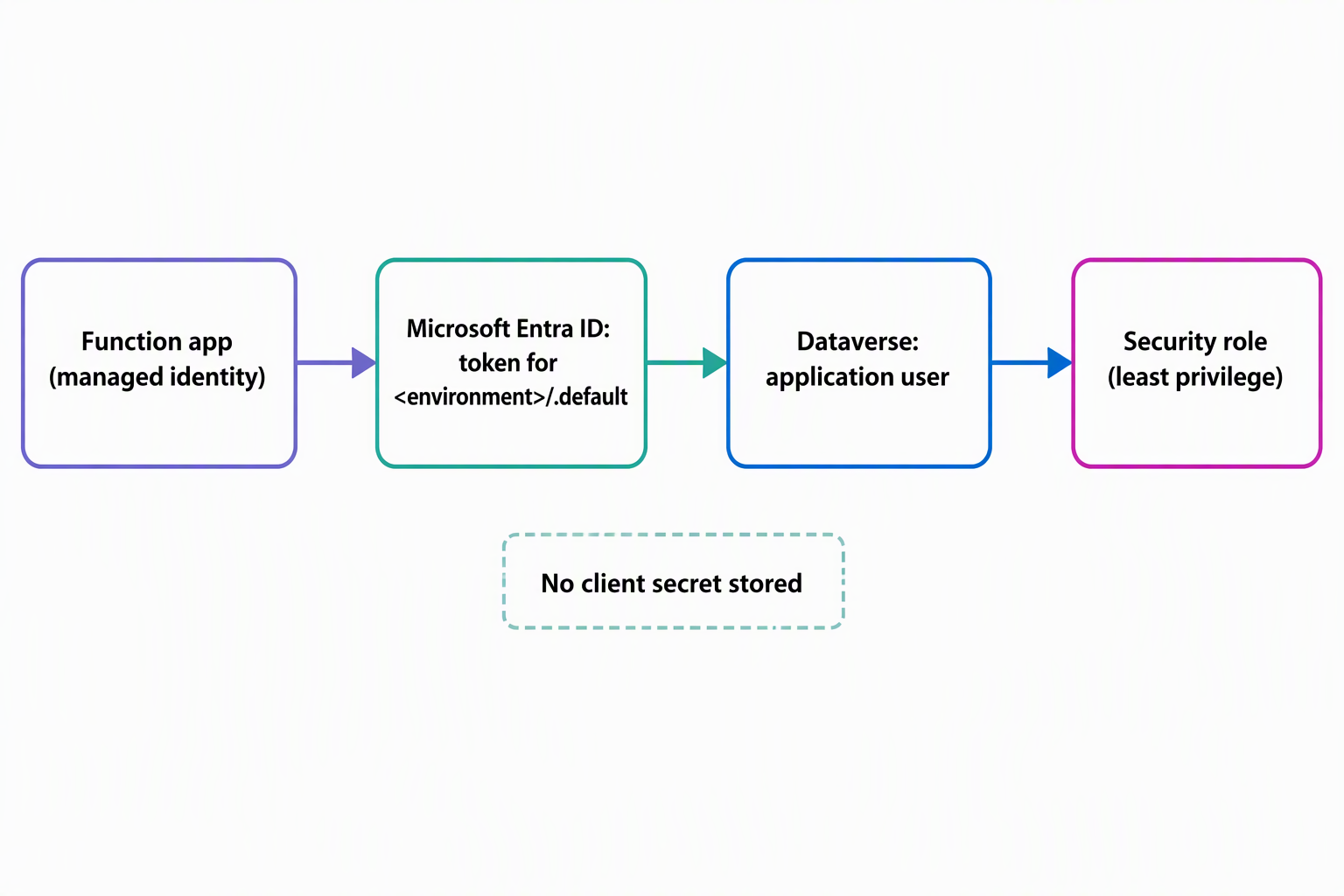
An application user, like any other Dataverse user, needs a security role before it can do anything. Here's where the setup diverges from what you might expect: you can't associate an application user with one of Dataverse's default security roles. You create a custom security role instead, one scoped to exactly what the identity needs, and associate the application user with that custom role rather than a built-in one.
Scope the role to exactly what the function touches
For Contoso's equipment-provisioning function, "exactly what the identity needs" means read and write access to the device, request, and allowance tables. These are the three tables the function actually reads from or writes back to as it confirms availability and updates a request's status. It doesn't need anything on the employee table, and it certainly doesn't need anything close to a System Administrator-level role.
That restraint matters more for a backend service identity than it would for a human user. A person signing in gets to notice when something looks wrong and stop. A managed identity doesn't notice anything; it calls Dataverse with whatever access its application user carries, every time, without anyone reviewing that decision in the moment.
Suppose the function's code ever has a bug, or the credential is somehow misused. The custom security role is the only thing standing between that mistake and the rest of your Dataverse environment. A role scoped to three tables turns a potential incident into a contained one.
Carry the same identity into orchestrations
This same managed identity doesn't stop being useful once execution moves into a Durable Functions orchestration. An orchestrator can call HTTP endpoints directly, and it has built-in support for authenticating those outbound calls with a managed identity.
As a result, a fan-out/fan-in workflow that checks availability across multiple sources and then needs to call back into Dataverse doesn't need a separate authentication story of its own. The identity and its application user carry through, no matter which part of the function app happens to be making the call.
Reflect: Contoso is deciding between two options. It could give its provisioning function app a user-assigned identity so a second function app (one that only reads reporting data) can reuse it. Or, it could give each function app its own system-assigned identity. Which would you choose, and what risk are you weighing either way?
Avoid two pitfalls
It's tempting to associate an application user with a broad, default security role to get something working, especially under deadline pressure. Resist that shortcut. A default role is built for a human doing a job across the product, not for a single backend function with three tables' worth of responsibility. That gap between those two things is exactly the exposure you're trying to avoid by using a managed identity in the first place.
The second pitfall shows up with user-assigned identities specifically. You can share one user-assigned identity across several function apps. Because of that, it's easy to forget that sharing the identity also means sharing its application user and, with it, every permission that application user's custom role grants.
Suppose one function app needs access to the allowance table and another only needs the device table. Giving both apps the same shared identity hands the second app access it never needed. Match the identity to the access boundary you actually want, not to whichever identity happens to be easiest to reuse.
Learn more about managed identities for Azure resources and about creating an application user in Dataverse.