Verify classification supports safe Copilot grounding
Relecloud is about to widen Microsoft 365 Copilot access to the regulated case team's site, and one Woodgrove Bank case file sits at the center of the decision. That file carries a sensitivity label resolved by Relecloud's highest-priority label policy—the same policy resolution you configured earlier in this module. Before anyone signs off on broader Copilot access, you need an answer to one specific question: does Copilot actually honor that label the way the policy designed it to, or does Copilot's recognition of labeling have gaps that the policy alone can't close?
Guiding question: Sensitivity labels protect content in more than one way—item-scoped file protection, encryption usage rights, and container-scoped site protection. Does Copilot recognize and respect every one of these the same way? Predict your answer before you read the reveal below.
Copilot only respects protection that already exists
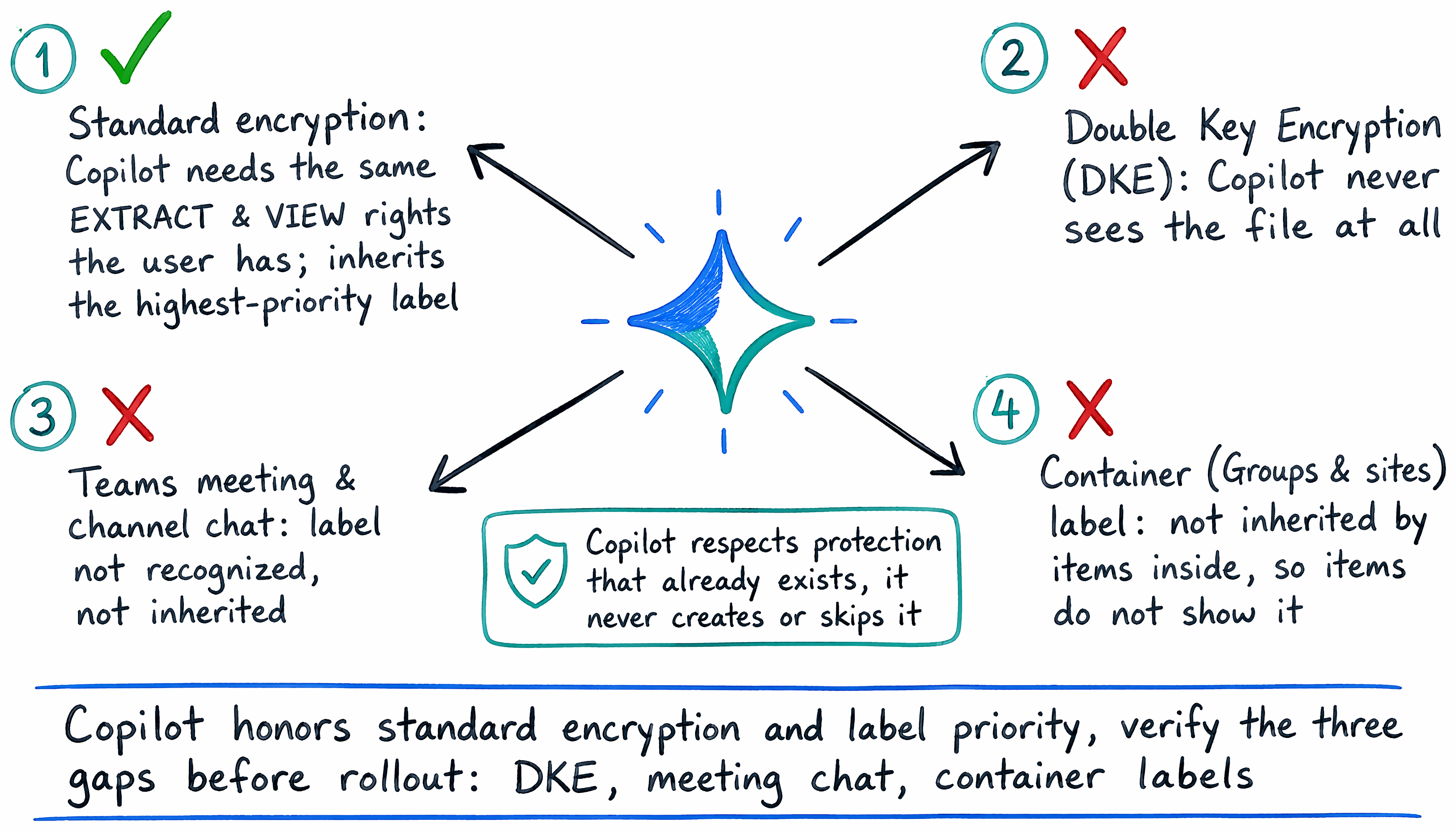
Here's the reveal: Copilot doesn't create protection, and it doesn't skip protection that already applies to content it references. When encryption is applied to an item, Copilot needs the same EXTRACT and VIEW usage rights the user already holds—Copilot "can only summarize or reference content that the user is authorized to access." If the case file's label restricts extraction, Copilot's response respects that restriction exactly the way opening the file directly would.
That same respect-what's-there behavior shows up when Copilot draws on more than one labeled reference to build a single response. Rather than picking one label arbitrarily or dropping labeling altogether, Copilot displays and inherits the highest-priority label among the sources it draws from—the identical priority-resolution concept that governs how Relecloud's policies resolve when a user falls under more than one label policy. In Copilot Chat, "the response reflects the highest-priority label," and when Copilot generates new content from labeled sources, that same highest-priority label carries forward whenever the scenario supports inheritance. So far, the labeling scheme and Copilot's behavior line up: policy resolves priority, and Copilot's response inherits that same resolved priority.
Learn more about how Copilot honors labels and encryption in How data is protected and audited in Microsoft 365 and Microsoft 365 Copilot.
Encryption stops Copilot cold—by design
Not every protected item reaches Copilot at all, and that's the first verification gap worth checking before rollout. Content protected by Double Key Encryption behaves differently from standard encryption: Copilot never uses it, period. DKE exists for Relecloud's most sensitive data, the content "subject to the strictest protection requirements," and as a direct consequence, "Copilot and agents can't access this data"—items protected by DKE simply aren't returned by Copilot in the first place. If the Woodgrove case file were DKE-protected instead of standard-encrypted, this verification question wouldn't be about whether Copilot respects the label; Copilot would never see the file to reference it.
Teams meetings and chat: a gap Copilot doesn't yet close
The second gap sits in a different place: Teams meetings and chat. A label that protects a meeting's chat isn't currently recognized by Copilot or agents the way a labeled file is. Data returned from a meeting chat or channel chat doesn't display an associated sensitivity label, copying that chat data can't be prevented for a destination item, and the label can't be inherited from it. This gap is narrower than it first sounds—it doesn't extend to meeting invites, attendee responses, or calendar events protected by sensitivity labels, which continue to work normally. But if the case team relies on Teams chat as part of its case discussion, that chat's label protection is exactly the kind of gap you'd miss if you test only file-based content before rollout.
Container labels were never designed to protect items—and Copilot doesn't pretend otherwise
The third gap connects directly back to the scope decision from earlier in this module. Recall that a label scoped to Groups & sites protects the container itself—who can join, what devices can connect—and was never designed to automatically label or encrypt the items inside it. Copilot's behavior here isn't a separate limitation so much as a consequence of that same design choice: sensitivity labels applied to containers aren't inherited by the items in those containers, so those items don't display their container label in Copilot and can't support label inheritance from it. If the case team's site itself carries a Confidential container label, a Teams channel message that Copilot summarizes from that site doesn't display Confidential—not because Copilot ignores the label, but because that label was never scoped to protect the message in the first place. Knowing this ahead of time turns what could look like a Copilot failure into an expected, verifiable outcome of a scope decision you already understand.
Learn more about these verification gaps in Considerations to manage Microsoft 365 Copilot and Channel Agent in Teams for security and compliance and Sensitivity labels for Microsoft 365 Copilot.
Verify both halves before you call it safe
Safe Copilot grounding isn't a single check—it's two. The first half is the one this module builds toward all along: does the classification and labeling scheme resolve the way you designed it, with the right item scopes, container scopes, and policy priorities in place? The second half is specific to Copilot: does Copilot's recognition of that scheme have any gaps for the content types actually in scope—DKE-protected files, Teams meeting chat, or items sitting inside a labeled container? For Relecloud's case file, both halves check out: the encryption usage rights apply as designed, and the file itself isn't DKE-protected or container-only. That confirms the file is ready for broader Copilot access, and that same two-part verification is what you run before any Copilot rollout that touches labeled content.