Publish a Dataverse event by using the IServiceEndpointNotificationService
The introduction describes how Contoso Facilities needs the availability service to learn about a request status change the moment it happens, not during the next scheduled sync. This unit explores the first of the two ways to make that happen: publishing an event directly in plug-in code, so you decide exactly when the event goes out.
Decide when your plug-in should publish an event
Not every change to the Request table matters to the availability service. An employee might edit a comment, correct a typo in a justification field, or update a cost center, none of which the availability service needs to know about. What the availability service cares about is a single business moment: the point where a fulfillment coordinator approves the request and the availability service needs to confirm stock.
When you call IServiceEndpointNotificationService from inside your plug-in, you control that decision in code. You can inspect the incoming values, compare them against the business rule you care about, and only publish the event when the incoming values satisfy that rule. This conditional check is the key capability shift this unit introduces: instead of publishing on every occurrence of a message, like every update to the Request table, you publish conditionally, based on logic you write.
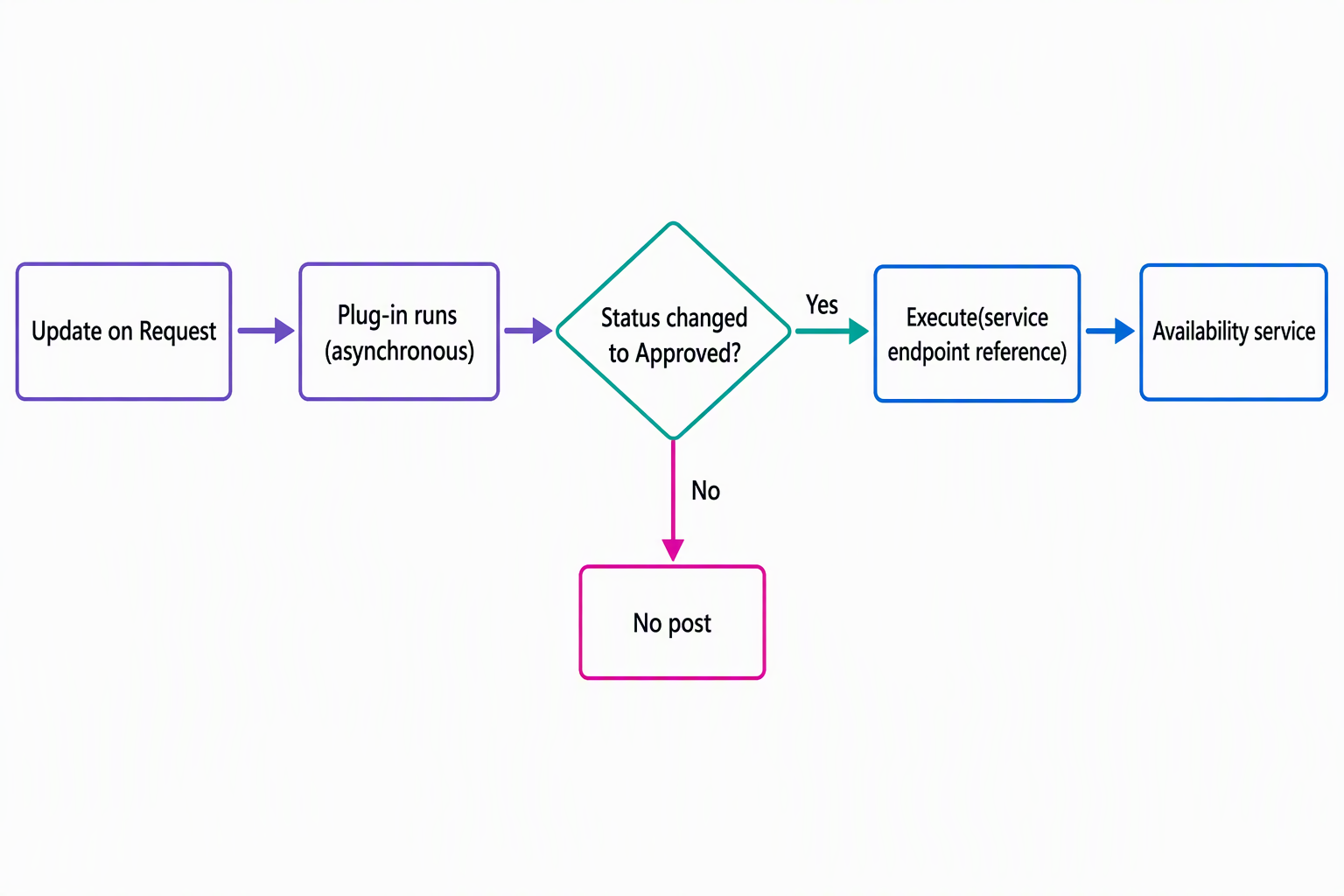
The next unit covers a no-code alternative: configuring publishing through the Plug-in Registration Tool. That approach is simpler to set up because it doesn't require writing conditional logic, but it also publishes on every occurrence of the message you register for. When the business rule that decides whether to publish is more nuanced than "this message fired," the code-based approach you explore here gives you the precision the tool-based approach can't.
Resolve the notification service and call Execute
IServiceEndpointNotificationService is an interface in the Microsoft.Xrm.Sdk namespace. It exposes a single method, Execute, which posts the plug-in's execution context to a service endpoint that's already registered against your environment. A later unit covers registering that destination endpoint, whether it's a webhook, Azure Service Bus, or Azure Event Hubs. This unit assumes the destination already exists and focuses on the call that publishes to it.
Inside a plug-in, you obtain the notification service from the IServiceProvider that Dataverse passes into your Execute method, the same way you obtain the organization service or the tracing service. You then call its Execute method, passing an EntityReference that identifies the registered service endpoint and the plug-in's own execution context:
// Inside the plug-in's Execute(IServiceProvider) method
var notificationService =
    (IServiceEndpointNotificationService)serviceProvider.GetService(
        typeof(IServiceEndpointNotificationService));

var newStatus = (OptionSetValue)target.Attributes["cmp_requeststatus"];

if (newStatus.Value == RequestStatus.Approved)
{
    var availabilityEndpoint = new EntityReference("serviceendpoint", availabilityServiceEndpointId);
    notificationService.Execute(availabilityEndpoint, context);
}
The payload that reaches the availability service isn't something you construct from scratch; it's the plug-in's execution context itself. Suppose the availability service needs additional data beyond what the context already carries. You enrich that context earlier in the pipeline by adding shared variables, rather than trying to reshape the payload at the point you call Execute.
One design detail is easy to miss: register Azure-aware plug-ins that call IServiceEndpointNotificationService asynchronously. This guidance has a direct consequence for how you design the Request-approval plug-in: an asynchronous registration helps keep the fulfillment coordinator's approval action from waiting on external integration behavior.
Guiding question: Think about another table or message in your own environment where only some occurrences matter to a downstream system. What condition, evaluated in code, would separate the occurrences worth publishing from the ones that are noise?
Apply the pattern to the request-approval scenario
Picture the plug-in registered on the Request table's Update message. Every time a coordinator edits a request, the plug-in runs, but it only has one job worth caring about: noticing when the status field transitions to Approved. The conditional check in the code sample above does exactly that. It compares the new status value against the "Approved" option and only resolves the service endpoint and calls Execute when the comparison succeeds.
Everything else about the update—a changed comment, an adjusted cost center, a reassignment—runs through the same plug-in step without ever reaching the Execute call. The availability service only hears from Dataverse when there's something worth acting on: confirming stock for an approved request. That's a meaningfully different outcome from registering the same step through the Plug-in Registration Tool, which would publish an event for every update regardless of which field changed.
Avoid the pitfalls that undermine this approach
A few mistakes commonly show up when teams first adopt code-based publishing:
| Pitfall | Why it matters |
|---|---|
Calling Execute on every operation, regardless of business relevance |
Floods the availability service with noise, making it harder to tell which notifications are meaningful |
| Registering the plug-in step synchronously when the integration doesn't need it | Register asynchronously instead; synchronous registration makes users wait on integration behavior that an asynchronous design avoids |
| Treating the service endpoint reference as fixed | If someone deletes and re-creates the destination endpoint, or if the plug-in points to the wrong service endpoint ID, the EntityReference becomes stale and the post fails |
Suppose you only need every occurrence of a message on a table published, without any conditional business logic. In that case, the code-based approach you explore in this unit is more overhead than you need. The next unit shows you how the Plug-in Registration Tool handles that simpler case without any code at all.
With the mental model for conditional, code-based publishing in place, you're ready to compare it directly against that configuration-driven alternative.