Publish a Dataverse event by using the Plug-in Registration Tool
The previous unit ends with a promise: a direct comparison against a configuration-driven alternative to the code-based publishing you explored. This unit delivers on that promise. You learn how the Plug-in Registration Tool lets you publish a Dataverse event without writing a single line of plug-in code. You also learn when that no-code approach serves Contoso Facilities better than the conditional logic you saw.
Compare a conditional check in code with an unconditional step in configuration
In the previous unit, calling IServiceEndpointNotificationService from inside a plug-in gives you a decision point: you inspect the incoming values and only publish when the incoming values satisfy your business rule. The Plug-in Registration Tool removes that decision point entirely.
When you register a service endpoint step through the tool, you bind a message and a table directly to an already-registered destination. That's the same way you'd bind a message and table to custom plug-in logic. From that point on, every matching occurrence of that message on that table triggers a post to the destination automatically, with no condition to satisfy first.
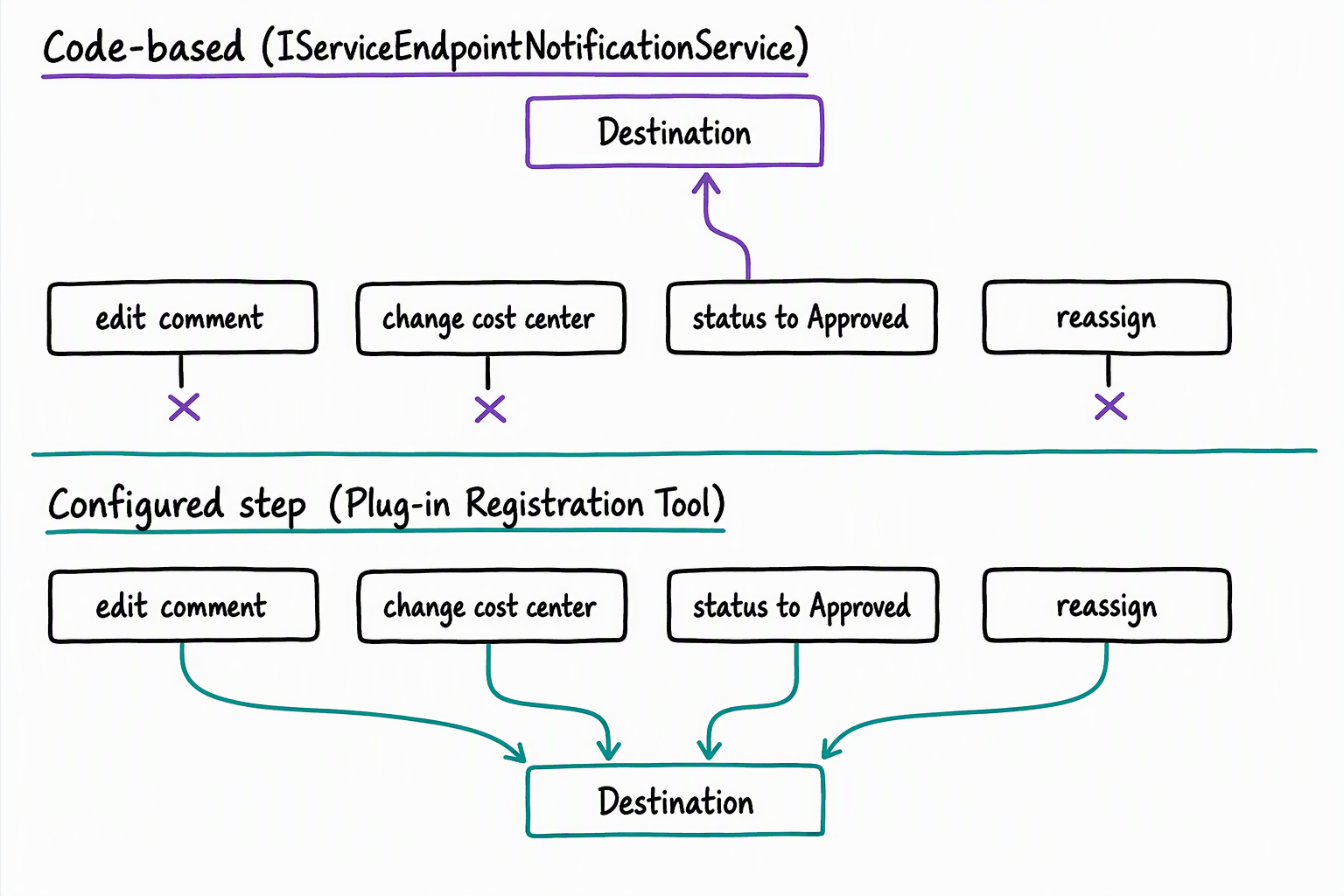
That single difference, conditional versus unconditional, drives almost everything else about when each approach fits:
| Consideration | Code-based (IServiceEndpointNotificationService) |
Tool-based (Plug-in Registration Tool) |
|---|---|---|
| How you set it up | Write, compile, and register plug-in code | Configure a step, no code involved |
| What gets published | Only occurrences that satisfy logic you write | Every occurrence of the registered message and table |
| Best fit | The destination needs a filtered subset of occurrences | The destination needs every occurrence, with no filtering |
| Ongoing ownership | You maintain the business-rule logic over time | No custom logic to maintain |
Register a service endpoint step instead of a plug-in step
The Plug-in Registration Tool isn't only for plug-ins. You already use it, or a tool like it, to register plug-ins, custom workflow activities, virtual table data providers, and webhooks. A service endpoint step follows that same underlying mechanism: a message, a table, and a pipeline stage.
To explore how this works, picture connecting to the Contoso Facilities environment with the tool. Select a service endpoint that's already registered there — the same availability-service destination from the previous unit. Registering the destination itself, whether it's a webhook, Azure Service Bus, or Azure Event Hubs, is what the next unit covers.
Here, you explore what happens once that destination already exists. With the endpoint selected, the registration consists of choosing Register New Step. You then specify the message you care about (Create, Update, or Delete), the primary table that message applies to, and the pipeline stage the step runs at.
From that moment, Dataverse posts the execution context for every matching occurrence of that message on that table to the endpoint without any further input from you. No conditional check runs first. If the message and table combination fires, the post happens. For Azure Service Bus and Azure Event Hubs, the step runs asynchronously. For a webhook, the step can run either synchronously or asynchronously.
What unconditional publishing means for the Request table
Picture registering a step this way on the Request table's Update message, pointed at the availability service. Every time anyone updates a request, Dataverse posts to the endpoint, including when a coordinator edits a comment, corrects a cost center, or reassigns the request to a different approver. None of that noise matters to a service that only cares about one thing: whether a request became approved, which means someone needs to confirm stock.
The Register New Step dialog in the Plug-in Registration Tool does include a Filtering Attributes field. It limits a step to updates that include a given column, such as the status column. But that filter works on which column changed, not the value it changed to.
A step filtered to the status column still fires whenever status changes to any value, not only to Approved. A tool-registered step still has no way to ask "did the status change to Approved?" before it posts; it only knows that the status column changed on a Request record.
That's exactly the gap the previous unit's conditional check closes, and exactly why Contoso Facilities keeps the code-based approach for that specific integration. Compare that to a few related pitfalls worth watching for whenever you consider the tool-based approach more generally:
- High-volume step registration can flood the destination with noise it has no use for.
- A missing target service endpoint leaves nothing for the step to point at.
- An overlooked pipeline stage can produce timing behavior you didn't intend, the same risk that applies to any plug-in step.
Decide when configuration beats code
None of this makes the tool-based approach the wrong choice in general, only the wrong choice for the availability-service scenario specifically. The tool-based approach earns its keep in three situations. It fits when every occurrence of a message on a table is genuinely relevant to the destination. It also fits when you want to avoid writing and maintaining custom logic, or when you're validating an integration quickly before investing in plug-in code.
Contoso Facilities has a scenario like that elsewhere in the same environment. Suppose an analytics and reporting feed needs to know about every new Request record the moment it's created, regardless of status, department, or device type. Completeness matters more than filtering there: the reporting feed wants the full picture, not a curated subset.
Registering a step on the Request table's Create message through the Plug-in Registration Tool gives Contoso Facilities that completeness without a single line of code. Meanwhile, the availability-service integration keeps its conditional, code-based publishing exactly as the previous unit designed it.
Synthesis prompt: Think about the two integrations in this unit, the availability service and the analytics feed. What's the deciding factor that pushes one toward code and the other toward configuration? Now think of an integration in your own environment. Which side of that line does it fall on, and why?
With both publishing mechanisms in place, the remaining question is what sits on the other end of either one. The next unit turns to that question: how you register the service endpoints themselves, including webhooks, Azure Service Bus, and Azure Event Hubs, so the destinations this unit assumed already exist.