Apply retention policies to AI app prompts and responses
As organizations adopt enterprise and consumer AI tools, the need to manage user interactions with these apps becomes increasingly important. Microsoft Purview retention policies help ensure that AI-generated prompts and responses are retained or deleted in accordance with compliance requirements. To apply retention, this content must first be captured by a collection policy that copies it into the user's Exchange mailbox.
Captured interactions are stored in hidden folders within Exchange Online mailboxes. Retention policies apply to these folders based on the locations you select when configuring a policy, allowing you to manage AI content using the same tools and processes already in place for Microsoft 365 workloads.
Understand where AI app data is stored
Retention behavior depends on the type of AI app and how it's integrated:
- Enterprise AI apps include registered apps such as ChatGPT Enterprise and Azure AI services. These apps use Microsoft Entra ID for authentication and store prompts and responses in the user's Exchange mailbox.
- Other AI apps include tools like ChatGPT (consumer), Google Gemini, and Microsoft Copilot (consumer). If these apps are captured using a collection policy, their data is also stored in the user's Exchange mailbox.
In both cases, the content is stored in a hidden folder within the user's Exchange mailbox. These folders aren't visible in standard mail clients but can be searched and retained for compliance using Microsoft Purview.
Note
AI interactions must be captured by a collection policy before retention can apply. The policy must be configured to copy message content into the user's mailbox for discovery and compliance.
Choose the correct policy location
To apply retention to enterprise or consumer AI app content, select one or both of the following locations when creating or editing a retention policy:
- Enterprise AI apps: For Entra-registered apps like ChatGPT Enterprise and Azure AI services.
- Other AI apps: For tools like ChatGPT (consumer), Google Gemini, and Microsoft Copilot (consumer version).
These are separate from the Microsoft Copilot experiences location, which covers Microsoft 365 Copilot and other first-party experiences.
Note
These policy locations aren't selected by default and must be explicitly added to each retention policy that should apply to AI content.
Configure a retention policy for AI app interactions
In the Microsoft Purview portal, go to Solutions > Data Lifecycle Management.
Select Policies > Retention policies > + New retention policy.
On the Name your retention policy page, enter a name and optional description.
On the Policy Scope page, assign administrative units or use the Full directory.
On the Choose the type of retention policy to create page, choose either a Static or Adaptive scope.
On the Choose where to apply this policy page, select one of these locations:
Enterprise AI apps
Other AI apps
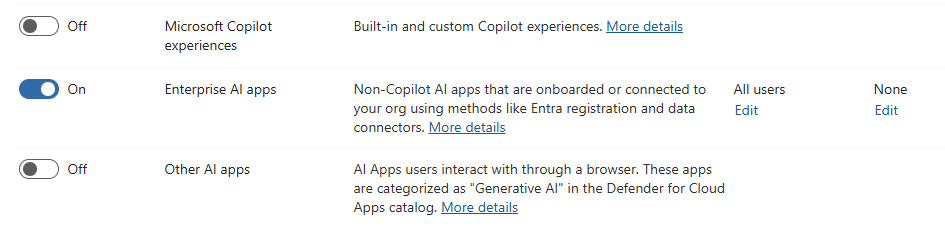
On the Decide if you want to retain content, delete it, or both page, choose whether to retain content, delete it, or both, and set how long to keep the content.
Review your policy settings, then create your policy.
Use retention labels for item‑level control
Because AI interactions are copied into users' Exchange mailboxes, you can also govern this data with retention labels published through a label policy. Publish the labels to the Exchange email location and, if needed, use an auto‑labeling policy to apply a label based on sensitive info types, keywords, or trainable classifiers. This supports item‑level retention when you need different rules than a broad policy.
Publish and apply labels
- In the Microsoft Purview portal, go to Solutions > Data Lifecycle Management > Policies > Label policies, then select Publish labels. Include Exchange email as a location.
- (Optional) Create an Auto‑labeling policy for Exchange with conditions that match AI interaction content, such as specific sensitive info types or keywords.
Note
AI interactions still need to be captured by a collection policy so they're written to the user's mailbox. Capturing enterprise and other AI app data, and some AI policy locations, require pay‑as‑you‑go billing. Retention labels themselves are published to Exchange because that's where the captured content resides.
What happens when retention applies
Once the configured retention period expires, items are processed through the Exchange compliance pipeline. They remain discoverable by eDiscovery if any holds are in place. When no holds apply, the service permanently deletes the items.
This process helps ensure that AI-generated content is handled according to your retention policies, even when it's not visible in the user interface of the AI tool.
Important
If a user is subject to another retention policy, an eDiscovery hold, or a litigation hold, permanent deletion might be delayed.