Align policy scope to risk
Once detection is defined, the next decision is where the policy should apply. Scope determines who is affected, where enforcement occurs, and how disruptive the policy feels in practice.
Poor scoping is one of the most common reasons data loss prevention (DLP) policies fail. It doesn't usually show up as a technical issue. It shows up as noise, confusion, or blocked work.
Choose locations based on risk, not convenience
It's tempting to scope policies broadly across all locations to ensure coverage. In practice, not all locations present the same level of risk.
Different locations support different kinds of data movement. Email, collaboration sites, file storage, and endpoints often expose data in different ways.
In Microsoft Purview, DLP policies can be scoped to locations like:
- Exchange email
- SharePoint sites
- OneDrive accounts
- Microsoft Teams messages
- Devices through Endpoint DLP
- Browser-based activity in supported browsers
Available conditions and enforcement actions vary by location, which is why scoping decisions directly affect how a policy behaves.
This page shows how those locations appear during policy creation, with each location scoped independently.
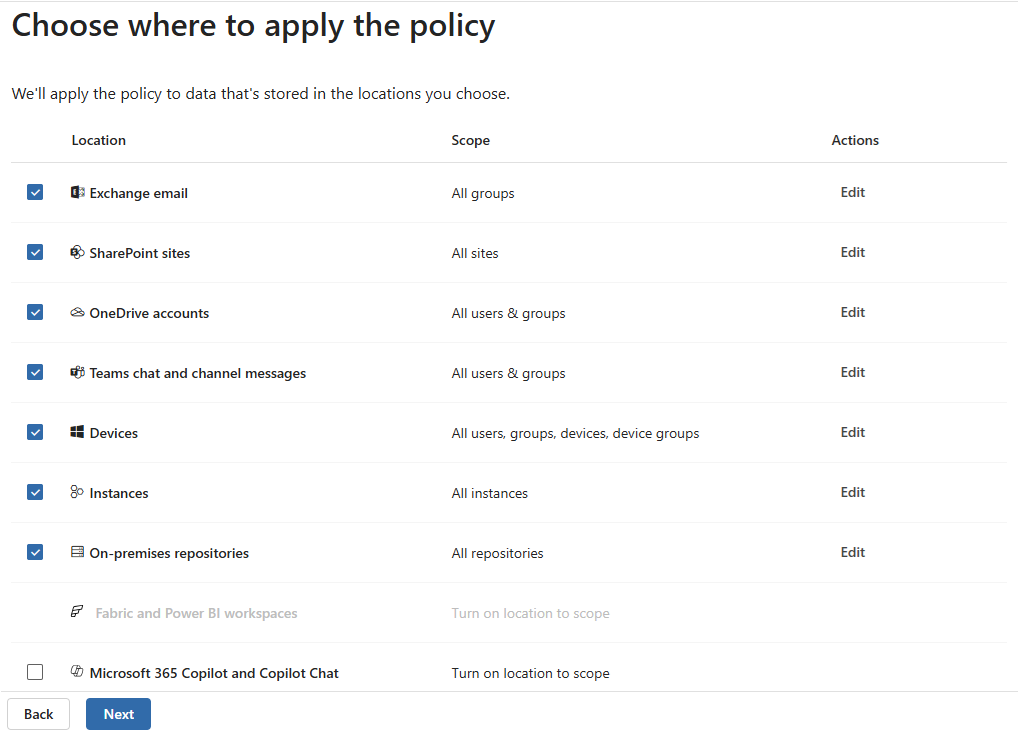
Effective scoping starts by asking:
- Where sensitive data is used
- Which locations support higher-risk actions
- Where enforcement would provide meaningful protection
Scoping to the locations that matter most reduces noise and makes results easier to interpret.
In practice, overly broad scope often shows up as alerts across many unrelated workflows or locations. When results span activities that don't share a common risk pattern, scope is usually too wide to interpret meaningfully.
Scope users, groups, and workloads intentionally
Who a policy applies to matters as much as where it applies. Broad user scope can make policies difficult to validate and harder to tune.
More deliberate scoping might focus on:
- Specific roles that handle sensitive data
- Departments with distinct workflows
- Workloads where risky actions are more likely to occur
Starting with a narrower scope makes it easier to understand policy behavior before expanding coverage.
Use pilot scopes to validate assumptions
Pilot scoping helps shape policy design. Applying a policy to a limited group allows you to:
- Confirm detection behaves as expected
- Observe real usage patterns
- Identify unexpected enforcement outcomes
A pilot scope has usually done its job when results are predictable and understandable, even if they aren't perfect. If alerts consistently reflect the scenarios you expected, expanding scope becomes a design choice rather than a guess.
Pilot scopes are most effective when paired with simulation, allowing you to evaluate results before enforcing restrictions more broadly.
Use inclusion and exclusion patterns to reduce noise
Scoping isn't only about what to include. Thoughtful exclusions are often just as important.
Exclusions can help:
- Avoid enforcing on known safe workflows
- Prevent duplicate alerts
- Reduce friction in low-risk scenarios
Exclusions that repeat across multiple policies often indicate a shared low-risk workflow rather than a detection problem.
Clear inclusion and exclusion patterns keep policies focused on the behavior you actually want to address.
Avoid overly broad scope
Broad scope can create the impression of stronger protection, but it often leads to unnecessary disruption.
When a policy applies everywhere and to everyone:
- Results are harder to interpret
- False positives increase
- User trust in enforcement decreases
Broad scope isn't always a mistake. Scope can be intentionally broad when enforcement outcomes are consistent and well understood. Problems arise when scope is broad by default rather than by design.
Effective policies balance coverage with precision. Expanding scope should be a deliberate decision, not a default.
Scope policies for AI-assisted workflows thoughtfully
AI-assisted workflows introduce new ways data can be reused, summarized, or transformed. These workflows often involve legitimate use of sensitive data.
Scoping policies for these scenarios requires care:
- Internal AI use might be expected and approved
- Browser-based AI tools can vary widely in risk
- Blocking too broadly can interrupt normal work
For example, a policy might apply to browser-based AI tools while allowing approved internal AI-assisted workflows used for drafting or summarization.
Rather than blocking entire categories of activity, deliberate scoping helps ensure policies address risky behavior without preventing acceptable use.
Once scope is set, enforcement choices determine whether protection guides behavior or disrupts it.