Validate policy behavior using simulation mode
Creating a data loss prevention (DLP) policy doesn't end when conditions, scope, and actions are defined. Before enforcement is enabled, policies should be validated against real activity to confirm they behave as intended.
Validation helps ensure policies reduce risk without disrupting normal work. It also provides the confidence needed to move from planning into enforcement.
Use simulation mode as a design feedback loop
Simulation mode allows a policy to evaluate activity without taking enforcement actions. Instead of blocking activity, the policy records what would have happened.
A DLP policy can be off, run in simulation, or run in enforcement, and the selected mode applies at the policy level, not per rule.
All rules within a policy run under the same mode. You can't simulate one rule while enforcing another.
This makes simulation a design tool, not just a safety check.
Simulation helps you:
- Confirm detection logic triggers as expected
- Observe how scope affects real users and workflows
- Evaluate whether selected actions are appropriate
In practice, simulation results are easier to interpret when patterns repeat. Repeated matches tied to the same action or workflow often point to scoping constraints. Scattered, one-off matches across unrelated activity might suggest detection is too broad.
While simulation doesn't enforce restrictions, users might still see policy tips or guidance. This allows organizations to observe not only how policies would trigger, but also how users respond to messaging before enforcement is enabled.
Treating simulation as feedback encourages deliberate refinement before enforcement.
Understand simulation constraints
Simulation has built-in limits that affect how results should be interpreted.
Constraints to keep in mind:
Simulation duration: Simulation typically runs for up to 15 days, and results are retained for 30 days after simulation ends. Reviewing findings during the validation window is important.
Location behavior: Not all locations are evaluated the same way. Locations that store content at rest are evaluated against existing and new items, while event-based locations are evaluated as new activity occurs.
Understanding these constraints helps set realistic expectations when reviewing simulation results.
Review results to understand real-world behavior
Simulation results show how a policy interacts with actual work patterns. Reviewing these results helps distinguish between intended enforcement and unexpected noise.
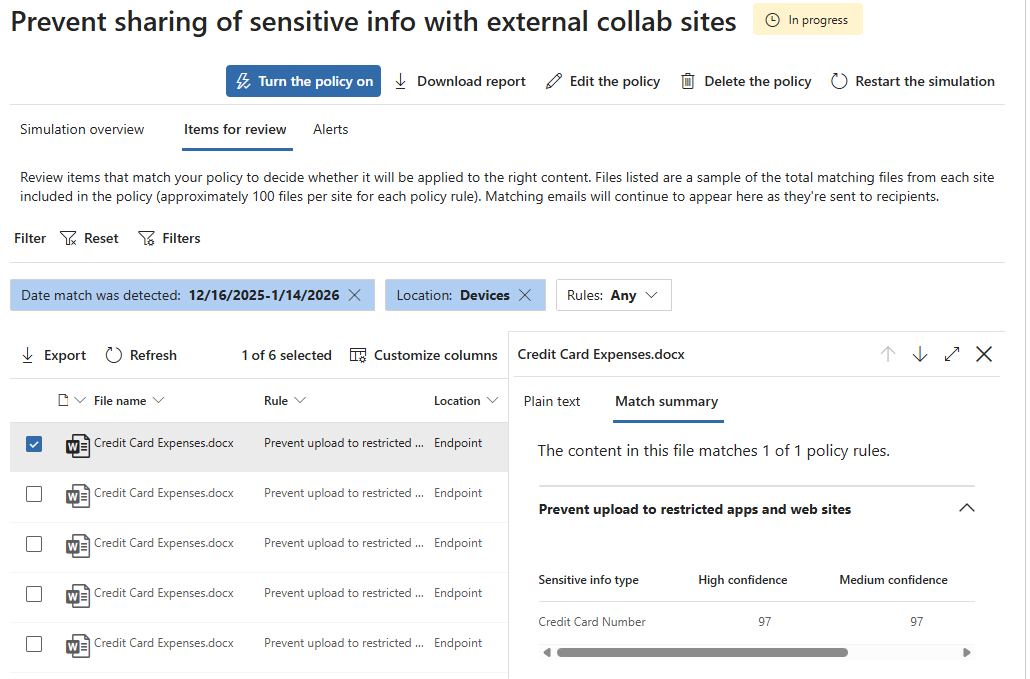
When reviewing results, look for:
- Where and how often the policy would trigger
- Whether activity aligns with expected risk scenarios
- Patterns that suggest legitimate work are being affected
Repeated alerts tied to the same users or workflows often indicate scope issues. Alerts spread across unrelated activity usually point to detection that needs refinement. High override rates tend to indicate action mismatch rather than user disregard.
The goal isn't zero activity. It's predictable, understandable activity.
If results are surprising or difficult to explain, enforcement should wait. If an alert can't be clearly explained, users are unlikely to understand it once enforcement begins.
Make targeted tuning adjustments
Simulation often reveals small adjustments that improve policy quality.
Common tuning changes include:
- Narrowing or expanding scope
- Refining detection conditions
- Adjusting actions to better match observed risk
Isolated events are rarely a strong signal. Tuning decisions are more reliable when patterns persist over time.
Identify when a policy is ready for enforcement
A policy is typically ready for enforcement when:
- Triggers align with expected scenarios
- False positives are limited and explainable
- Actions match the organization's risk tolerance
- Users can understand why enforcement occurs
Readiness is about confidence, not perfection. Some noise is expected, as long as it's predictable and understood.
Recognize validation as the start of the policy lifecycle
Validation isn't the final step. It marks the transition from design to ongoing management.
Once enforced, policies should continue to be reviewed and refined as:
- Business workflows change
- Data usage evolves
- New risks emerge
Viewing validation as the beginning of a lifecycle helps keep policies relevant and effective over time.
Validation confirms readiness, but real environments continue to change once enforcement begins.