Evaluate data security objectives and prioritize gaps
- 10 minutes
The posture dashboard tells you where the organization's data security stands at a high level. Data security objectives take that further by focusing on how sensitive data is protected, broken down into specific security goals with their own risk indicators. That breakdown is what lets you determine which gaps carry the most risk and where to focus first.
How objectives are organized
Objectives are grouped under two categories: Data protection, which covers preventing exposure, oversharing, and exfiltration, and Data discovery, which covers identifying sensitive data and monitoring unconnected sources. The number and names of specific objectives might change as Data Security Posture Management (DSPM) evolves, but the structure stays consistent. Every objective follows the same layout and surfaces the same types of signals.
Knowing the category helps you recognize dependencies. Discovery gaps can weaken protection objectives, because data loss prevention (DLP) policies depend on classification to identify what to protect. A large labeling gap in discovery reduces the effectiveness of every protection policy that references labels.
What to look for on an objective card
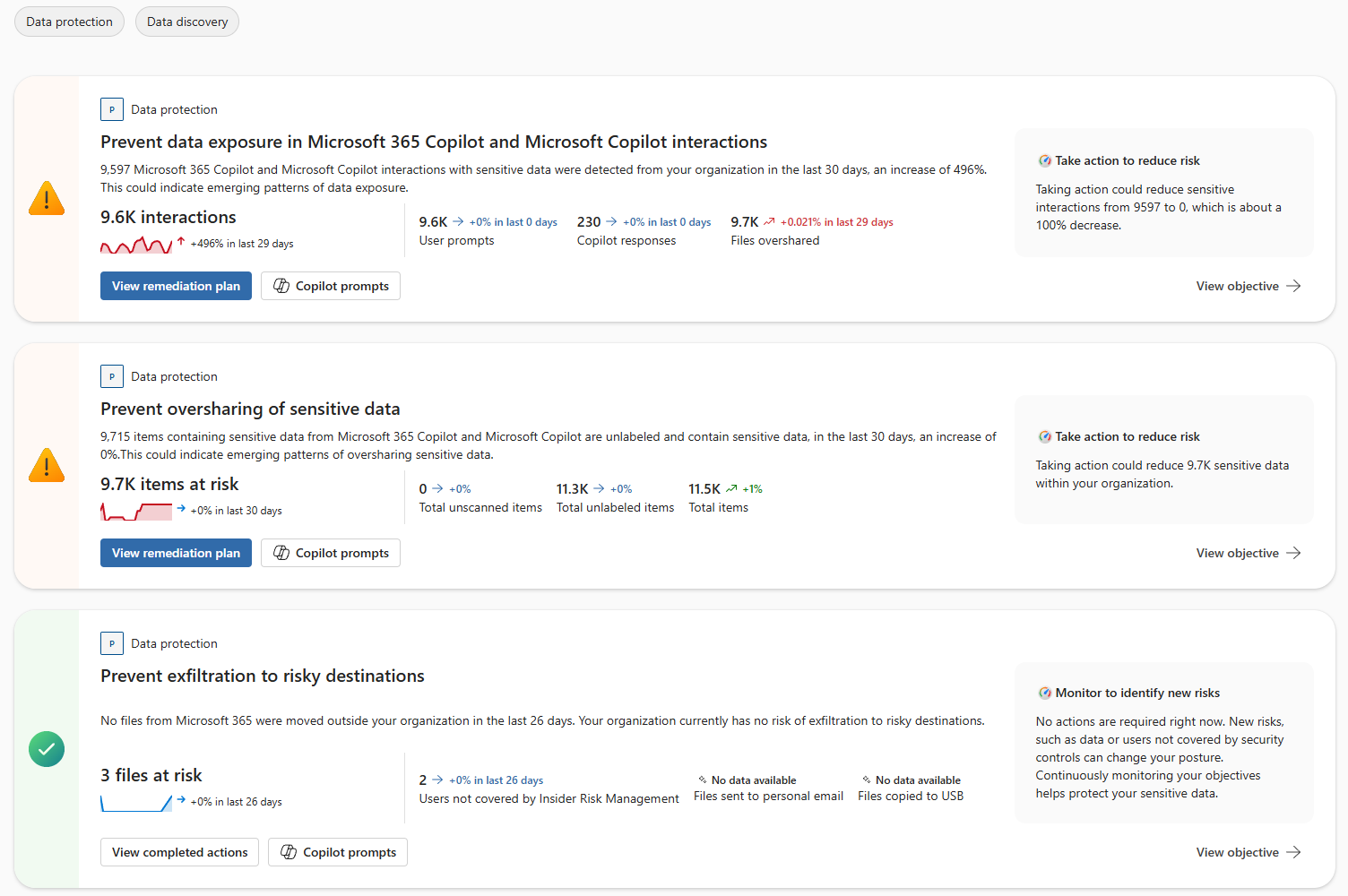
Each objective card surfaces four signals you need to assess priority:
- Whether the objective needs action or evaluation: A warning state means DSPM has identified enough risk to recommend intervention. A healthy state means conditions are within tolerance. Start with warning-state objectives.
- Scale and momentum: The item count tells you how broad the exposure is. The 30-day trend percentage tells you whether it's growing. Read them together. A large count with an upward trend is both broad and accelerating.
- Where the risk concentrates: Submetric breakdowns show which specific dimensions of the objective carry the most exposure. These turn a headline number into an actionable location.
- What DSPM recommends: The action panel tells you whether to reduce risk now, with an estimate of how many items the action addresses, or to monitor for emerging patterns.
Submetrics that show "No data available" don't mean the objective is healthy. They mean DSPM can't assess that dimension because a data source or connector isn't configured. That's itself a gap worth noting during assessment.
Evaluate priority across objectives
Not all objectives carry the same urgency. Comparing objectives requires reading several signals together and applying judgment based on what the organization cares about most.
Four factors help you compare:
- Scale: the main risk metric tells you how many items are affected. An objective showing thousands of items at risk represents broader exposure than one with a handful of files at risk.
- Trend direction: a steep upward percentage signals accelerating risk even if the absolute count isn't the highest. A flat 0% trend on a large count means a persistent gap that isn't being addressed but also isn't worsening.
- Status: warning-state objectives with "Take action to reduce risk" need evaluation before green-state objectives that are in monitor mode. But a green checkmark with "No data available" submetrics isn't truly healthy. It means coverage can't be assessed.
- Business context: objectives related to Copilot and AI interactions might carry outsized importance in organizations actively rolling out those tools, because AI amplifies the reach and speed at which sensitive data gets surfaced.
These factors can conflict. An objective might have a larger absolute count but a flat trend, while another has a smaller count but rapid growth. A smaller but accelerating gap is often more urgent than a larger but stable one, because the stable gap gives you more time to respond.
Compare across categories, not just within them. The filter tabs separate Data protection and Data discovery objectives, but discovery gaps can compound protection gaps. Protection controls like DLP policies depend on classification. If a discovery objective shows a large volume of unlabeled data, that gap weakens every protection objective that relies on labels to identify sensitive content.
Assessment versus remediation
Each objective card links directly to a remediation plan. That proximity is helpful, but it can also pull you toward action too early. Acting on the first objective you see without comparing it to the others risks fixing a visible gap while a more significant one remains unaddressed.
Read all the objectives, compare their signals, and identify your priorities before selecting a remediation path. The assessment work is comparing and ranking. The remediation work is configuring policies and controls based on that ranking.
Check your knowledge
Feedback
Was this page helpful?
No
Need help with this topic?
Want to try using Ask Learn to clarify or guide you through this topic?