Build aggregation pipelines
Basic CRUD (create, read, update, delete) operations work on individual documents, but many business questions require you to process data across multiple documents. Aggregation pipelines let you chain stages together to filter, group, reshape, and summarize your data in a single query.
What is an aggregation pipeline?
An aggregation pipeline is an ordered sequence of stages, where each stage takes documents in, transforms them, and passes the result to the next stage. Think of it as an assembly line for your data: every station performs one focused job (filtering, grouping, joining, or reshaping), so a complex analytical question becomes a series of small, composable steps.
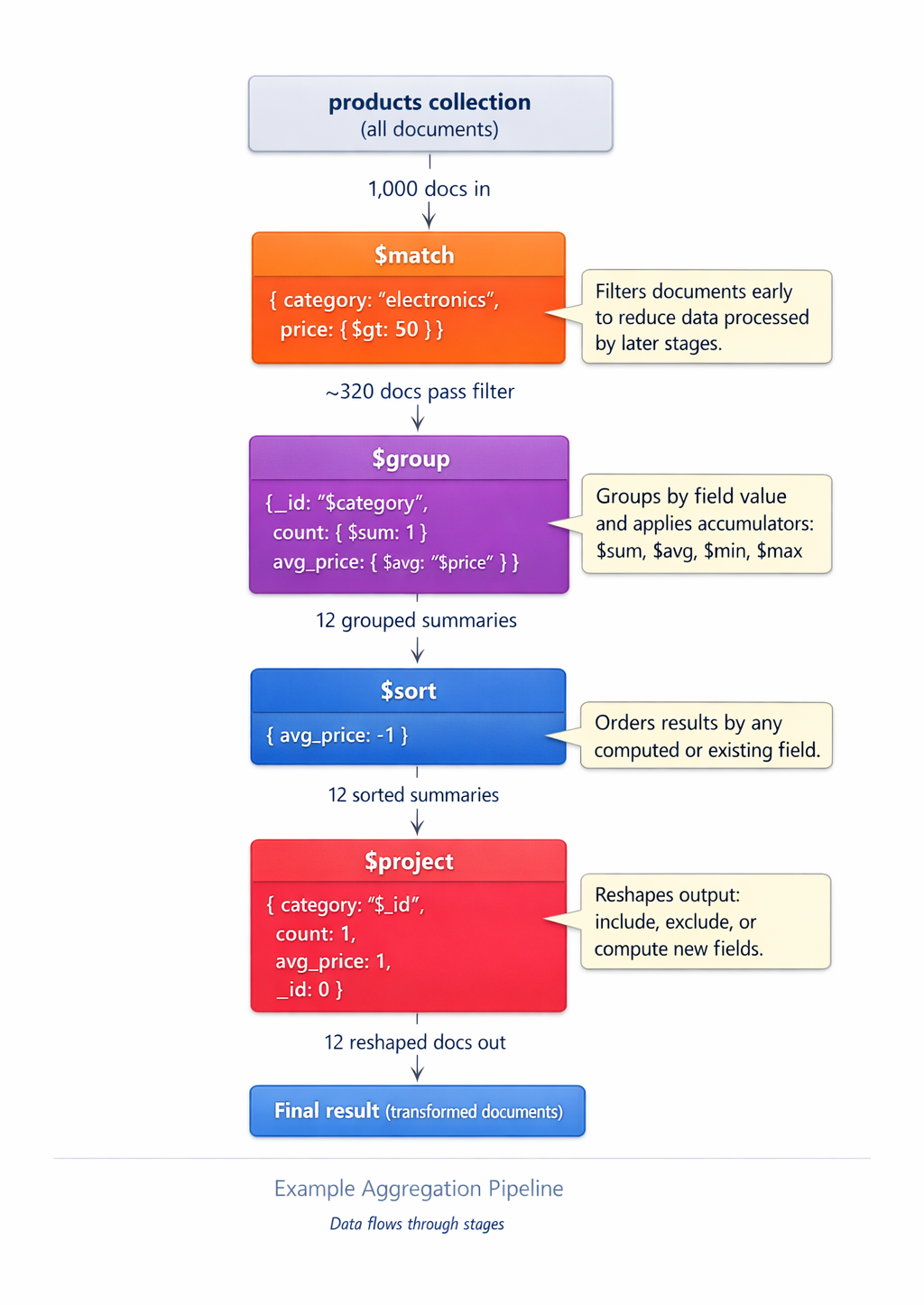
The basic syntax is:
db.collection.aggregate([
  { stage1 },
  { stage2 },
  { stage3 }
])
Azure DocumentDB supports 58 of 60 MongoDB aggregation stages, so nearly all pipeline patterns work as expected.
Filter with $match
The $match stage filters documents using the same query syntax as find(), and it's typically the first stage in a pipeline. Filtering early matters because every document removed by $match is one less document that flows through later, more expensive stages like $group, $lookup, and $unwind.
// Find all bike products
db.products.aggregate([
  { $match: { parentCategory: "Bikes" } }
])
You can use any query operator inside $match:
// Bikes priced over $1,000
db.products.aggregate([
  { $match: { parentCategory: "Bikes", price: { $gt: 1000 } } }
])
Group and summarize with $group
Most analytical questions come down to grouping documents by a key and computing a summary value for each group. For example, you might need total revenue per category, average rating per product, or count of orders per customer. The $group stage handles this work: you specify a grouping key with _id, then use accumulator expressions like $sum, $avg, and $max to roll up the documents in each group.
// Count products and calculate average price by parent category
db.products.aggregate([
  {
    $group: {
      _id: "$parentCategory",
      product_count: { $sum: 1 },
      avg_price: { $avg: "$price" },
      total_inventory: { $sum: "$inventory" }
    }
  }
])
The _id field specifies the grouping key, not necessarily the document's _id field. Use $fieldName syntax to reference document fields.
Note
The $ symbol serves two roles in aggregation pipelines. Before a keyword like $sum or $match, it identifies a built-in operator and appears as an unquoted key. Before a field name like "$price" or "$parentCategory", it tells the pipeline to read that field's value from the current document. Field references in aggregation pipelines are always written as quoted strings in JSON syntax, regardless of the actual type of the field.
Common accumulators include:
| Accumulator | Description |
|---|---|
$sum |
Calculates the sum of numeric values |
$avg |
Calculates the average of numeric values |
$min |
Returns the minimum value |
$max |
Returns the maximum value |
$count |
Counts the number of documents |
$first |
Returns the first value in each group |
$last |
Returns the last value in each group |
$push |
Returns an array of all values in the group |
$addToSet |
Returns an array of unique values in the group |
Reshape documents with $project
Applications rarely need every field stored on a document. The $project stage reshapes each document as it passes through the pipeline, letting you include or exclude fields, rename them, or compute entirely new ones. Use $project to trim the response payload before it leaves the database and to derive values once instead of recalculating them in application code.
// Return product name, price, and a calculated discount price
db.products.aggregate([
  { $match: { parentCategory: "Bikes" } },
  {
    $project: {
      _id: 0,
      name: 1,
      price: 1,
      discount_price: { $multiply: ["$price", 0.85] }
    }
  }
])
Use $project to rename fields, compute derived values, or strip out unnecessary data before sending results to your application.
Sort and limit results
Answering questions like "top 5 by revenue" or "the 10 most recent orders" requires both ordering and a cap on the result size. The $sort stage orders documents by one or more fields, and $limit returns only the first N documents that emerge from sort. Together, they're the foundation of leaderboards, dashboards, and paginated views.
// Top 3 most expensive products
db.products.aggregate([
  { $sort: { price: -1 } },
  { $limit: 3 }
])
Unwind arrays with $unwind
When documents contain arrays (tags on a product, line items in an order), you often need to analyze the elements individually rather than as a packed list. The $unwind stage flattens an array field by emitting one output document per element, each carrying a copy of the parent document's other fields. That makes it possible to group, count, or join on values that live inside arrays.
// Count how many products use each tag
db.products.aggregate([
  { $unwind: "$tags" },
  {
    $group: {
      _id: "$tags",
      count: { $sum: 1 }
    }
  },
  { $sort: { count: -1 } }
])
For a product with tags: ["mountain", "aluminum", "disc-brake"], the $unwind stage produces three documents, one for each tag, each containing the original document's other fields.
Join collections with $lookup
Document databases encourage embedding related data in a single document, but some relationships are still best modeled across collections, such as orders and products or reviews and customers. The $lookup stage performs a left outer join with another collection in the same database, attaching the matching documents as an embedded array so you can analyze related data without making a second round trip from your application.
// Join orders with product details
db.orders.aggregate([
  {
    $lookup: {
      from: "products",
      localField: "items.sku",
      foreignField: "sku",
      as: "product_details"
    }
  },
  { $limit: 5 }
])
The $lookup stage adds an array field (product_details) to each order document containing the matched documents from the products collection. If no match is found, the array is empty.
Note
For $lookup to work across collections, both collections must be in the same database. Cross-database joins aren't supported.
Chain stages for complex analysis
Individual stages are useful, but the real value of pipelines comes from composing them. By chaining $match, $lookup, $unwind, $group, $sort, $limit, and $project together, you can answer multi-step analytical questions in a single round trip to the database, with the server doing the heavy lifting close to the data.
The following pipeline answers the question "What are the top three product categories by total revenue?"
db.orders.aggregate([
  // Stage 1: Only delivered orders
  { $match: { status: "delivered" } },

  // Stage 2: Flatten the order line items
  { $unwind: "$items" },

  // Stage 3: Join with products to get the parent category
  {
    $lookup: {
      from: "products",
      localField: "items.sku",
      foreignField: "sku",
      as: "product"
    }
  },

  // Stage 4: Flatten the product array
  { $unwind: "$product" },

  // Stage 5: Group by parent category and sum revenue
  {
    $group: {
      _id: "$product.parentCategory",
      total_revenue: { $sum: { $multiply: ["$items.quantity", "$product.price"] } },
      order_count: { $sum: 1 }
    }
  },

  // Stage 6: Sort by revenue descending
  { $sort: { total_revenue: -1 } },

  // Stage 7: Return only the top 3 categories
  { $limit: 3 },

  // Stage 8: Clean up the output (returns only category, total_revenue, and order_count)
  {
    $project: {
      _id: 0,
      category: "$_id",
      total_revenue: { $round: ["$total_revenue", 2] },
      order_count: 1
    }
  }
])
This pipeline filters, joins, groups, sorts, and reshapes the data in a single query, which is more efficient than running multiple separate queries and processing the results in application code.
Add computed fields with $addFields
$project is powerful, but it forces you to think about every field you want to keep. When you only need to add or overwrite a value while preserving everything else, $addFields is the simpler choice. It augments each document in the pipeline output with new or updated fields (computed values, derived flags, classification labels) without disturbing the rest of the document. Like all aggregation stages, $addFields only affects query results. It doesn't change the documents stored in your collection.
// Add a price tier label based on price ranges
db.products.aggregate([
  {
    $addFields: {
      price_tier: {
        $switch: {
          branches: [
            { case: { $lt: ["$price", 50] }, then: "budget" },
            { case: { $lt: ["$price", 500] }, then: "mid-range" }
          ],
          default: "premium"
        }
      }
    }
  }
])
Tip
Place $match stages as early as possible in your pipeline. Filtering data early reduces the number of documents that flow through expensive stages like $group, $lookup, and $unwind.
You now know the full set of MongoDB Query Language (MQL) operations. You learned how to insert, query, update, delete, and aggregate documents. In the module's hands-on exercise, you put them to work building an end-to-end product catalog and sales summary on your own Azure DocumentDB cluster.