Handle case sensitivity in queries and data
Unlike the structural and performance anti-patterns covered earlier, the case-sensitivity anti-pattern is a data quality issue. It creates duplicate records, causes failed lookups, and leads to frustrated users who can't find their accounts or data.
Understand case sensitivity in Azure DocumentDB
Azure DocumentDB, like MongoDB, treats queries as case-sensitive by default. This means "haladhar@contoso.com", "Haladhar@Contoso.com", and "HALADHAR@CONTOSO.COM" are three different values. A query for one doesn't match the others.
This behavior causes problems when applications don't normalize data before storing it. Let's consider customers use their email addresses for sign in. If one customer registers with multiple case variants of their email, they end up with multiple accounts. When they try to sign in, they might type a different case than what's stored, resulting in failed logins, and support tickets being opened. For example, this customer registered three times with different email capitalizations:
// Anti-pattern: storing data without case normalization
db.customers.insertOne({
  email: "Haladhar@Contoso.com", firstName: "Haladhar", lastName: "Keot"
});
db.customers.insertOne({
  email: "haladhar@contoso.com", firstName: "Haladhar", lastName: "Keot"
});
db.customers.insertOne({
  email: "HALADHAR@CONTOSO.COM", firstName: "Haladhar", lastName: "Keot"
});

// Three documents for the same customer
// A unique index on email won't prevent this
// because each string is technically different
The consequences affect both data integrity and user experience:
- Duplicate accounts: Customers register multiple times with different capitalization and end up with separate accounts.
- Login failures: A customer who registered as
"Haladhar@Contoso.com"can't sign in by typing"haladhar@contoso.com". - Search misses: Queries for product categories, tags, or names return incomplete results when case varies.
- Inconsistent analytics: Reports count the same entity multiple times under different case variants.
Normalize data on write
The most reliable fix is to normalize case-sensitive fields before storing them. Convert lookup fields like emails, usernames, and product codes to a consistent case at the application layer:
// Normalize fields before inserting
db.customers.insertOne({
  email: "haladhar@contoso.com",            // Always lowercase
  emailOriginal: "Haladhar@Contoso.com",    // Preserve for display if needed
  firstName: "Haladhar",                    // Keep proper case for display
  lastName: "Keot"
});

// Always normalize before querying
const customer = await db.customers.findOne({
  email: inputEmail.toLowerCase().trim()
});
With normalized data, a unique index prevents true duplicates:
// Now the unique index works as expected
db.customers.createIndex({ email: 1 }, { unique: true });

// Attempting to insert "HALADHAR@CONTOSO.COM" (normalized to "haladhar@contoso.com")
// correctly triggers a duplicate key error
Tip
Decide on a normalization convention early in development. Lowercase is the most common choice for emails, usernames, URLs, and slugs. Uppercase works well for product SKU and codes. The key is consistency, pick one and apply it everywhere.
Identify fields that need normalization
Not every field needs case normalization. Focus on fields used for lookups, uniqueness constraints, or filtering:
| Field type | Normalization | Reason |
|---|---|---|
| Email addresses | Lowercase | Sign in lookups, unique constraint |
| URLs and slugs | Lowercase | URL routing, unique constraint |
| Product SKU | Uppercase (or lowercase) | Inventory lookups, unique constraint |
| Tags and categories | Lowercase | Filtering and aggregation |
| Display names | No normalization | Preserve user-intended capitalization |
| Addresses | No normalization | Preserve proper nouns and formatting |
| Free-text content | No normalization | Preserve original formatting |
For fields that shouldn't be normalized (like display names), store a normalized version alongside the original for search purposes:
db.products.insertOne({
  name: "Mountain-100 Silver, 44",
  nameLower: "mountain-100 silver, 44",  // For case-insensitive search
  sku: "BK-M100S-44",                    // Normalized to uppercase
  "category.name": "Mountain Bikes"       // Keep proper case for display
});

// Search by normalized field
db.products.find({ nameLower: { $regex: /^mountain-100/ } });
Handle case sensitivity in queries
Sometimes you can't control how data was stored. For example, you might inherit a legacy dataset with inconsistent casing. In these cases, you have several options for case-insensitive queries.
Case-insensitive collation indexes let the database handle case folding at the index level. Azure DocumentDB supports case-insensitive index properties through collation:
// Create a case-insensitive index using collation
db.customers.createIndex(
  { email: 1 },
  { collation: { locale: "en", strength: 2 } }
);

// Queries using the same collation are case-insensitive
db.customers.find({ email: "Haladhar@Contoso.com" })
  .collation({ locale: "en", strength: 2 });
Collation strength 2 ignores case differences while respecting other character distinctions. This approach uses proper index support and doesn't require data migration. However, you must specify the collation on every query or set it as the collection default.
Regular expressions with the i flag perform case-insensitive matching but can't use standard indexes efficiently:
// Case-insensitive regex query
db.customers.findOne({ email: /^haladhar@contoso\.com$/i });
// Works but can't use a standard index on email efficiently
Text indexes are inherently case-insensitive and work well for search scenarios:
// Create a text index for case-insensitive search
db.products.createIndex({ name: "text", description: "text" });

// Text search is case-insensitive by default
db.products.find({ $text: { $search: "laptop" } });
// Matches "Laptop", "LAPTOP", "laptop"
Important
Regular expression queries with the i flag can cause full collection scans on large datasets. For the best performance, normalize data on write or use a case-insensitive collation index.
Collation support in Azure DocumentDB follows the International Components for Unicode (ICU) standard, an open-source set of globalization libraries that define how strings are compared across languages. Strength level 2 handles not just English case folding but also accent-insensitive matching for languages like French and German. Set the collation at the collection level with db.createCollection() if you want case-insensitive behavior as the default for all queries, rather than specifying it on each individual query.
Apply normalization to existing data
If you have existing data with inconsistent casing, run a migration to normalize the affected fields:
// Migrate existing email data to lowercase
db.customers.find({}).forEach(function(customer) {
  const normalizedEmail = customer.email.toLowerCase().trim();
  if (normalizedEmail !== customer.email) {
    db.customers.updateOne(
      { _id: customer._id },
      {
        $set: {
          email: normalizedEmail,
          emailOriginal: customer.email
        }
      }
    );
  }
});

// After migration, add the unique index
db.customers.createIndex({ email: 1 }, { unique: true });
Before running the migration, check for conflicts. Two customers might have emails that normalize to the same value:
// Find potential conflicts before normalizing
db.customers.aggregate([
  { $group: {
    _id: { $toLower: "$email" },
    count: { $sum: 1 },
    variants: { $push: "$email" }
  }},
  { $match: { count: { $gt: 1 } } }
]);
Resolve any conflicts before applying the normalization and creating the unique index.
Unlike the structural and performance anti-patterns in the previous units, case sensitivity is a data quality issue that compounds over time. The longer inconsistent data accumulates, the harder it's to clean up. You should normalize early in development, and running a conflict-detection aggregation before applying fixes to existing data prevents the problem from becoming a costly migration project later.
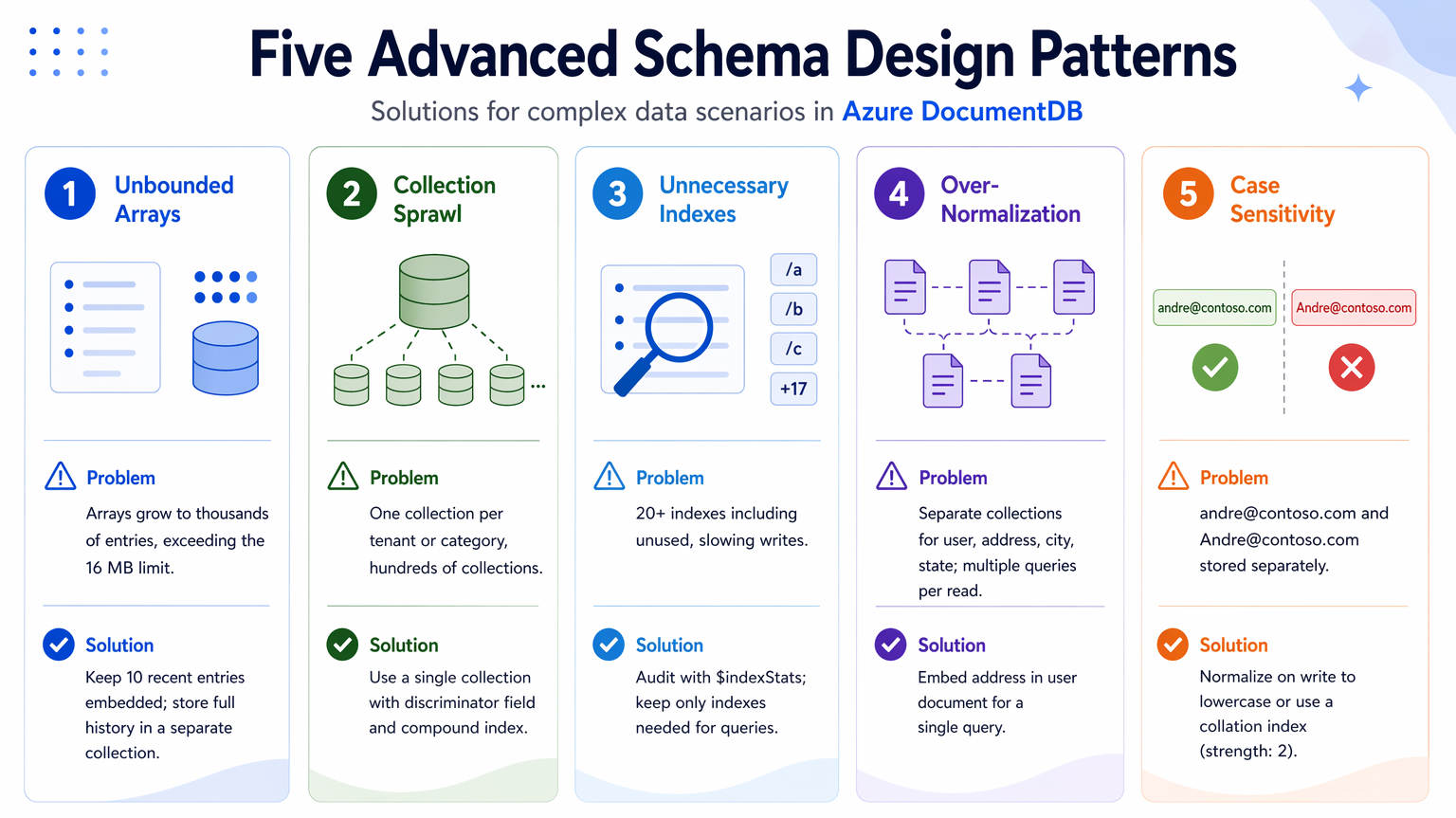
We now visited all five schema design anti-patterns: unbounded arrays, collection sprawl, unnecessary indexes, over-normalization, and case sensitivity. Each one has distinct symptoms and consequences, but they all share the common theme of being preventable with thoughtful design and regular maintenance. By recognizing these anti-patterns early and applying the targeted fixes covered, you can ensure your Azure DocumentDB application remains performant, cost-effective, and user-friendly as it scales.