Work from a workspace over time
A workspace proves its value when you return to the work. New meeting notes arrive, a teammate needs to catch up, and next month's review approaches. Keep your references and conversations organized so you, and anyone working with you, can continue without rebuilding context.
Keep your conversations organized
Every chat you start in a workspace stays with it. Start a separate chat for each line of work so you can find the relevant history.
For Project Atlas, keep one chat for the weekly "what changed" check, another for the executive review, and another for the vendor risk.
In a shared workspace, your chats stay private. Each person works in their own conversations, grounded in the shared references they can access and use with their license.
Catch up on the work
Before you dig into a new round, get your bearings. To catch up on the go, generate an audio overview from your references. Treat it like any other synthesis: it helps you get oriented, and you still check key claims against their sources before you act on them. For current steps and requirements, see Get an audio overview.
To learn what changed in the sources themselves, such as a milestone date that moved in the tracker, ask Copilot to compare dated sources, as described next.
Analyze across your sources
Use questions that span several sources to identify changes, disagreements, and gaps:
| When you want to... | Try asking |
|---|---|
| Catch up after time away | "Compare the copy of the tracker I saved last Monday with this week's version. Group changes by decisions, dates, owners, and risks." |
| Find where sources disagree | "Where do the tracker, the latest meeting, and the deck draft disagree? Show each version and its source." |
| Spot what's missing | "Which risks or open decisions in the meetings and email threads aren't reflected in the deck draft?" |
| Prepare for a conversation | "What will the sponsor most likely ask about this month, and which source answers each question?" |
For a "what changed" question, give Copilot something to compare against: dated notes, or an earlier saved copy alongside the current file. A reference to the latest file alone doesn't establish what it said last week.
Answers like these are a starting point for your judgment. Apply the four source checks, especially coverage: a synthesis draws on your workspace references, so ask yourself whether anything that shapes the answer lives somewhere you haven't added yet.
When you need a lasting output, create drafts, outlines, and Copilot Pages from the workspace, grounded in your references and checked against the sources. Pages you create there stay with the workspace, and you can also open the workspace in OneNote. In the next unit, you practice revising a Page and carrying checked content into Word.
Work together in a shared workspace
A workspace is designed for team collaboration. Invite teammates when they need its working context, not just its finished brief. You can invite people when you create a workspace, or select Invite in an existing workspace.
Plan for these access differences:
- Linked files: People you invite gain access to the files referenced in the workspace where your permissions allow it. Some files might stay restricted, so check that key collaborators can open what matters most.
- Editing access: Everyone you invite can edit the workspace; read-only membership isn't currently supported. If someone only needs the result, share the finished brief or a Page instead.
- OneNote content: If the workspace references OneNote pages or sections, share the entire OneNote notebook as well so others can see that content.
- Instructions: Your workspace instructions guide everyone's answers, and collaborators can edit them. Agree on changes so the guidance stays consistent across the team.
- Inside your organization: Workspaces can be shared only with people in your organization.
- Mixed licenses: Teammates with only a Copilot Chat license can use standard sources, such as uploaded Word, Excel, PowerPoint, and PDF files, Copilot Pages, and public web pages, up to 50 references. They can't use premium sources, even if they can open the files. How a file is added matters more than its format: an uploaded Word file is standard, but the same file added from SharePoint is premium. Inviting someone doesn't change their license, so confirm that each collaborator can use the sources the work depends on.
For details, see Copilot Notebooks is now Copilot Workspaces, sharing and file access, and frequently asked questions.
Keep it current, and know when to let it go
Before each round, remove outdated versions, add new sources, and confirm the instructions still suit your audience. In a shared workspace, agree on who refreshes which sources, because everyone's answers depend on them. Linked files update when their authors update them; check their dates and content for freshness.
Uploaded files are copies, not live links to local originals. If a local original changes, re-upload or replace the reference and verify its content. Keep earlier saved copies only when needed for comparison, and label their dates so historical content isn't mistaken for current status.
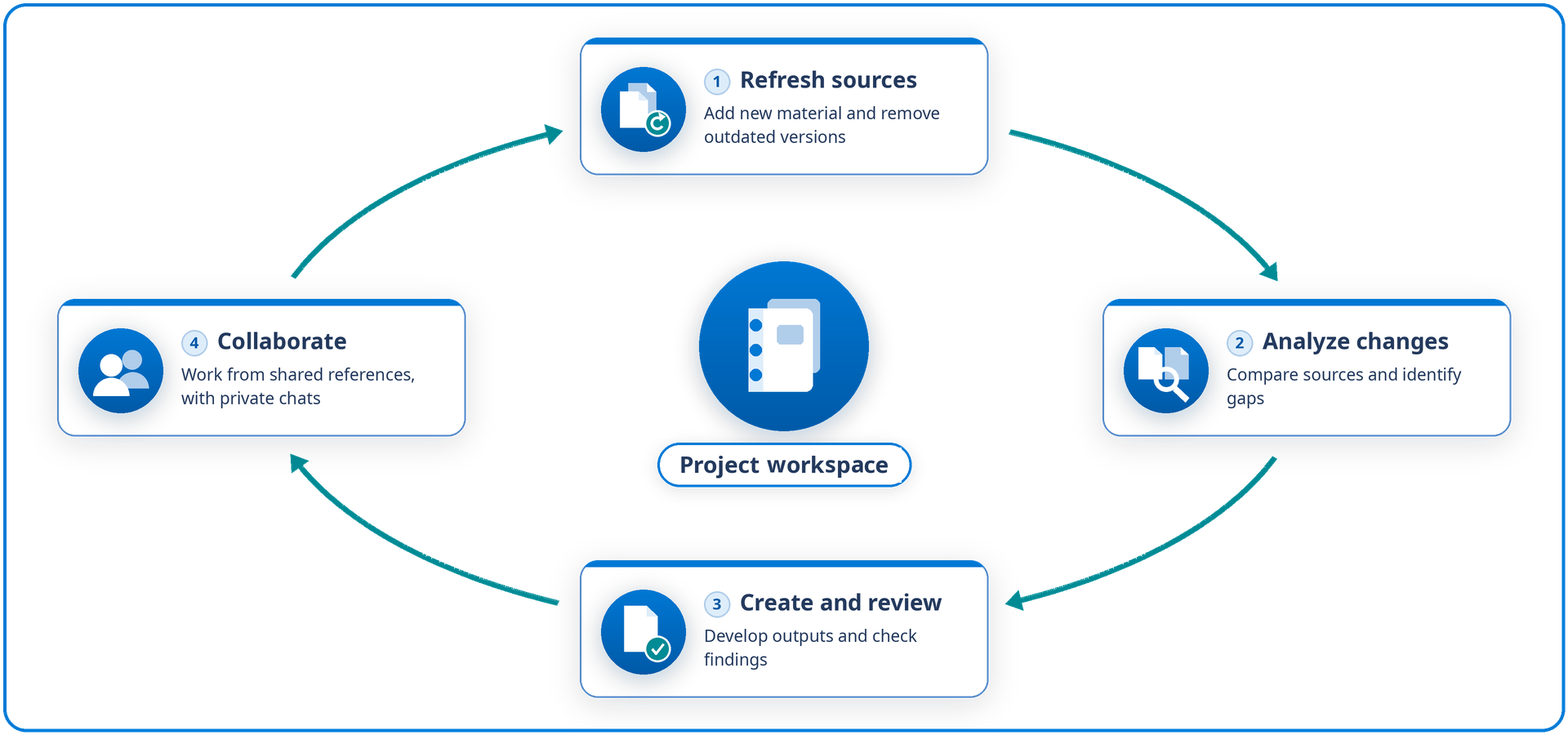
If you move to a separate Chat conversation for part of the work, bring the relevant sources and findings with you. A workspace's references and instructions stay with the workspace.
When the work ends, save needed outputs in their permanent home and retire the workspace according to your organization's retention practices. Deleting a workspace is permanent, so confirm with your team that everyone has what they need first.
Bring it to your own work
You're ready to move on when you can organize workspace chats, catch up on the work, analyze across sources, judge outputs, and work with others while keeping access and references current.
Tip
Picture your workspace a month from now. Which chats would you want to find waiting for you, and who else on your team would benefit from opening it?
Next, you turn your checked findings into a deliverable your audience can use.